Desertcart purchases this item on your behalf and handles shipping, customs, and support to Tunisia.
๐ฅ Stay cool, save green, and control your comfort like a pro! ๐ฟ
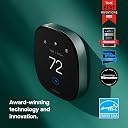
The ecobee Smart Thermostat Premium combines cutting-edge energy savings, smart sensors, and voice assistant integration to deliver personalized comfort and enhanced home security. Featuring a sleek metal design, built-in air quality monitoring, and compatibility with 95% of HVAC systems, itโs the ultimate upgrade for a connected, efficient home.


| ASIN | B09XXS48P8 |
| Additional Features | Amazon Alexa, Siri, Wired Smart Thermostat |
| Best Sellers Rank | #1,539 in Tools & Home Improvement ( See Top 100 in Tools & Home Improvement ) #8 in Home Programmable Thermostats |
| Brand | ecobee |
| Brand Name | ecobee |
| Color | Black |
| Connectivity Protocol | Wi-Fi |
| Connectivity Technology | Bluetooth |
| Control Method | App |
| Control Type | Touchpad Control |
| Controller Type | Amazon Alexa, Android, Apple HomeKit, Google Assistant, iOS |
| Customer Reviews | 4.3 out of 5 stars 4,131 Reviews |
| Display Type | LCD |
| Finish Types | Matte |
| Included Components | ecobee Smart Thermostat Premium, ecobee SmartSensor, Backplate, Wire labels, Screws & drywall plays plugs, power extender kit (for sysytems without a c-wire), trim plate, and quick start guide |
| Item Dimensions D x W x H | 2.9"D x 4.09"W x 4.09"H |
| Item Type Name | Smart Thermostat |
| Item Weight | 1.3 pounds |
| Manufacturer | ecobee |
| Manufacturer Part Number | EB-STATE6-01 |
| Manufacturer Warranty Description | 3 year manufacturer. |
| Material Type | Metal |
| Model Name | Smart Thermostat Premium |
| Model Number | EB-STATE6-01 |
| Mounting Type | Wall Mount |
| Number of Batteries | 1 Lithium Ion batteries required. (included) |
| Number of Items | 1 |
| Power Source | Battery Powered |
| Product Dimensions | 2.9"D x 4.09"W x 4.09"H |
| Product Style | Smart Thermostat Premium |
| Shape | Rectangular |
| Special Feature | Amazon Alexa, Siri , Wired Smart Thermostat |
| Specific Uses For Product | Air Conditioner, Boiler, Dehumidifier, Electric Baseboard Heater, Furnace, Heat Pump, Humidifier |
| Specification Met | Energy Star |
| Temperature Control Type | Cooling |
| UPC | 627988004006 |
| Unit Count | 1 Count |
| Voltage | 24 volts |
C**A
Very happy with our purchase!
The best thermostat! We love that it came with a smart sensor. We replaced our Google Nest with this one and have been really happy with it. Our electric company charges higher rates during certain times of the day, and this thermostat automatically works with that by switching to Eco mode when it makes sense. Weโve definitely noticed a difference in our electric bill, and it still keeps our house comfortable year around The app is easy to use, and installation was simple enough that we were able to do it ourselves. The Wi-Fi connection has been reliable, and itโs nice being able to check on or adjust the temperature when weโre away from home.
A**R
Wish I Had Bought It Much Sooner
I just installed this thing and what do you know, my old, antiquated thermostat was reading TEN DEGREES lower than the actual temp, prompting the heater to run all day and night just to maintain 60 degrees (meanwhile it was actually 70 in the house). Instantly saw this when I installed the Ecobee and used an external thermometer to measure it's accuracy. The installation was easy enough, the only pain in the asphalt that I experienced was having to crawl up into my attic to connect one single wire to the furnace (the wire was already there, just needed to be connected to the C contact). The install directions via the downloaded up couldn't have been clearer and easier to understand. Bottom line, if you know where your furnace is and you can access it, you'll be able to install the Ecobee (even if you know nothing about furnaces as I don't). Once installed, the app is sleek and gorgeous, as is the thermostat itself. The only confusion I had using the app for the first time, is it's not really like my old, manual, 20 year old thermostat. You CAN set the temp manually and it will hold that temp, but only until the set "schedule" starts whenever your "sleep" time starts. Simply put, there are three modes you can fully program with start/end times, and set temps. "Home" (when you're home but not sleeping) "Away" (when you're not home, like at work every day) and "Sleep" (when you're home but sleeping). I'm not usually a fan of this type of schedule automation, but it actually makes perfect sense. You can change anything about your weekly schedule at any time, setting when each "mode" (home, away, and sleep) starts, ends, and what temp it should hold. The schedule allows customization for each of the 7 days in a week, or you can set 1 days worth and copy it to the other 6 days of the week. That's what I did because I work from home, so I'll really only be using the "Away" mode when we're on vacation, etc. Right now only use the Home and Sleep modes 7 days a week (no more adjusting the heater before bedtime, the app does it for me via my set schedule). I got one sensor with my thermostat and paid for 2 more. So worth it. You can place those sensors in other rooms, so I have a total of 4 rooms sending temp readings to my app (because the Ecobee thermostat itself acts as a sensor of course). I can choose to use all, some, or just one of the sensprs for any part of my schedule. So I have it set to read all 4 sensors during the day (aka, in "Home" mode). Then at night ("Sleep" mode), I have it only reading the sensors in our room, and the baby's room. That way only the temps in those rooms will trigger the heater if those rooms drop below my target temp, what's happening downstairs in the middle of the night doesn't matter so I don't have it consider those sensors until 7am (when my day/"home' schedule starts). There are a ton of different ways to schedule it if you have more than one sensor, but how to use all of it is simple, and easy to understand (no tech-y chops required). There are a bunch more features I've omitted such as local weather forecasting on the app, local rebate programs coordinated and participated in through the app, and even TOU (Time Of Use) rate plan entry so you can really get efficient with your energy use. We also have solar, so this thermostat is the perfect companion, but that would still be the case if we weren't solar customers. If you buy this, the only thing you'll regret is not buying it sooner (especially if you have an old thermostat like I did, lesson learned - NEVER trust an old thermostat)! Five stars Ecobee, you got this one right!
K**H
I am a blind user
I plan on updating this in 30 days. Itโs not totally functional yet and I have not called the company yet and they do publish their number in several places to contact them. The things I didnโt know so far. When the heating and air-conditioning company arrived. I needed a extra heavy duty power line from the unit to the thermostat. The thermostat I had worked off two AA batteries, and did not have enough power to operate the unit so an extra Higher level line had to be placed from the heater air conditioner to the thermostat so when the guy arrived he did not have this part with him. So you need to let them know upfront that you may need a more heavy duty cord to install this. It was installed by the person in probably 90 minutes Even though he worked in the business and had worked with us before they seem to do a few problems and they may not have done with the unit but with the way he installed it into my air-conditioning and heating and finally it works. After it works it works fine. I downloaded the program to my iPad and I can operate it from my iPad. My question is now do I install it to my Alexa or to my home on Siri. If I Install it on Siri it looks like I may need to buy a hub for about $100 to get the signal from the thermostat to my Siri, but I also just purchased an iPhone 14, which indicates that I may not need this. So Iโm not answering a lot of your questions here other than the fact, this is not as simple as slapping it into the wall. It does come with two parts that Iโm not quite sure yet to do it one looks like a huge lollipop, which I believe is some kind of remote sensor and another one maybe looks like the small pyramid which I believe is the sensor that you put in the fireplace like your bedroom, so that the thermostat has another location in the house . Iโve been working with this on and off now for about 30 days and not having 100% vision or extremely low vision has added to my frustration however, I am planning on calling the company this week and will follow up with hopefully more good news on the bottom. However, I would strongly recommend this to anyone because you can look at it on your iPad and see the exact temperature. You can turn the air conditioning on and off reset the variable which switches from heat the air conditioning with an algorithm so that youโre not going hot, cold, hot cold all the time, but it knows based on outside conditions what things are going on. Sorry this was so long and so many unanswered questions however, I would buy this again in a second without a problem . I hope this review helps you and again it was written with Siri so sorry for any strange words and I do hope to update us in the next week month or so I guess thank you for reading my review. Have a great day and as they say stay cool, I donโt get hot under the collar :-) OK this is my update so far, I paired the unit with my iPad Pro you could not do this if you cannot see, thereโs too many touchy things with the screen that you have to move your hand around I was on the phone with Apple assistance for an hour and a half and finally my neighbor stopped over and help me install it in about three minutes, so please donโt try to do this by yourself. Iโm continuing down the process and will add on to this again in the future, but to excellent I am happy to have it. I can use it on my phone my iPads, or at the hub unit itself if you buy this youโre simply going to need a little help Have a good day. Thank you for reading my review. I plan on updating this again one more time. OK this will be my last entry. Let me tell you what happened when I called the company as I told you I ended up with two parts one is a sensor. Itโs very small and the other piece looked like a lollipop with five wires coming out of it it was very intense after a pretty lengthy phone call I found out the sensor has a tag that you pull out to activate the battery when you do that you will need someone standing at the thermostat to type in where youโre putting that sensor in your house. The most significant thing is the thing that looks like the lollipop with five wires coming out of the bottom of it is something that you attached to your HVAC unit your heating and air-conditioning unit if you have the older wire going to an older style thermostat. The technician should know how to install this and then it transmits the data electronically to your new thermostat. Unfortunately the person who installed my thermostat had no idea what that thing was so where I said earlier in this review that you may need to have them install a more heavy duty wire from the unit to the thermostat that would not be necessary if they use this thing properly however, I would still tell them when you call up the HVAC people that they may need to bring a more heavy duty cable because you have an older style thermostat in case the information I received was incorrect and you have to pay a fortune for them to go back to the shop etc. and get things. Overall, Iโm very satisfied with this. Thereโs a Lotta other things you can hook into it like sensors and cameras and it seems to be an excellent device. I do have as I believe I said earlier the Siri HomePod mini mixed in with it however, when you use the HomePod mini, the wall unit does not talk to you. it only talks to you if youโre using an Alexa-based item I hope this has been an awful lot of information. Hopefully you can use it. I wish I had read this before I started. Thank you be well take care if I should have any problems in the future I will come back in here and edit them and have a great day. Thank you for reading my review . OK this is an additional update. I was not planning for but when you go to install the room sensor, nothing about the directions seem to work from them. Trying to have you figure out which sensor you have instead of giving you a picture of each type of sensor so when you figure out the sensor and you think you have it, it tells you that it has a clear bottom when the bottom looks like a Hershey kiss, but then, when you go to parrot the screen that it says where the location is for the menu, screen is not where the menu screen is located on your screen and you look at the directions and it still doesnโt work then you take the battery out if you can figure out how to do that let it sit outside for two minutes and then put it back in and it still doesnโt work after pulling the tub out of the battery so Iโm going to have to wait a month until my niece comes in from out of state because my local person I was trying to use to do the simple task canโt figure it out because itโs not so simple and the directions do not match up with the directions they give you to the device on the wall so now Iโm extremely frustrated . I may call the company back next week and talk to them but so far I am not overwhelmed by the people at the company at their support desk at least one person Iโve talk to so far it seems like heโs never done this before or heโs read the manual :-) Iโm sure heโs better than that and Iโm being critical right now because Iโm angry but thatโs OK Iโll get this figured out Iโm blind and I ever come over. Come out on a daily basis so I should be able to overcome this . OK Iโm adding more onto this after I could not install the thermostat. I sent a quasi-obnoxious email to the company and they responded on the next business day which was Monday. They gave me a lot of support and gave me new directions on how to do things and said they would be handling the corrections and told me I could arrange an appointment with them to install the new thermostat thermometer in the house in the litter in the bedroom. So this will still be in the future the other thing thatโs funny is this morning when I was walking by the unit all of a sudden started talking to me. I guess itโs been talking to me all the time, but since I have so many other devices around the house, the talk to me itโs been overwhelmed by some other devices, but the thermostat thermometer does talk and answer my questions and it is have Siri inside it, so thatโs another positive that offsets a prior complaint I had overall Iโm still very happy with it. I just want to get this last sensor put into the house and then Iโll be done and good to go. If youโve read this far, then you deserve a medal :-) OK first I apologize that this is so long. I had ADT at the house today working on an alarm system and I gave them the directions for installing the room sensor. They said and they are professional and they had a hard time using the most recent set of directions that was sent out on installing the sensor. It seems easy enough but you really have to stop and think and do not throw away that little plastic strip that you pull out of the thing Iโve lost mine in the house and I have no idea where it is. Overall final thought I love this unit. I can lay in bed and turn air-conditioning on and off. Iโm sure Iโm saving money so that the outside temperature when it drops down but itโs still a little bit warm in the house I can shut off the air conditioner and I have to pay for the cool stuff that the outside is already cool overall most things about this thing are perfect especially as a blind person you donโt have to try to read things you can use your phone or your tablet to control everything and it works great. Overall, I would give this a five out of five. I realize they complained a lot here but I simply think the service people there have never use the product or use it as a blind person or sometimes when you already know the answer, you can use the product and not have an issue but if youโre beta testing head and youโre an analog person in the digital world, sometimes things donโt go so smooth and you get a special reward if youโve read this far, thank you so much you need to get a life because this has not been the most interesting thing but hopefully my issues will make your issues last and youโll have a terrific product at the end overall Iโd like to thank ecobee for making such a great product but they could work better on their directions to installation stuff. Thank you so much. Have a great day .
L**H
Ecobee Amazing
We have been extremely happy with our Ecobee thermostats! Installation was surprisingly simple because the app walks you through nearly the entire setup process step by step. One of our favorite features is being able to control the thermostats either directly on the unit or from our phones. Itโs so convenient to adjust temperatures, update schedules, or switch to vacation mode remotely. In fact, we forgot to set vacation mode before leaving town once, and being able to do it from our phones was so convenient. The extra room sensors that came with ours have also been great for helping maintain a more even temperature throughout the house. Theyโre currently running a really good Memorial Day sale, too. We already own three of the thermostats, and now Iโm considering adding the Ecobee doorbell because weโve had such a positive experience with the brand.
G**D
IF YOU HAVE A HEAT PUMP WITH AUX HEAT AND LIVE IN A RURAL AREA BEWARE!!
I'm really disappointed in this device. IF YOU HAVE A HEAT PUMP WITH AUX HEAT AND LIVE IN A RURAL AREA BEWARE!! I love everything about the ecobee premium smart thermostat - except that it can not control my HVAC. I live in a mountainous valley in North Central Washington. We see temps down to -20 in the winter. A typical winter day may be -5F at 8:00 AM and 30F by 1400. Because I have a heat pump, I need my system to change between heat pump operation and aux strip heat at the right times. Below 20F I need aux heat. Above 20 I want to save money and energy (one of Ecobee's stated purposes) and run my heat pump. I was drawn to ecobee because it has many parameters to control the crossover temperature between compressor operation and aux heat. Ecobee uses information from the internet (apple weather specifically) to determine the outdoor temperature at your location. They tout special algorithms to determine accurate weather information specific to the address of your residence. Unfortunately, this is false advertising. After I set up my device and noticed my outdoor temperature was inaccurate by more than 15 degrees I contacted ecobee support. I learned that my closest weather station was 30 miles away, on the other side of a mountain range in a completely different climate than where I live. Despite there being multiple accurate NOAA weather stations nearby as well as two airports, after at least 8 hours of my time with ecobee support I was never able to get outdoor temperature information that was even close to the actual temperatures at my house. While ecobee can try to push a closer station to the device, for some reason which was never explained to me the closer stations only update on average 2-3 times a day. So it could be 14:00 and 30F outside but the device still thinks it is 3AM and it is -1 outside. The end result is while I'm at work and trying to keep my house at 62, the expensive and energy intensive aux heat is running for several hours when it does not need to be. Ecobee could provide me with no solution. A google search on this topic reveals this has been a known issue for at least 5 years. Ecobee has not adressed this issue and it doesn't seem like they plan to any time soon. I'm really bummed because after all this effort and time, I still can't control my system and there is no hope for a fix according to support. Support was very friendly and tried to be helpful to the best of their ability. But unfortunately this is a critical design flaw in Ecobee's system. This is not that complex of a problem and I know it could be fixed. I assume ecobee does not want to spend the money to accommodate rural customers by engineering the flaws out of their system, or simply paying for access to more weather stations that update more regularly. Or Ecobee could create an wireless outdoor temp sensor that could communicate with the thermostat like their indoor area sensors do. I believe if they did this they'd have one of the best products on the market. But as it stands, this device is no better than me manually switching between heat pump and aux heat when I happen to be home. I'm returning the device and going back to the drawing board to try to figure out the solution for what should be a fairly simple problem.
A**.
Good Thermostat, PEK Kit could be improved.
Short and sweet overview: I installed this in an old house. I had to use the PEK kit to get this working. The instructions were relatively clear and easy to follow. Setup was easy with the app and got it working quickly. Pay extra attention to the wiring instructions as I plugged one of the wires in the wrong port and was scratching my head for a bit trying to figure out where I goofed up. It's a pretty good thermostat and I really love the homekit integration. Here's a more detailed review of the things that stuck out to me: The Good: 1. "Condition alerts". The thermostat alerts you to specific conditions. It actually told me that my humidity in my house was too high and it is a potential health risk. I had zero idea. It also gave me suggestions on how IT could attempt to fix it as well as other options. (consider an HVAC upgrade, buy a dehumidifier etc.) I do like the fact it can monitor and watch for health issues. The Bad/Improvements: 1. The PEK (power extender kit) needs to have better terminals to plug your HVAC wiring in. In most homes that I've seen the cables are twisted copper wires not solid copper cables. This was a huge pain to put into the terminals in the PEK as they're just little holes (see picture). I had a very tough time getting them fully inserted and connected well. Initially I tried to wind the cables with a pair of pliers but it was really hard to get it perfect enough to insert into the terminal without dislodging one of the cables on the end, and therefore getting it stuck in the PEK. Because of this I couldn't get the cables fully seated. I ended up running to home depot and buying some crimp connectors and it was easy enough then, but a little better design could've prevented that hassle. I'm not an electrician, but I do worry a little about putting the PEK in the electrical cabinet for my HVAC system. Good news is that It is well insulated and made out of plastic so shorts aren't really going to be an issue. It also has a magnet to attach it somewhere in the cabinet. 2. One thing I really miss from my old nest smart thermostat was an easy button to press to put it in eco mode. To clarify, the echobee has an eco mode but it doesn't quite work the same. I do travel alot and I like to be able (on the nest) to put it in eco mode and it keeps the house between a specific temperature range I set. This isn't easily accessible on the echobee or I just haven't found it yet. 3. It does come with some sticker paper cable markers. I would've liked these to be a little more heavy duty. I found they got damaged or ripped off if I touched them. I ended up switching to painters tape and labeling them that way. 4. This does come with a smart sensor, and I would've liked the sensor to be visible in homekit. To the best of my knowledge you have to go through a bunch of menus to see it. 5. I also purchased this thermostat because it gives me a rebate with my electrical service provider. However it "says" I only have Excel Energy and they actually don't service my area. There's no way to change it or search for another service provider. That was a little frustrating
J**S
Replaced nest with ecobee, totally worth it
I bought this thermostat to replace my nest one that was installed when my house was built 4 years ago. I really like the idea of a WiFi thermostat and the option to adjust it with my phones app. I was having issue from the beginning with the old thermostat in keeping rooms cool. It is a one level, on slab, 1300 sq ft home. This new thermostat had one sensor included beside the thermostat itself but I wanted one for each area Iโm in during the day. I work from home and with the old unit it would think I was away when in my office and adjust the temp to the away temp then Iโm adjusting it manually. After doing this for probably months and annoyed with this feature I turned it off. This defeated the purpose of the smart thermostat I think. The old unit also had a temp fluctuation or 2 degrees plus or minus. That can make a big difference in this size home on a sunny and hot day with no trees shading the house. Now that I am using the ecobee that has all changed. I ordered two extra sensors and now it can adjust the temp or leave it be depending where I am in the house. I love that and itโs much more efficient. I rarely have to adjust the temp manually. Itโs actually working as it should. It was simple to switch out the nest with the ecobee as their website has great information to see if your system is compatible and walks you through the install with very easy directions. Once installed and linked to WiFi it was super simple to run through the programs and have it set up in no time. The display is easy to read and use as is the phone app. Iโve been using it for a month now and am so glad I changed to ecobee. It has kept my house so much more comfortable without the fluctuations that the old unit did. This unit has a plus or minus of a half of degree, not 2 so that is a plus, easy install and user friendly website information. Definitely recommend additional sensors for those rooms you use frequently. That is one of the great perks to this system over others. It knows where you are in the home, reads the temp, and adjusts what you prefer the temp to be. Worth every penny
J**R
Absolutely Love It
Easy to have installed and program. Much more accurate in temperature than my old thermostat and the room sensors allow for better control of the on and off times of my HVAC unit. Will ultimately save me $ on my electric bill from the AC not running so much.
C**S
Great customer service, just not compatible in Australia
I really wanted this product to work in Australia, purchased it, got an electrician to help with installation, but unfortunately had no success. However, the seller was very accomodating and helped with offering a full refund. Would highly recommend. Thank you
B**Y
Good product
Itโs good, but not sure if the sensor that came wi the it works properly
A**I
ู ู ุชุงุฒ
ููู ุนูุจ ูุญูุฏ ููู ูู ูุณูุงู ุงูุดุฑู ุงูุงูุณุท ุงุนุฏุงุฏุงุช ู ููุน ุงูู ูุฒู ูุงู ุฎุงุตูุฉ ุงูู ููุน ุฎุงุตู ุจ ุงูููุงูุงุช ุงูู ุชุญุฏู ูููุฏุง ููุท ููู ูุฏููู ุฎุฏู ุฉ ุนู ูุงุก ูุถุจุทูู ุงูุงุนุฏุงุฏุงุช ูุชุชูุงูู ู ุน ู ูุงูู ๐๐๐๐๐๐ ุจุงูู ุงูุงุนุฏุงุฏุงุช ุชุนู ู ุจุดูู ู ู ุชุงุฒ
S**3
Personal preference
After using both the Nest and Ecobee Premium thermostats, Iโve found that while the Ecobee wins in terms of screen size and overall appearance, the Nest is significantly smarter and more user-friendly in terms of ease of use and navigation.
D**N
Installation Issues
After 2 weeks since purchased, I still have no idea how to install?!
Trustpilot
2 weeks ago
3 weeks ago