Desertcart purchases this item on your behalf and handles shipping, customs, and support to Tunisia.
🚀 Unlock lightning-fast WiFi and total control — because your network deserves the upgrade!
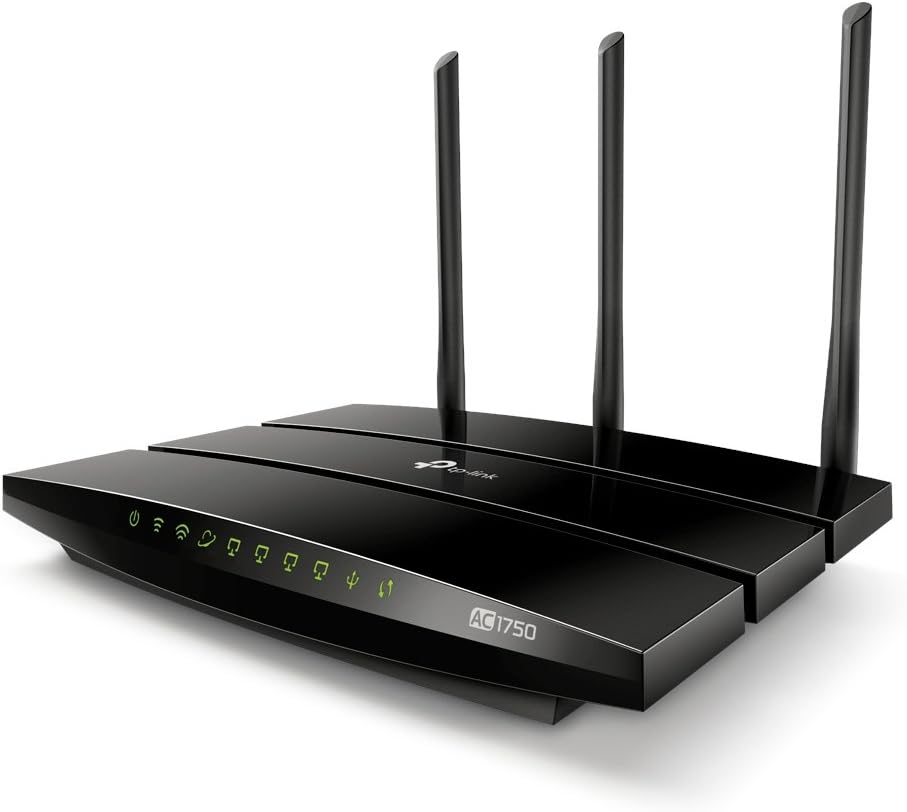
The TP-Link Archer C7 AC1750 is a dual-band gigabit router delivering up to 1.75Gbps combined wireless speed with advanced 802.11ac technology. It features dual USB ports for media and printer sharing, secure guest network access, and IP-based bandwidth control, making it ideal for busy professionals seeking reliable, high-performance home or office networking.


| ASIN | B00BUSDVBQ |
| Antenna Location | Indoor/Outdoor |
| Antenna Type | Internal |
| Best Sellers Rank | #22,196 in Computers & Accessories ( See Top 100 in Computers & Accessories ) #596 in Computer Routers |
| Brand | TP-Link |
| Built-In Media | Routers, hub, networking |
| Color | WiFi Router |
| Compatible Devices | Tablet |
| Connectivity Protocol | ethernet, wi-fi |
| Connectivity Technology | USB |
| Control Method | App |
| Controller Type | vera |
| Customer Reviews | 4.2 out of 5 stars 18,794 Reviews |
| Data Transfer Rate | 1750 megabits_per_second |
| Frequency | 5 GHz |
| Frequency Band Class | Dual-Band |
| Global Trade Identification Number | 00845973070601 |
| Item Dimensions L x W x H | 9.57"L x 6.32"W x 1.28"H |
| Item Part Number | Archer C7 |
| Item Type Name | TP-LINK Wireless Dual Band Gigabit Router (Archer C7) |
| Item Weight | 0.51 kg |
| LAN Port Bandwidth | 10/100/1000 (Gigabit) |
| Manufacturer | TP-LINK USA |
| Maximum Upstream Data Transfer Rate | 1300 megabits_per_second |
| Mfr Part Number | Archer C7 |
| Model Name | Wifi Router |
| Model Number | Archer C7 |
| Number of Items | 1 |
| Number of Ports | 5 |
| Operating System | Microsoft Windows 8/7/Vista/XP/2000/NT/98SE, MAC OS, NetWare,UNIX or Linux. |
| Other Special Features of the Product | Alcohol-Free |
| Security Protocol | WPA-PSK/ WPA2-PSK |
| Special Feature | Alcohol-Free |
| UPC | 845973070601 971736088382 |
| Unit Count | 1.7 Ounce |
| Voltage | 110 volts |
| Warranty Description | 2-year. |
| Wireless Communication Standard | 2.4 GHz Radio Frequency , 802.11a/b/g/n |
| Wireless Compability | 2.4 GHz Radio Frequency, 802.11a/b/g/n |
S**Y
Great Bang for the Buck
I'd been getting by with an old 2.4Ghz D-Link N router since about 2009. It worked well enough, until I built a Plex server for the living room and setup a home network on the LAN. I set up a homegroup and had the Plex server transcoding and streaming to other devices on the LAN. It would work for a few days and then randomly stop working, for example my office PC spontaneously could no longer reach the server, I couldn't ping the server, could not access its shared network drive, etc. Everything would work for anywhere from 2-4 days and then just stop working until I rebooted the router. I figured it must be some kind of IP routing conflict, so I assigned EVERYTHING static IP's, but the problem persisted. Also, signal degradation between the router (which is at one end of the house) and the Plex server (which is at the other end) was very noticeable when running speedtest. While my office PC (which is about 12ft from the router) would pull about 27-30Mbps down over 2.4Ghz, the Plex server (which is about 40ft from the router) would only pull about 16Mbps down over 2.4Ghz. My motivation was to increase the speed for the Plex server, so I decided to take a chance on this TP-Link Archer C7. I did not want to spend $250 on an AC router, and the TP-Link had many good reviews, so I figured I'd try it and hope for the best. Setup was easy and the gateway interface is nice, lots of configuration to play around with. I had 8 devices up and running on the network within the span of maybe 30 minutes. I reserved addresses for the Plex server and the office PC, and left everything else DHCP. The network has been up and running for several days now without any issues, even with DHCP devices coming and going. My Plex server speedtest increased from ~16Mbps to ~30Mbps, and the office PC increased from ~27-30 to a whopping ~88-90Mbps. Caveat there though, is that the office PC is running on the 5Ghz band while the Plex server is too far away to connect to the 5Ghz band, so it's still on 2.4Ghz. Still, speeds have increased across the board without having really done anything other than swapped out the router, so I'm happy. Seems the 5Ghz range is limited, so I will likely get a range extender here soon. Definitely recommend this router to anybody wanting to upgrade an old router without spending 250-300 on a Nighthawk or something like that.
P**T
Absolutely Wonderful
I had a Netgear wndr3700 router that was originally 80 dollars from 5 years ago. It did the job nicely and was considered a highish-medium-range-quality router at the time. This C7 is also supposed to be in the highish-medium-range-quality section, but it laughs at that expectation and decides to perform like a high-range-quality router instead. For the record, this is C7v2, while the C7v1 is the one with i-product problems and other network issues. C7v2 is the fixed version. So let me start on the difference. 1) Holy crap that range. I get FIVE BARS on my crappy built in wireless chipset on my dekstop. That's going over the distance of at least 40 feet, through 3 walls, and a ceiling. On my wireless N PCI card, I get 4 steady bars - mainly due to how my dekstop sits and the fact there's external antennae. Previously, my chipset would get 3-4 bars and my wireless N PCI card would get 3 bars. 2) Internet speeds. My old router, gave me 1-13 mbps on my chipset, 130mbps on my wireless N card. The maximum for the chipset is 150mbps, the maximum for the card is 300mbps. I sometimes got 40-50mbps on my chipset and 150-170 on my wireless card. Now? 74-120mbps on my chipset and 150-200mbps on my wireless N card. However, the chipset is now way more ideal because keep in mind. Signal quality with lower mbps > lower signal quality with higher mbps for gaming. 3) Signal sharing. My old router only went up to 300 for 2.4ghz/300 for 5.6ghz. As you can see from the description, the Archer C7 gives you a lot more to work with. My old router would NOT send signals to anything further than my desktop, even though my wireless card was only drawing in half the maximum amount. The netgear just couldn't send a strong enough signal. Now the C7 lets devices past my desktop work with the Internet. On top of that, their speeds are actually improved compared to my old router EVEN WHEN MY DESKTOP IS IN USE! In short, this router will not dissapoint you. If it somehow does, then I'm sorry, you got a lemon. Or, for some reason, you can't set it up right... *cough* Feature Pros: 1) Nice disk for installations. Does most of the work for you. 2) Takes about 10-15 minutes to setup. 3) Has all the standard features like IP binding, DMZ, and data distribution. 4) USB ports for printers, although, most printers come with built in wireless now so... Eh. 5) Great network file sharing, which again, the USBs come in handy. 6) Reboots can be done remotely (which acts like turning off your router/turning it back on without actually having to) There are some cons, but they're more or less just inconveniences than actual hardware/software problems. 1) Your settings reset with firmware updates. So when you first set it up, use the disk to set it up and don't mess with anything. Just go to TP-Link's main website, download the new firmware on to your computer, then upgrade the firmware. After that, feel free to mess with the settings. 2) Reboots are required for major changes, where most routers don't require reboots for things like SSID changes. Meh. If you are looking at this, you are most likely looking at the Archer C8. Yeah. I had that too. It was great but I had ordered this one too just to try it out. The C8 has a slightly better 5ghz band, but the signal quality is actually the same despite beamforming (which doesn't work with everything, mind you). The 2.4ghz band is just as fast, but seems to have slightly higher latency. Don't get me wrong, the C8 is wonderful. But don't get the C8 unless you have A LOT of wireless devices running SIMULTANEOUSLY. The only real boon to the C8 is the stronger CPU and flash memory, which does not come in handy AT ALL for transfer rates (for some reason since it seems to cap) and it does absolutely nothing if you're only running 4-6 or so wireless devices simultaneously. So, in short, C7 is the more cost effective and just-as-good-as C8 version of Archer C8. lol Don't be fooled by pretty casing and higher CPU/flash... Save some money!
B**N
Quick and easy setup
I got this to replace a Linksys WRT610N which suffered a fatal blow after a power outage. I really wanted to stick with Linksys since it's all I've ever used for my home network but after reading tons of reviews I couldn't find one for $150 or less that consistently had good reviews so I broadened my search.... First off I read the negative reviews on Amazon for this router, and aside from the entertainment value there were 2 things I noted: 1) most of the negatives are by people who blame the device rather than admit they are clueless and 2) there were a lot of replies from TP Link, which to me is a good sign. I moved on to professional reviews and based on those reviews I decided to take a chance this router. Thus far it seems to have been a good decision. Since I RTFM, it took me all of 5 seconds to find the URL to configure this router. After initial login I changed the user/pass and the IP of the router. The reboot on this device is pretty slow but for me that's not an issue as I expect from my routers that I won't need to reboot it again for months if not longer after it is configured. After the reboot I spent about 20 minutes on the rest of the configuration which for me included setting the DHCP Range, DHCP Reservations, Port Triggering, DMZ, and wireless networks. Rebooted again and 4 days later it's still business as usual. I can't speak to the long term reliability of this router yet as I've only had it up and running for 4 days, but thus far it's given me no issues at all. The speeds are what I would expect for wired connections, getting about 70MB/second consistently transferring 2-4GB files. I don't know actual wireless speeds at this point, but I am able to stream 720p/1080p HD videos without any issues from my media server to multiple devices simultaneously using both 5Ghz and 2.4Ghz. The only reason I gave 4 stars instead of 5 is because the 5Ghz band doesn't have the range I hoped it would, but to be fair, the router is in my basement and 5Ghz is not known for doing well through floors/walls but there are completely dead spots on this band upstairs which I did not have with the Linksys. I may be able to remedy this if I play with the antennae but I haven't gotten around to it yet. The 2.4Ghz band far exceeded my expectations. With my Linksys I could get a decent signal anywhere in my house on either floor but at the opposite end of the house on the main floor it was about 60% signal and outside the house the signal dropped to about 10% immediately outside the door and after 3 steps there was no signal. With this router I have a 100% signal in every corner of my house and I can now even get wireless on my patio at about 50% strength and I the signal doesn't drop off completely until I'm well out in the yard. I'll update this review should I run into any major issues, but otherwise I'd say this router definitely seems to be worthwhile. My network and connected devices: Motorola Cable Modem->TP Link Router->Trendnet 8-Port Gigabit Switch Hardwired to router: Desktop (Win7), Switch Hardwired to switch: Domain Controller (Server 2008), Plex Media Server (Win7), Desktop (Win7), Xbox One, Xbox 360, PS3 Wireless 5Ghz: Mac Mini (OSX 10.9), Macbook Pro (OSX 10.9), Laptop (Win7), Laptop (Win8) Wireless 2.4Ghz: iPad2, 2 Kindle Fire HD, 2 Laptops (Win7), Wii, 2 Smart TVs, 2 Bluray players, 4 Smart Phones, 2 iPod Touch, Printer Update: 10 days since I wrote this review and no issues to report. I've done lots of co-op gaming on xbox live (wired), worked from home over VPN on the 5Ghz wireless for way too many hours, streamed movies over both wireless bands, and it's been business as usual for the rest of the the family with all their wireless devices. No drops, no hiccups, no speed issues... Still remains to be seen if it will hold up in the long run but so far this router seems to be a good buy.
L**O
Excellent Router that Punches Well Above its Price Point -- Buy It
I found this router through a third party website review (the Wire Cutter), that aptly called this, "the Best Wi-Fi Router (for Most People)." I would probably amend that title and say, "the Best Wi-Fi Router (for Virtually Everyone)." Do not let the low price fool you into thinking it's an entry level or low-end model. It only costs around $100 but, from my observations against four other routers that cost considerably more, it performs well beyond its price point. I have purchased a number of routers over the years as the technology and performance improves, and the number of devices my family uses has increased. Over the past few years, I had migrated to the more expensive ($300+) routers in the hopes of greater performance. Right before this, I had an Asus RT-AC5300, a beast of a router that exceeded $400 when I bought it. But what I found was that as the price point goes up, the performance does not, and the reliability goes down. These expensive routers tend to be buggy and drop connections; they simply have too many features and are way too complex, all to provide functionalities that no one uses, or that none of your connected devices support anyway. The ASUS got so bad it was rebooting itself every few hours. The days of the rock-solid Linksys WRT54G seemed long gone... So I returned the ASUS RT-AC5300, gave my WRT1900ACS to a friend, and bought an Archer C7 (v2). After two weeks of testing it, I have four words: it just works -- period. The signal is strong and punches through the lathe-and-plaster walls of my nearly 100 year old house. Its signal is considerably stronger than the WRT1900ACS that I had (which cost almost three times what this one did), and rivaled the signal strength of the $400 ASUS. It doesn't drop connections, doesn't reboot itself, and delivers a strong and steady stream of data to all devices, wired and wireless. Only one word of warning; you need to make sure the Archer C7 that you purchase is NOT a first version. Everyone on the web has reported that TP-LINK badly botched the V1, especially for Macintosh/Apple devices (which is most of my house); most of those should be out of circulation or in landfills by now. The one I bought from Amazon was a V2, and it works perfectly with all of my Apple and non-Apple devices.
D**D
Don't waste your time. There are far better options out there. - UPDATED
UPDATE: I am keeping the router, and actually like it again. I'm leaving the 1 star review, though. TP-Link customer service was BS, as I explain in the old review below. What caused me to change my mind about the hardware? LEDE Project started building OPENWRT firmware for this device, and I tried it out. It blows the stock TP-Link firmware completely off the battlefield. This is now my primary router and it works fantastically. If you have a chance to pick up the Archer C7 V2, and don't mind fiddling with the firmware, get it. If you don't want to mess with it, I suggest you go with Ubiquiti. I know that reddit suggests buying this router quite often, but don't take that advice. This router has no configuration settings for Quality of Service (QoS). This means that streaming, gaming and voip do not get any sort of priority over downloads or other low prio traffic. This also means that if your ISP suffers from bufferbloat, you are screwed. I have a 100mbps download speed from my cable company, yet wired streaming is interrupted by wired game downloads. This is unbelievably bad. To add to this, TP-Link has now taken a stance against aftermarket firmwares such as DD-WRT or OpenWRT, so even if you wanted to go in yourself and fix these game-breaking issues, you are unable to. I am beyond my return window, so I am actually going to donate this piece of junk to my office for use as a wireless access point only and will buy a router that's got basic features included. EDIT: TP-Link responded to my review and asked for an email discussion. So I contacted them, they asked me to paste my review into the email, which I did. The response was to give me a link on how to use their awful "bandwidth control by IP", as some kind of half-butt work-around for QoS. Option 2 was for me to buy the TP-Link AC2600 router instead, which has updated firmware and actual QoS settings. This is a joke. First time buying anything from TP-Link, and definitely the last time. 1 star review remains. 11-8-2016 UPDATE: I decided to replace this router with an ASUS AC68u. Night and day as far as performance and options. I have not had a single problem. Here's where the Archer continues to woe me. I relegated it to a wireless access point by turning off DHCP and NAT, plugging a LAN port wire into the main router and setting the SSID/passwords the same, and putting the wireless broadcasts on differing channels from the main router. This is similar to how I had it set up with my Netgear as the AP and the Archer as the main router. What a piece of junk. I understand android phones don't have roaming built in for access points on the same network. But this Archer AP now actively boots me off for a few minutes, even with all roaming features disabled. I've relegated this pile of trash to being an expensive 4 port dumb switch for my kid's room. I will absolutely not buy another TP-Link product again. This one piece of equipment and stand-off p*ss poor customer service that went with it is enough to keep me away for life.
N**J
Simple to setup great product and great range
A++, i have used other inexpensive routers before, this one is a breeze to set up. I read through many comments before I bought this unit, and it was very very simple to set up. (not a rocket scientist and had this running in less than 3 minutes with a computer can't set up on a tablet). A lot of people complained about that. It was a breeze. Great great range in the 2.5 GHZ band so so on the 5, but my router is not centrally located in my house though, in the living room on the far side near a wall. Whole 2400 square foot home gets full bars on 2.5 and most of my lot, gets full bars. The lowest point on the exact opposite side of the house (upstairs too), gets 2-3 bars, with 5 ghz. Range is superb, but signal strength on the 5 is ok for the 5ghz band. I have dedicated the 5 for streaming and online game play, and 2.5 for iPad use, computer use ect. Seems to be holding up just fine. We use a 10 MBS internet connection and i feel that, that is more than enough for our casual house. Does everything we need and then some. I don't have a printer or a hard drive hooked up to this thing, so can't vouch for that setup, but everything else, is fine so far. If you want better range for 5 GHZ range. I found hi gain antenna for 14 bucks for a set of three. However we streamed on our Roku 3 wireless N with not the greatest signal strength in our bedroom on opposite side of the house from the router (a little over halve sig strength), and everything seemed fine. I can't figure out how to login to the app the app though. App requires a user name. have no idea what that would be, I could have forgot to write that down during setup up. Otherwise, i am tremendously happy with this unit. Glad I purchased it. Only had it a week, and we love it. I almost bought the apple airport extreme, or that asus for 199. Let me tell you save the hundred bucks, as there is nothing wrong with this unit. If you are looking for a solid dual band router with good range, save the hundred bucks and by something else for your house. When i add my printer and a hard drive to this unit, i'll come back and edit this.
B**A
Great router for the price, can be used as a wireless AP if needed.
Recently switched ISP and the stock router was not 802.11ac, but was quite good for all other purposes. I needed a way to add 802.11ac to increase wireless speed (I do a lot of wireless backups of work and personal data to a NAS RAID device - it took forever on 802.11n even with a very good connection). After some researching, this was the most highly recommended and most cost efficient way to add 802.11ac speeds to my WLAN. The challenge was to set up the device as a wireless AC access point, bypassing the DCHP features and allowing my ISP router to handle all of that. The Archer C7 made is very easy to do - a simple toggle on the web-based management console allows you to turn off the DCHP, another one disables the Firewall, and another one disables NAT / Hardware NAT. Voila! I had to play around with the NAT setting a little and eventually found it worked more reliably with the feature turned on (contrary to what I'd read on other forums about how to setup a wireless router as an access point), but that's a minor quibble. Now I have a dramatically faster wifi network across my house, easily maxes out my ISP's advertised speeds of 150mbps up/down. I'm getting 30-50MB/s (megaBytes, not megabits) write speeds for copying large directories with thousands of images. Wirelessly! Single large file transfers may be even faster, but I haven't tried yet. So for $90, my wireless network is now 2-3 times faster, as advertised by the 802.11ac standard. This router does not have "beamforming", but for the layout of my house, I'm not sure the additional price was worth it, nor does it matter practically speaking. Starting with the Archer C8 and C9 (different form factor, white upright case), the Archer lineup does have beamforming, FWIW. I like the flat shape, glossy black aesthetic of this router, as it matches the other devices in my entertainment console. Of note, I'm a Mac user, and this is my first non-Apple router. I have a technical/CS background, so I didn't mind that it took some digging under the hood to get this to work. If you want a plug-and-play solution in an Apple household, don't have special networking needs (extending existing wifi networks, bypassing features in the router, or whatever), the easiest (but not cheapest) solution may still be to go the route of the Apple Airport Extreme routers. For the supertechies, this router also supports OpenWRT and, I believe, DD-WRT firmware, but I haven't tried it yet and I suspect it will void your warranty.
R**H
This may be the best router I have had if I can get things to work correctly.
It's 3 stars right now until I figure out what the heck is going on with my connection. I had it running for less than a day and then everything went south. I have upgraded the firmware, ran it on basic config outside of changing the passwords and picking channel 11 for my 2.4 ghz band and yet I am having the hardest of times either just getting to the internet or when it is running it seems to just stop. SETUP: Comcast 30 emg download 5-6 meg ujpload - Using Motorola surfboard docsis 3.0 Modem connected straight to router which is one level above via a brand new cat 5e cable (tried 2 different ones) Router has a cable plugged in that has a 10/100 meg switch on the end ( a tp-link switch) mainly for 2 xboxes 10/100 meg tp-link switch has a d-link 1 gig switch plugged into it to service 2 computers on top floor and magic jack (I know I should probably run the 1 gig switch to the router and bounce the 100 meg switch off of the gig switch but that may happen later) This setup was running for almost a day until Sunday. I noticed everything dropped and that was it, for 45 minutes i tried to get the network back up and running to no avail. Had things to do so the grand child suffered and couldnt watch her cartoons on her tablet. Took the cable from the Internet port of the router and plugged it directly into my laptop - no go, couldnt get an internet signal - starting to think docsis 3.0 is messed up so I reset it for a minute or two - rebooted laptop - nada. signed into my comcast account and ran a network check - they claim everything to my house is just fine. I clicked the link to to a line test / reset the line & modem - still no connecticity to the laptop. Now I'm thinking ok, whats the slim chance that both cables are bad so I go behind the furnace and plug directly into the modem with the cable that came from tp-link - nothing. Hard reset modem for 2 minutes and turned back on - I now have internet connectivity. GREAT! Back up stairs I go, plug in the tp-link router, nothing else and try the wifi - nothing. Plug in a spare cat-5 into the router and try the internal network card of the laptop - nothing - WTH. Turn off router and plug the d-link dir655 back in and hard reset the modem, its now working. What the Heck moment again. Unplug d-link dir655 and plug in the tp-link and leave powered off. Go back downstairs and hard reset the modem again, go back upstairs and power on tp-link after the modem had all of its signals. It starts working - shaking my head. Son is happy, I have 3 bars across the street at the neighbors on my phone from my tp-link, excellent. 3 minutes later - phone rings and the infamous words 'dad the internets down again, magic jack doesnt work, nothing works' - SMH, ready to scream. go back put the DIR655 d-link router back inline, reset the modem, power on dlink, everything is working, havnt heard any complaints yet since yesterday. I'm going to try and be patient tonight and against my best judgement start on this again before the Blackhawks take the ice in game 3 of the Stanley Cup - I'm going to be patient and reset the mode for 5 minutes before turninng it on and then I will wait a good couple of minutes before powering on the tp-link and hope for the best. If this starts working and stays working I will certainly change the stars to a full 5 as the connectivity in my house is now 1000% better for the upper rooms and back rooms than it ever was and the range outside is outstanding. The TP-Link Tether app wouldnt work at first and thats why I mainly upgraded the firmware on the router to the latest version and then it worked. The app is very inconsistant at showing the device names which is confusing. Sometimes its just 'android device' followed by the mac address, couple of other times it named all of the devices correctly. Maybe this is all part of my link issue or maybe I just have a defective router. I don't know but I will revisit this review once I come to a final conclusion.
P**É
Produit conforme, fonctionne très bien comme relais
Utilisé pour prolonger mon réseau wifi et avoir des ports ethernet supplémentaires, le routeur remplit pleinement sa fonction. Après avoir un peu tâtonné à l'installation (1er démarrage long), le résultat est très satisfaisant. La première étape était de le basculer en mode point d'accès, puis copier coller le SSID et mot de passe Wifi de la box dans les paramètres du routeur : il n'apparaît alors plus q'un seul réseau auquel les appareils se connectent automatiquement sans que j'ai pour le moment rencontré de problème de bascule (MacBooks et iPhones). En ethernet j'ai connecté ma box TV HD 4K qui fonctionne sans aucun problème ou bug. Mais je n'ai pas testé le débit exact par rapport à celui de la box. Les test de débit Wifi sont concluant et dépassent régulièrement 200Mbits (l'image postée est un peu le débit mini). J'ai souvent un upload plus fort que mon download donc il me reste quelques paramétrages à creuser... Dans tous les cas, il remplit sa fonction d'extension de wifi et de hub ethernet : les débits sont suffisant pour tous les usages, y compris un téléchargement rapide (un fichier de 2,5Go en 3mn en wifi). Enfin au niveau tarif, le routeur était en promo à 56,10€ et Amazon offrait 10€ pour toute commande supérieure à 50€ : au final cela me revient à 46€10, un tarif imbattable. Difficile de ne pas être satisfait ! Si mon avis vous est utile, cliquez, cela fait toujours plaisir !
S**)
Mejoró el wifi y el alcance. Con muchísimas funciones. Tope de gama.
PUNTOS POSITIVOS: - El router doble banda más rápido que he probado hasta ahora. - Muchísimas opciones de configuración en el panel del administrador. - Servidor DLNA, Servidor FTP, Servidor de impresora USB, y Servidor de almacenamiento. - Puede emitir a 2 frecuencias (2,4ghz y 5ghz). *En mi caso mi portatil no reconoce la frecuencia de 5ghz aunque el movil (Nexus 5) si. La frecuencia de 5ghz es la recomendada para por ejemplo streaming de video o juegos online (al no tener tantas interferencias con otras redes wifi o aparatos electrónicos). Puedes desactivar alguna de las frecuencias si no las necesitas o si tus aparatos no la reconocen. PUNTOS NEGATIVOS: - Tamaño físicamente grande (mayor que otros routers que he probado). - El panel del administrador puede resultar algo confuso (de tantísimas opciones que tiene y la manera en que se organizan). Cuento mi experiencia: Hace tiempo mi proveedor de internet me aumentó la velocidad a 50 megas y me tuvo que cambiar el router antiguo por uno que soportara una mayor velocidad (Netgear CG3100D). Todo fue “más o menos” bien, con la excepción de que: 1)No llegaba el wifi al salón de mi piso (no es exageradamente grande, 90m2). 2)la velocidad se reducía un poco con respecto al cable (en principio normal, ya que por wifi siempre llega menor velocidad). 3)A veces se “trababa” cuando había muchas conexiones al mismo tiempo y había microcortes de conexión. Hace muy poco se me aumentó a 200 megas, y la cosa fue peor: No me llegaba ni un 30% de la velocidad contratada por wifi, etc y seguía sin tener acceso al wifi en el salón. Este router: 1) Mejoró la cobertura wifi del piso y ahora tengo wifi en donde no llegaba. 2) Aumentó considerablemente la velocidad de internet (sigue sin llegarme el 100%, pero si el 60%). 3) Tiene muchísimas opciones que en principio no sabía ni que existían. La instalación básica fue muy sencilla. En la caja había un mini-cd (también se puede descargar desde su página web), seguí los pasos tal como indicaba y listo. Los usuarios más avanzados pueden meterse en el panel del administrador a través de su explorador (en mi caso 192.168.0.1) y cambiar las opciones que deseen, pero para los que somos novatos la instalación standard a través del mini-cd fue una maravilla y en 10 minutos lo tuve montado. Como curiosidad en páginas web especializadas comentan que TP-Link usará de ahora en adelante la nomenclatura "Archer" para los routers con el estándard ac (último standard de wifi lanzando en 2013). ALTERNATIVAS: TP-LINK TL-WDR4900 Una buena alternativa. Al sacar el Archer han reducido bastante de precio este modelo (80€ en diciembre 2013). Sería un router que no se adecúa al último standard ac pero que para muchos otorga un rendimiento más que de sobra (y muchísimas funciones al igual que este. Puedes ver tablas comparativas que proporciona TP-Link para tomar tu decisión de un modelo u otro. ASUS RT-AC66U 139,59€ diciembre ‘13 (envío gratis si eres de amazon premium). Es un poco más caro que el router que el TP-Link que adquirí. Emite doble banda, Gigabit LAN, 802.11ac - 802.11 a/b/g/n/ac, wifi para invitados, multitud de características… y con la garantía de una buena marca referente en la informática como es Asus. Además está en el Top 10 de routers comprados, por algo será…. ASUS RT-N66U 117,71€ en diciembre ’13 (envío gratis por amazon premium) El modelo antiguo del anterior, Gigabit LAN, 802.11ac - 802.11 a/b/g/n… CONCLUSIÓN: El router TP-Link Archer C7 es fantástico y mi experiencia ha sido muy positiva. ¿Merece la pena gastarse más de 25€ por adquirirlo en lugar de TP-LINK TL-WDR4900? Probablemente no, ya que el rendimiento por lo que comentan en los foros es muy parecido. Yo me decidí a comprar el Archer ya que uso internet muchas horas diariamente y no me arrepiento de mi decisión.
R**L
Werkt goed en simpel te installeren
Deze ruim 8 maanden in gebruik als een accespoint voor wifi in het hele huis. Ik heb een nieuwbouwwoning en dan heb je tegenwoordig geen of een matige wifi op sommige plekken in huis. Ik heb eerst verschillende wifi versterkers geprobeerd, maar een accespoint werkt voor mij stukken beter. De TP link is super makkelijk te installeren en geeft een sigmaal op 2,4 en 5 g hertz. Helemaal top.
O**O
Five Stars
Well pleased, thank you.
L**E
Incredible value and performance!
We were struggling with our WIFI signal throughout the house as we have numerous devices spanning multiple floors and the constant cry was "the WIFI signal stinks..." Our old router was approximately 7 years old and, after doing some research, I decided replacing it might offer some relief. This router seemed to get great reviews everywhere I looked and offered tremendous value for the type of performance it was offering as compared to some much more expensive options. Upon receiving it, this was up and running within 5 minutes out of the box! The set-up interface was so user friendly I think my dogs could have done it. As for the performance? VERY noticeably improved! The entire family was overjoyed as all of their devices were no longer buffering or showing the good old spinning wheel anymore. The biggest area we were struggling with was streaming on our tv; (buffering more than we would have liked) So the first thing I tried was loading up a 1080p stream of a movie. Stream choices loaded instantly and when I clicked on one it was loaded up and running in less than 5 seconds. Clearly this router has made a big difference! And the strength of signal it emits with the 3 antennas is great. I can be in my shop about 220 feet away from the house and location of the router and I will still get a working WIFI signal. The dual band is also great as I reserve the 5G network for streaming videos on our tv and the other network is open for everything else. Couldn't be happier with this router and recommend it to anyone who is looking for a replacement.
Trustpilot
2 weeks ago
1 month ago