Desertcart purchases this item on your behalf and handles shipping, customs, and support to Tunisia.
🪄 Command your devices like a true wizard—because ordinary remotes are so Muggle.
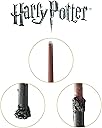
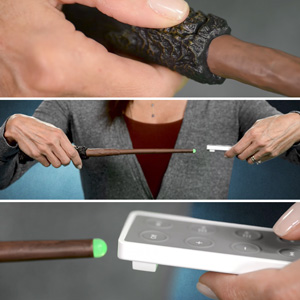
The Noble Collection Harry Potter Remote Control Wand is an officially licensed universal IR remote that lets you control up to 9 programmable gestures for TVs, Blu-ray players, and speakers. Powered by 2 AAA batteries, it combines authentic wizarding charm with practical media control, making it a must-have for Harry Potter fans and tech-savvy professionals alike.


| ASIN | B00FXMDRZK |
| Additional Features | Universal |
| Battery Type | AAA |
| Best Sellers Rank | #32,871 in Electronics ( See Top 100 in Electronics ) #1,550 in Remote Controls (Electronics) |
| Brand | The Noble Collection |
| Color | Black |
| Compatible Devices | DVD/Blu-ray Player |
| Connectivity Technology | Infrared |
| Controller Type | Universal |
| Customer Reviews | 4.3 out of 5 stars 3,882 Reviews |
| Global Trade Identification Number | 00849241001236, 00849421001230 |
| Item Weight | 259 g |
| Manufacturer | The Noble Collection |
| Max Number of Supported Devices | 1 |
| Maximum Number of Supported Devices | 1 |
| Mfr Part Number | FBA_NN8050 |
| Model Name | Remote Control Wand |
| Model Number | NN8050 |
| Number of Batteries | 2 AAA batteries required. |
| Number of Items | 1 |
| Special Feature | Universal |
| UPC | 849241001236 849421002596 849421001230 |
| Unit Count | 1 Count |
L**.
Not as hard as others claim. Seriously.
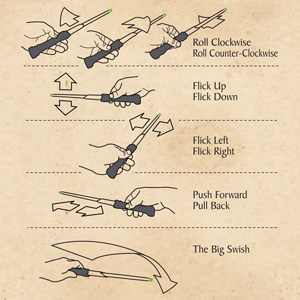
First off, I get that at first, it may seem complicated to set this wand up, but once you figure out how to get it into "program mode" everything else is a breeze. You MUST have a remote/device that uses IR (infrared technology). This means that any device that has a remote, in order for the buttons to do whatever you want (volume up, change scene, etc) you would have to make sure to point the device's remote, somewhat in the direction of the device. If you don't have to point the remote to the device, like with the Amazon Firestick....that device uses RF (radio frequency). In short, this will not work with a Firestick which is what I kinda wanted it for (it was a gift to my girlfriend). Luckily!!!!.....we also have ROKU. This definitely uses IR and let me tell you that this wand does exactly what it is supposed to. It has 9 movements to program (turn left, turn right, push forward, pull back, swipe up, swipe down, swipe left, swipe right, and a big swish). We setup all 9 and we can navigate magically through ROKU now!!! We also set it up to raise and lower the volume of our sound bar. Seriously, the BEST GIFT for Harry Potter fans. I just can't with this and my girlfriend is in awe with it. It's sooooo cool!!!! I will say it was a little confusing at first but again, if you settle your nerves and truly focus on what/how you are supposed to set it up, it'll be 1000000% worth it! Be patient and be rewarded with having the coolest remote in town!
B**S
Great Wand! Limited Use, but Good when Used!
It's a little finnicky when first setting up; I had to program the same command two or three times before some of them would really work on my TV. Once it does though, it feels fairly natural to use. I've got a TV that's only hooked up to my Bluray player, so the commands are all the useful ones for me. Over-the-top swing turns on the power. downward flick is play, upward is pause. Forward motion is select, and backward is eject (feels like I'm pulling out the tray with a magic tether). Right flick is fast-forward, left is reverse. Rotating clockwise and counter-clockwise seems like it was meant for volume, especially because it tends to log multiple action pretty quickly the more you turn it. Overall, it's a lot of fun to use, and while I wish there was a couple more actions to do more with my Bluray player, I think it does very well as it is (and I understand that controls would be a lot harder to map if there were more motions). I'd say get it if you're a real Harry Potter fan with a bit of extra cash and want a remote that you don't need to use many controls with.
S**B
Really fun when if you practice the swipes!
As some of the reviews say, took a bit to set up. It appeared not to work for some of the mappings, but once I realized you couldn't map one thing to two places (i.e. I accidentally mapped "power" to twist right, then tried to map "power" to "swipe up". It wouldn't power up with a "swipe up" unless I mapped something else to "twist right") Once we cleared out all the mappings, we got it set up to turn on the TV, navigate to Netflix, select, volume up, volume down, and return home. Not full control, but enough to be fun and useful. Our 7 year old loves it! Especially since we set it up to "stab forward" to select something. It can be frustrating, as It is pretty sensitive .Easy to mix up swipes, just as I imagine a real wand would be.
V**N
Does work, just not with Firestick
Super cool gadget! It took a sec to program, but was easy enough to figure out with the provided instructions and videos. However, we realized that while the wand controls our physical TV (volume and power), it will not control the Firestick (d pad and pause/play). Will be returning unfortunately.
G**L
Be sure you have an IR remote
Cool product. Programing is challenging and miss fires every now and then. start with the best batteries avaliable( lithium) because according to Rufuss the remote will need to be reprogrammed when the batteries need to be replaced. After more practice with the wand the easier and better it gets. Wishing there were more styles to choose from to one in every room
N**Z
Cool idea, hard to execute
I watched more than a few online video tutorials that others posted regarding the programming of this remote, and read the instructions but I had no easy luck programming this wand. I could say over the course of a few days I spent a couple of days for a couple of hours just in training mode for the commands. I didn't try to program until I successfully and repeatedly got the practice mode moves down. Then spent about 2-3 hours trying to program. Continually "re-setting" the wand, re-issuing commands. The instructions detail that when programming a wand move with a remote control command was successful it would vibrate and flash a color (if I recall correctly), regardless, I would get the indication that the movement and command synced up, however when using the wand flourish as programmed nothing would work. I started off with very simple commands, like turning the volume up I the wand command would be to flick the wand up, and volume down, flick the wand down. The only successful command that would work was to turn the volume up. I initially tried syncing commands with the universal remote from our cable box but since I was having so many problems I went with basic programming commands with the remote that came with the tv. So power off, on, volume up, and down. It was soooooooo much work, with little in return. I essentially decided that even if I did spend more time getting things to work perfectly that the wand move was so specific that I could see myself getting frustrated just trying to change the channel. I'm pretty good with tech but this had me reaching for my good old fashioned traditional remote control quickly! This was just my experience with the wand.
M**S
Does not work as programmed
The kids and I were very excited to receive this. We immediately tried to program the wand. It is very easy to put the wand in all three mods it comes with and was easy to program the wand. Now comes the problem. The 9 control commands the wand remembers get corrupted and confused. We programmed the big swish to the power button and left to left button. It worked the first and second times. The third time, the wand turned off the TV with the left tick and nothing on the big swish. It remained like this until I reprogrammed it again. Then it does it again. Even though the green light told me that all 9 commands were programmed, only three commands were retained these commands were clockwise, counter-clock wise, and the rest were considered by the want as one command. Putting the wand in practice mode, it was evident that all gestured used were correct as I did get correct numbers of blinkings and pulses. I do not know how commands could be corrupted while in control mode and it was frustrating reprogramming it several times just to achieve the same conclusion. The wand also was highly sensitive to touch and rolls. Gentle touch turned the orange light on and sometimes it stayed on and couldn't be turned off. Rolling clock-wise continue sly could be mistaken to counter-clock wise in between. Overall, cool concept and bad execution both in hardware and firmware. I'm returning this wand as it doesn't worth this much.
C**N
Never point this wand at your cat and simultaneously say "Avada Kedavra."
When I opened the box and held this wand for the first time, nothing happened. Then, I heard John Hurt's voice inside my head say, "Well, give it a wave" (RIP). So, I went for it. The next thing that happened was...magical! My Xbox went straight to Netflix and in just a couple flicks of the wrist, I was watching my show. I then rotated the wand clockwise and the volume turned up. Finally, as I pointed the wand at my overhead fan, I spoke the incantation, "Nox" and pulled the wand back towards my body. The Wand-Extinguishing Charm worked like a... charm and my lights were off. Seriously though this remote is freaking awesome. I don't know why so many dumb muggles are on here crying about programming the remote being too difficult for their little muggle brains. If you can read you can easily program this remote. Don't worry, if you're interested in this remote you probably can read just fine. Unless you're one of those people that "love" Harry but have only seen the movies. In that case, no one cares about you anyway. If you're thinking to yourself, "How in the world did this guy get the wand to control his Xbox, his TV's speakers, and his fan?" I'll give you the answer. I have an IR remote for my Xbox One that I bought at Best Buy awhile back. I used that to program the A button, up/down/left/right and the B button. I used the little handy-dandy remote that goes to my fan to program the lights/fan. So, if you have an Xbox One - but only have conventional Xbox One controllers for it - you can't make the wand do this and you're a muggle. Also, if you have a fan with an overhead light - but don't have the handy-dandy remote - you can't make the wand do this and you're a muggle. I hope my review helped some of you out at least :)
A**.
Muy buena réplica para fans de Harry Potter
La varita tiene un diseño muy fiel al original, con buenos acabados y sensación sólida en la mano. Es ideal como objeto de colección o decoración, y el detalle del control por movimientos la hace divertida para usar con dispositivos compatibles. No es un juguete infantil como tal, sino más bien un artículo para fans: cumple muy bien si lo que buscas es una varita especial y diferente. El embalaje está cuidado y es perfecto para regalar. Le quito una estrella porque la funcionalidad es limitada y depende mucho de la compatibilidad, pero como pieza de merchandising, es una compra muy recomendable.
C**N
Harry Potter
Memorable gift
M**L
Süper akıllı asa
Oğluma doğum günü hediyesi olarak aldım.Elinden hiç bırakmıyor.Tv ile eşleştirdik.Çok güzel çalışıyor.
J**S
Great gift
Love it. So easy to set up. Obviously it’ll be a novelty and not your every day remote but still great for Harry Potter nights. Imagine controlling the marathon via wand?! Awesome
A**O
recensione
Prodotto ottimo, qualità nelle rifiniture e funziona molto bene
Trustpilot
1 week ago
2 months ago