


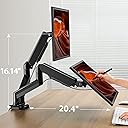


HNDSK4 Dual Monitor Stand
Product ID: 81738180
Details
- BrandHUANUO
- ColorBlack
- Compatible DevicesMonitor
- MaterialSteel &
- Maximum Tilt Angle90 degrees
- Mounting TypeTabletop Mount
📏Wide Compatibility
⚙️Full Motion Adjustability
🖥️Dual Monitor Support
🚀 Elevate Your Productivity, One Monitor at a Time!
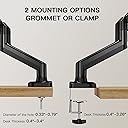
The HUANUO Dual Monitor Arm is designed for 13 to 27-inch monitors, featuring gas spring technology for easy adjustments. It supports a weight of up to 17.6 lbs per arm and offers versatile mounting options, making it perfect for enhancing your workspace ergonomics and efficiency.
| ASIN | B07CWQ5S1Q |
| Best Sellers Rank | #2,580 in Computer Monitor Arms |
| Brand | HUANUO |
| Color | Black |
| Compatible Devices | Monitor |
| Customer Reviews | 4.4 out of 5 stars 3,013 Reviews |
| Enclosure Material | Steel & Plastics |
| Item Type Name | dual monitor stand |
| Item Weight | 11.2 pounds |
| Manufacturer | HUANUO |
| Material | Steel & Plastics |
| Maximum Tilt Angle | 90 degrees |
| Maximum-Supported Screen Size | 27 inches |
| Mfr Part Number | HNDSK4 |
| Minimum-Supported Screen Size | 13 inches |
| Model Number | HNDSK4 |
| Mounting Type | Tabletop Mount |
| Movement Type | Articulating , Fixed, Rotate, Swivel , Tilt |
| Number of Items | 2 |
| Number of Packs | 1 |
| UPC | 736900376890 |
| Unit Count | 2 Count |
| Warranty Description | 5 YEAR |
B**B
Great product, don't listen to some of the reviews on here.
I purchased these to mount my 23" BenQ monitors in my home office. I've had my fair share of cheaply-made over-priced mounting arms before so I was skeptical about the price, but I ended up going with these anyway. They work extremely well. The plastic isn't luxury plastic, sure, but it's not cheap by any stretch of the imagination. Besides, what do you expect for 55 dollars? This is literally more than half the price of comparable products. Additionally, last I checked, no one is planning on beating these things up. You attach it to your desk, mount the screens, and then they're no longer going anywhere. Such a silly thing to complain about. Next, a lot of reviews seems to dislike the cord organization channels. They're perfectly fine. They're snug, but you want them to be snug. You set the cords where they need to go, give yourself enough slack to move around, and then you're set. I had zero issues getting them organized. You can easily fit 4 different cables in each channel if you do two coming in from each entry point. Again, a very silly thing to complain about. Another problem people seem to have is the actual installation. If you're able to read at a 3rd grade level then the instructions are perfectly clear. It's like a 3 step process and it's put together enough out of the box that 99% of semi-competent toddlers could figure it out without the instructions. I can assure you that any review on this page complaining about the instructions or installation process are as incompetent as they come. Installation took 15 minutes from start to finish. Lastly, I see some complaining about not being able to push the monitors perfectly flush against the wall when the desk is against it. That is by far the most ridiculous thing to complain about. Seriously, desk mounts are inherently unable to extend beyond a physical object. How anyone could expect otherwise is mind boggling. In addition to that, the monitors do NOT have to be "right in front of your face." They still have plenty of room. Unless you have reason to believe that these mounts will defy the laws of physics, you won't have any issues either. I love these mounts. The gas pistons are great. Once you get them tuned the right way, they're buttery smooth. I can't believe such a high-quality product is available for such a cheap price. If you're like me and refrain from making these purchases because you insist on getting the right ones, just pull the trigger. They're fantastic. I'll be purchasing another for my desk at work because I love them that much. (P.S. - I love that the arms are independent of each other. You can have one facing the other direction to show someone something without losing use of the other. Love, love, love, love them!)
W**Y
Pretty good!
I have two 27" monitors (Pixio) that I connected to this monitor stand. The stand is study enough to not hurt my desk (Ikea table-top --which I thought would be relatively weak, but is surprisingly durable) and strong enough to hold up both my monitors. I will say though that the up-and-down range of motion is limited and the monitors won't stay fully upright if I move them too much. For moving my monitors from right-to-left motions, this stand works quite well and the placements are stable regardless of where I move the monitors. The set-up is also pretty quick (took me a couple hours to hook both my monitors up and put the wires into the screw-solidified plastic slots. All in all, a good purchase and great for my work-from-home set-up.
R**N
Pretty good, annoying cable management
I currently have a 27 and 28 inch monitor on this thing, and it holds up alright. I can tell that the 28 is on the very edge of stability because it's a little finicky to adjust just right. It does't seem to drift very much if at all once set. Setup is easy enough. I had a problem with the VESA mount plate on one of my monitors: the mounting area on the monitor is recessed a little and I had to loosen the plate screws to get it on and off the arm, but that's a problem with the monitor. My desk was just the right thickness where I had to use the clamp extension thing plus a block of plastic to make it clamp down firmly (36mm / 1.42"). A little unfortunate but easily resolved. I do however HATE the cable management channels. They screw into place, it is a little awkward to reach, you need a short phillips screwdriver for desk clearance, and they simply don't fit many cables. If you have a monitor with a thick DP cable, an AC power cable, AND a USB cable? Have fun. Extremely frustrating to deal with. You might as well not even bother with the channels and use zip ties.
J**J
super solid adjustable mount, PERFECT for my 2 x 24" LCDs
I was skeptical of this at this price point, but received good sturdy hardware. Clamp or hole mount (I used clamp) and VESA hardware worked well. The VESA plate screws to the monitor, then the plate slides onto end of the mounting arms. Gravity holds while you secure with a thumbscrew. So the monitors are easily mounted and removed! Wires concealed easily. Only small complaint I have is with my monitors, the VESA mount was recessed about 1/4 inch so i could use some shorter standoffs to flush mount the plate. The standoffs are too long for the screws provided, so I'll have to stack some washers or something.
K**N
Basically all I could ask for at this price range
I saw a lot of negative reviews and was very nervous about grabbing this. Firstly, the instructions were very straightforward...I don't know if anyone's ever assembled anything without words before, but if you can follow very straightforward pictures labeled with the correct screws (A, B, C, etc), you will be fine. Seems like many reviewers do not fall into this category. Secondly, I was also worried about not being able to put my desk up against the wall. Before, it was flush against the wall, but now, there's about a 3in space between the wall and my desk. Not a problem in my case. I also saw someone complaining about the height. I don't know how tall you beanstalks are, but the arms can go fairly high -- even higher than the adjustable stand on my AOC 24G2. You just have to adjust the tension in the arm. It tells you in the instructions how to raise and lower the arm. I also see people complaining about the arm not being able to hold up their monitors. I had an issue where my monitor was dipping, but I fixed that by tightening the left screw in the adjustment swivel closest to the monitor. As a side note, I think some folks might be confusing the weight of their monitor. Retailers often put the weight of the whole item, which includes the packaging, stand, etc. Your 24 or 27in monitor is likely not 10lb, let alone 14lb, if you're unsure about whether these arms can hold your monitor. The people having trouble with the arm holding up their monitor are probably not tightening screws well enough. It's sturdy, easy to assemble (I assembled it with no help), and features all the advertised range of motion. The only thing I dislike is that you have to unscrew and screw in the cable management compartments. I ended up not using them because of that. The only real issue I ran into while assembling was that the thumb screw to attach the monitor to the arm was too thick due to the depression in the back of my monitor, so I ended up using the other screws included (I don't think they were intended for that). Everything is still working and I can still easily disassemble it. Otherwise, it was basically all I could ask for in a monitor arm at this price range.
B**N
Dual arm - would buy again. Perfect for my need
I have two 24 inch Dell monitors. I mounted mine by drilling a hole. I have them on the left side near corner configuration. Very happy. They move any direction you want, and stay where you put them. My desk faces the room rather than the wall, so I can extend them outside the desk and push back in as needed. I have a cheap particle board desk with a 3 inch apron and no rim to clamp onto so I opted to drill. I don't use for sit-stand positions. Since the desk is easily replaceable, I feel like I can drill holes all over it without a care in the world - but it was not necessary. It's super sturdy and I think they will last longer than the desk.
G**A
Does the Job OK but Due to Flaws I Don't Think I Can Recommend.
It's sturdy and easy to assemble. What I don't like are the following cons: 1) It doesn't place the monitor any higher than the Asus stand that came with that monitor (see picture with speaker for a sense of the max height). At least the monitors are the same height, but I would honestly like them about inches higher as I'm still looking slightly down at them when seated. 2) the design of the arms makes it difficult to easily move the monitors around the exact position I want and back again. These definitely seem designed to stay in one position. I can't slide the left monitor to the left, for instance. I can rotate the direction the monitor is facing, but that's about it. If I move it up and down it actually moves in a swinging arch pattern due to the joints in the arms. I have two 24 in monitors and I can't even arrange it so that they're touching. 3) I tried to capture it in the photograph but the arms angle severely so I can't have the monitors back as far as I want because the arms stick out behind the desk. I compromised and have the monitors more forward but still had to move my desk away from the wall. Overall it does the job for me now but with these flaws I don't think I can recommend it. It just doesn't seem very well engineered.
K**R
Great - after a timely assembly
Get a friend to help! It's a great product once it's set up and working, much lower priced than many others. There are clever ways to set it up, but the instructions are not awesome. I had a really hard time getting the monitors attached correctly. Even had new hardware sent out before I realized I misunderstood the diagram. The back has a nice way to hide a lot of cables, but again, it takes a lot to do/undo these spaces, but it's done forever once it's done. We put the monitors on before attaching the post to the desk, but again, that took 2 people to make that happen. Now that it's up, I'm very happy!
D**M
Excellent!
Purchased as part of a dual 27" monitor setup. Everything works really well! Setup was very easy. The arms are sturdy and stay in place when I move the monitors. Their range of motion is also really impressive, allowing me to perfectly line up the two screens despite them being different brands. Also the all black construction looks so much better than a lot of other models. Super pleased with the quality to price ratio on this item - comparable products on Amazon sell for about double the price. Highly recommend purchasing if you want to de-clutter your desk!
K**R
Impressed with the quality but maybe not for small desks
TL;DR: Easy to assemble. Quality parts and feels sturdy. Need a lot of space behind your desk for the arms. I wanted to free up space on my desk and improve my ergonomics by lifting my external monitor and laptop on to a mount. I spent quite a while looking a many different options for mounts and chose the HUANUO. First impressions were really good - they obviously put a lot of thought into the packaging and assembly as the parts come out of the box in the order you need to assemble them, and the major pieces are already attached. I probably had it assembled and attached to my desk in under 10 minutes. The VESA attachments were a tiny bit fiddly but it was not too challenging to get my monitor mounted. What I liked: - Easy to assemble - Feels sturdy; monitor didn’t wobble when typing - Gas spring is quite easy to adjust (and has fine adjustment so you can get it right for the weight of your monitor) - Good range of motion on the arms What I didn’t like: - VESA attachment is fiddly to connect - it would be nice if this used a VESA quick release style attachment - Final joint where VESA attachment connects to the main arm was too tight and I couldn’t see an obvious way to loosen it - Even with tightening the retaining screw as much as I could, you can feel a bit of play in the VESA attachment when you move the monitor - The arms take up too much space - now I will say this is a specific issue for me because my desk is against the wall / window of my home office. Even with the few extra inches the window opening gives past the wall, I couldn’t get the monitor into the ideal position without moving my desk away from the wall. Ultimately, if you are like me and have a small desk for a home office, especially if you have limited space behind your desk, you might want to look at one of their fixed T-shape monitor mounts. But if you have the space, this is a great buy for the money.
A**R
A game changer for less than $75?!
I went to print out the invoice for this so I could claim the expense, and after using it for a couple of weeks, I'm shocked it was only $72 CAD. It is exactly what I need. I have a VERY small office and now when I have someone come in to see me, I can just swish these off to the side and speak with them face-to-face. No more fumbling around clunky monitors or standing up so I can see the person sitting across from me. Setup was a breeze and I've had zero issues with hydraulics. I would highly recommend this product.
M**I
Good quality
Good quality, flexible and good value
N**D
Cable management system needs some tweaks
All in all, this isn't a bad monitor stand. It's sturdy and holds my two 24" monitors with ease. However, the range of motion can be bad if you have no space behind your desk (say, there's no clearance between the back of your desk and the wall). Also, the cable management system needs a serious tweak. I have 3 cables, a DisplayPort, HDMI, and the power cable for my monitor, all running in the cable management shroud underneath the arms. Attempting to feed the cables, hold the shroud closed and in the proper position, put the screw in, make sure it's aligned, and then screw in the screw itself is damn near impossible. Simple solution? Make the screws longer so they can be hand fed to start, instead of trying to use this non-magnetic screwdriver/allenkey combo that's given!
Trustpilot
4 days ago
3 weeks ago