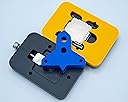
🚀 Delid like a pro, overclock like a boss.
The Rockit 88 Delid & Relid tool is the safest, easiest way to delid Intel CPUs on LGA 1150 and 1151 sockets. Precision CNC-machined from premium materials, it enables enthusiasts to reduce CPU temperatures dramatically and unlock higher overclocking headroom. Trusted by professionals and backed by dedicated support, this original Rockit Cool product transforms your CPU cooling and performance with minimal risk.
| ASIN | B06WVYL61Q |
| Brand | ROCKIT COOL |
| CPU Manufacturer | Intel |
| CPU Socket | LGA 1150 |
| Customer Reviews | 4.8 out of 5 stars 339 Reviews |
| Item Weight | 6 ounces |
| Manufacturer | Rockit Cool |
| Mfr Part Number | R88BK-SI-ST |
| Model Number | Rockit 88 |
| Processor Brand | Intel |
| Processor Core Count | 1 |
| Processor Count | 1 |
| Processor Socket | LGA 1150 |
| UPC | 042768549605 |
N**R
Amazing support from the manufacturer
I ordered the kit for the 115X socket CPU for my 7700K. When it arrived it didn't look like the picture. It only had 2 of the smaller thumb screws instead of 3. There were small flat head allen screws with a small allen wrench in addition to the big allen wrench. The base that the CPU sits in looked different too. I went to the Rockit88 website and looked at the different kits for each socket type. It looked like I received a kit that was a mix between the 115X socket and the 9th generation socket. There was no way I was going to risk damaging my CPU if this wasn't packaged correctly. I sent a message to the manufacturer through their website along with a few pictures of what I received asking if it was correct. I was pretty sure it had been packaged wrong so I called Amazon and arranged to return it. I then purchased another 115X kit directly from Rockit88. The next morning I received an email from James at Rockit and he said I did indeed receive the correct parts as they redesigned the kit to fit more sockets. Now I felt stupid since I had arranged a return and placed another order. He included an attachment with instructions on how to use the new style kit. I sent him another message asking if he would be able to cancel the order I placed on the Rockit website. He got back to me the next morning and instructed me how to cancel the order. Then he sent another message saying it had already been processed. One last email indicated he was able to stop my order from shipping and cancel the order for a full refund on my credit card. Not many manufacturers would go above and beyond to stop an order like this. I went through the delid/relid process and the tool itself worked perfectly. It is a quality product. I watched many videos and read many articles about delidding so I was confident I had the knowledge to do it right. Upon booting up my computer I had nothing but problems. My monitor had no signal and multiple error codes on my motherboard. I removed the cooler, CPU, memory and graphics card and reseated everything. To my amazement it booted up properly. I either bumped a ram stick or the CPU wasn't seated exactly right. Now the next problem was temperatures that were HIGHER than before the delid. Also I had a huge difference is temp between some of my cores. Again I sent a message to James to see if he had any ideas. He got back to me within 24 hrs again and offered to redo the delid if I shipped him my CPU. He didn't say if there would be a charge for this service but even if there was this was a nice gesture. Before I received his response I had redone the delid myself. I was absolutely amazed that this time my temps were much lower and all the core temps were much closer together. I was able to overclock to a stable 5.0Ghz at 1.330 volts and still have better temps than before the delid. Very happy with that! I don't know what went wrong the first time and there really isn't a way to know. I used Thermal Grizzly Conductonaut between the die and the head spreader. I used Kryonaut between the heat spreader and the all in one water cooler block. I have read some people end up delidding multiple times to get the best results.
S**Z
****PLEASE READ - WORTH EVERY PENNY ONLY IF....****
Rockit 88 Kit Review: The Rockit 88 kit is super easy. It's well made, and I really liked the wooden stick they include. It makes getting the glue off a cinch. Directions are easy enough to follow for delidding the IHS from the cpu. The only tricky thing is when relidding, just make sure you essentially "clip" the top onto the bottom piece. Make sure it's evenly clipped all the way around. My first attempt I didn't get it fully clipped on right, and had to go through the process again. All in all, it's a great little kit, albeit a little pricey...but will definitely resolve heating issues if you use LM. I tried using MX-4, and did not have good results. You MUST use LM to get something like the i7 7700k under control. I am now a believer in this procedure, and LM. Conductonaut Liquid Metal (LM) Review: So I purchased a Rockit 88 de/re lid kit off Amazon, as well as conductonaut to fix some out of control temps on my i7 7700k. While running Prime95 @4.6 ghz (a very mild OC) I was hitting temps over 90c on multiple cores. My Kraken x72 360mm radiator could not keep up even in performance mode. However, Amazon screwed up and sent me the Rockit 88 kit, but NOT the conductonaut. I had ordered a lot of things, and forgot about the conductonaut, so I delidded and was sitting there with no LM (liquid metal) to put on the processor. So instead, I ordered some MX-4 off PrimeNow. With MX-4, my temps hardly changed. Only dropped a few degrees, and a little more stable without as huge of jumps in temp. I did not find that the MX-4 "cured" my temp issues...so I re-ordered the Conductonaut. After ANOTHER de/relid of the processor with the Conductonaut, success! My temps dropped incredibly. I now Idle ~32-34c, with 100% load on Prime95 sitting me at 60-65c. I cannot believe the incredible difference, especially from such a small amount. Application: So applying this stuff is not as tricky as videos would make you believe. The correct amount to use is as follows, put the tiny metal tip on, and gently squeeze out the smallest amount you can without it falling off the end. Then gently wipe the small little ball of LM onto the processor. This tiny bit is ALL YOU NEED. LM is conductive, so you'll need to find the small golden circles on the board located on the inside of the IHS perimeter, and coat those with clear nail polish. Wait 30 minutes for nail polish to dry. Anyway, the LM is also fairly easy to spread. I taped off the board so only the cpu was showing, and used the provided high quality black q-tip (as it's much better than a standard q-tip), and squished the puddles of LM across the board. You will be surprised how well this stuff spreads with this method. You can coat the whole CPU no problem. It might seem like you won't be able to, but you will. I did NOT apply LM to the IHS. I removed all glue from the IHS, as well as the board, and used as thin of a layer as I could of permatex on the 4 corners of the IHS to relid. You want to ensure that the IHS is essentially contacting the cpu and LM, so you don't want to have any thickness to the Permatex gasket maker on the IHS basically. All you're doing is keeping the lid in place so that you can get it back in your motherboard and the CPU cooler installed again. The CPU cooler will hold the IHS in place from there. You do not need to make a gasket for the gods, that can only be removed with a Hercules level of force. TL:DR - Rockit 88 kit with Conductonaut dropped my temps at least 25 degrees over MX-4 for a de-lid and re-lid procedure on an i7 7700k.
T**S
Delidding my 8700k resulted in 37 deg C lower temps in Prime95!
I don't usually dabble with my home desktop computers that much in the overclocking or customization departments, simply bc I am too busy. However, I recently had some free time on my hands and decided to test out some overclocking on my new flight simming rig at home (i7-8700k, ASUS ROG Maximus X Hero, EVGA 1080Ti FTW3, 32 GB 3600 MHz Corsair RAM). At stock, my 8700k on the Cryorig H7 would hit the mid 80 deg C range in Prime95 with AVX at -3. And any attempt to overclock it to 5 GHz or higher resulted in thermal throttling, temps in the mid to high 90s deg C and various lock-ups or freezes. After hearing so much about delidding, I decided to give it a go and used the Rockit 88 kit to delid my 8700k. With the kit, I removed the IHS, cleaned the thermal paste and silicon gasket glue and then applied the much nicer Grizzly Conductonaut liquid metal and resealed with new gasket maker. I then let the chip set in the Rockit 88 vise overnight. I then applied Grizzly Kryonaut between the 8700k and the CryOrig H7 (bc liquid metal can decolor and tarnish the cold plate) and booted up. With only Windows 10 and Chrome running and no major loads, I got temps that were 5 to 7 deg C cooler at idle, and with Prime95, I was now down to the high 60s deg C. I was then able to overclock up to 5 GHz with no problems and Prime95 ran at 5 GHz with temps in the mid 70s deg C with no problems or crashes. A few weeks later, I put in a custom water loop with mainly EK parts and now, my delidded 8700k runs at 31 deg C at idle, upper 40s with the most intensive games or flight sims (like DCS World, using virtual reality), and at 58 to 59 deg C under Prime95 with AVX at -2. So, what an improvement! I would easily recommend the Rockit 88 kit to other computer power users and you will definitely see a large improvement in temps. Also, the Rockit 88 parts are very well manufactured to the correct tolerances and dimensions and it comes with instructions and everything needed for the delidding. Five star experience and would recommend this to other computer power users and overclockers.
A**R
Anticlimactic Snap
I saw one video where the YouTuber swears the snapping of the lid is like a shotgun going off. It seemed more like snapping a twig to me. This is an easy to use tool for delidding. All you have to do is follow the instructions, screw everything down in a secure manner, and follow the triangular arrow. Several years ago I would have been all over something like this, if Intel had been putting TIM between the CPU and IHS. It took me a while before I decided to delid but boy was it worth it. I bought this so I could delid an 8700k but I tested it out on a 6700k first. The temps went down by an insane margin and now the temps won’t hit more than 57c while the running a newer version of Prime95, at 4.8ghz with 1.425v, while using an old H100 cooler with ML120 fans. Last year when I overclocked the 6700k, then temps at 4.8ghz were in the low 90s at the same speeds. That a 30c drop in temps at +1.4v. I was expecting only 20c like everyone else was saying. The only thing I didn’t care for was the relidding kit coming with a tensioner that only mounts with 2x screws. Also, the IHS guide/jig didn’t get the lid in the exact same spot as before. Another thing that might be useful is a template for reapplying the metal TIM on to the back of the IHS. When I cleaned the IHS on the 6700k, it was so clean that I didn’t know where to put the tape, for where I would apply the Conductonaut. So what I did was I put the IHS back on to the CPU after I applied the metal TIM using the relid template, then I went by the imprint. This is a great tool and it was totally worth the purchase. The tool seems like a safe way to remove the IHS. I still have the 8700k, 7700k, and a 4790k to delid yet and I’m expecting awesome temp changes with those.
D**R
Easy to Use and Significant Temperature Improvement
I used this to delid and relid a lemon i7700k. Previously I was seeing temperatures in the 90's with spiking all the way up to the thermal limit. Current max temp has been 60. You may not see this type of increase unless your CPU was a fiery little failure like mine, but improvements of 15 degrees are not uncommon from what I have read. The process and tool were easy to use after watching a quick YouTube video. My version's relid tool was a bit different, but the process was the same. Quality materials that fit and worked well. I am very satisfied with this purchase. Well worth the money for it and the extra bits I needed like gasket sealer and the liquid ultra. Do some research on YouTube if you are unsure how to use this. You won't be disappointed.
D**G
With this you won't even care about water cooling anymore :)
This is amazing. Here is a real world result: I have a 3.8ghz Kabylake I5 running at 5ghz at 1.3 volts. Doing a full Antivirus scan with MS Security Essentials would peg all 4 cores to 100% and would stick at 80c. After delidding with Thermal Grizzly Conductonaut and Artic thermal compound for the CPU fan heatsink, the same run stays at 60c. In World of Warcraft in 1440 mode raiding it stays around 54c-56c and won't go higher. I use two Gentle Typhoon 120mm fans on an H20 radiator. Maybe the monster Noctua could even go lower, but these numbers are with the fans at 1,050 RPM so I haven't juiced the fan curve, it's whisper quiet. Don't be nervous about delidding, as long as you have this tool and clean everything well you'll be fine. Watch the videos and if you've ever installed a CPU fan, this will be a walk in the park. Some things to make it easier: $2.50 jug of 91% pure rubbing alchahol, available at any store. Locktight gel super glue for relidding (get the gel it sets up in 5 minutes instead of hours). Little pack of small paint brushes Thermal Grizzly Conductonaut not the other kind they make if you want the massive temp drops. Use normal thermal compound on the CPU heat plate after you get it relidded. Tiny paintbrush will leave nothing to chance for control and complete coverage spreading it. Thermal conductive tape with let you protect the circuits on the dye from ever coming in contact with the liquid metal compound. Q-tips and napkins, also bookmark the tutorial movies on your phone if it's your only computer, so you can refer to them in case you forget how the lid goes back on and need to zoom in on a photo of it's orientation. I refuse to install a fish tank (water cooling) in my computer, and now I never will have to. I have a GTX 1060 6gig with the Arctic Turbo II fan kit and that works wonders for the video card. It's a bulletproof combination and with the prices of 1080ti's not coming down for years I couldn't care now, the whole system can overclock to the sky and never get hot.
T**.
Easy to use and study
Delidded my i7 8700k with thermal grizzly conductonaut and it dropped 23c off my max. although the application of TIM on my 8700k was stupidly small, uneven, and barely made contact so my temps were probably higher than normal on stock TIM. It took 3 business days before it was shipped when i payed for one day shipping on the order, but oh well. My IHS didn't seem to stick down to the PCB on one side without using too much RTV, but once is sat in the socket it was fine with a small amount of RTV.
T**T
Worked perfectly. Instructions are on youtube, and not very good
First, I bought a "used very good condition" version. The seller is the manufacturer, and as I guessed, this was a brand new item. Note: there's zero wear to expect on these anyway. I used that to delid and relid an intel 8700k that is a few years old. I used some liquid metal... check my other reviews (from later today). The only downside is the instructions to delid are available, but not how to relid. youtube has some versions that have a different "top" for reliding (the yellow part, for them is white and shaped a bit differently...) But it's easy to guess. Overall: - super solid - scary sound when the lid pops-off (also it takes some real strength turning that wrench, it's a bit scary you need to apply that much force) - great to relid too. - great company overall (they they should add a relid video, their instructions are pretty lame, and there's no meaningful paper nor pdf instructions)
K**N
Highly recommended for safe Delid and Relid
This Delid kit makes breaking the lid off foolproof. Large snapping noise means it is successful. Made of nice sturdy quality. You can do the entire delid process in the tool itself (putting paste/liquid metal, etc, while still in the crevice of the tool). The relid kit did as expected and put the lid on properly, the relid kit also does a good job at pushing down the lid to maximize contact without breaking and leaving it for a couple hours. If you are scared of damaging your cpu but want to delid, this is highly recommended. I recommend getting Thermal grizzly conductonaut for inside, Kryonaut for ontop lid, and some black RTV silicone glue for adhesive. (This ended up being about $120 CAD). Good luck.
や**う
これ一つで完全な殻割りを実現出来ました
このお陰でCPUの殻割りと殻戻しが難無く成功しました。ただ説明書が付属してなかったので、あちこち検索して手順を把握。殻を戻す時にも、製品の台座の上に載せたまま、シーラ跡剥がし、絶縁剤、リキプロ、ゴムシーラを塗布、蓋固定まで一連の作業が出来るので大変安全で楽でした。良く考えられた逸材です。
E**Y
Work like a charm
Work like a charm.easy to use, It's just a shame it only work for a specific size only, i would have loved to delid all my friend's cpu too
M**D
Great quality
This has made the process of delidding my processors a breeze. Great quality and fit of parts. If your looking for a solid delid tool look no further.
S**N
Worked like a charm
Worked perfectly. The whole process of popping the IHS off my 8700K probably took a whole minute at most, and with the arrows to line up the CPU in the hole, it seems pretty fool-proof. The alignment bracket was useful for centering the IHS when I reattached it, though I didn't bother relidding it and simply let the motherboard retention bracket hold it in place. The wooden stick was helpful for cleaning the IHS glue out of hard-to-reach places, and also helped clean up my inevitable mess when applying liquid metal to the die. My only complaint is there wasn't any instructions in the package. It wasn't really an issue since the internet is full of video guides, but something official would have been nice.
Trustpilot
2 months ago
3 weeks ago