Desertcart purchases this item on your behalf and handles shipping, customs, and support to Tunisia.
🎨 Elevate Your Artistry, Own the Creative Edge
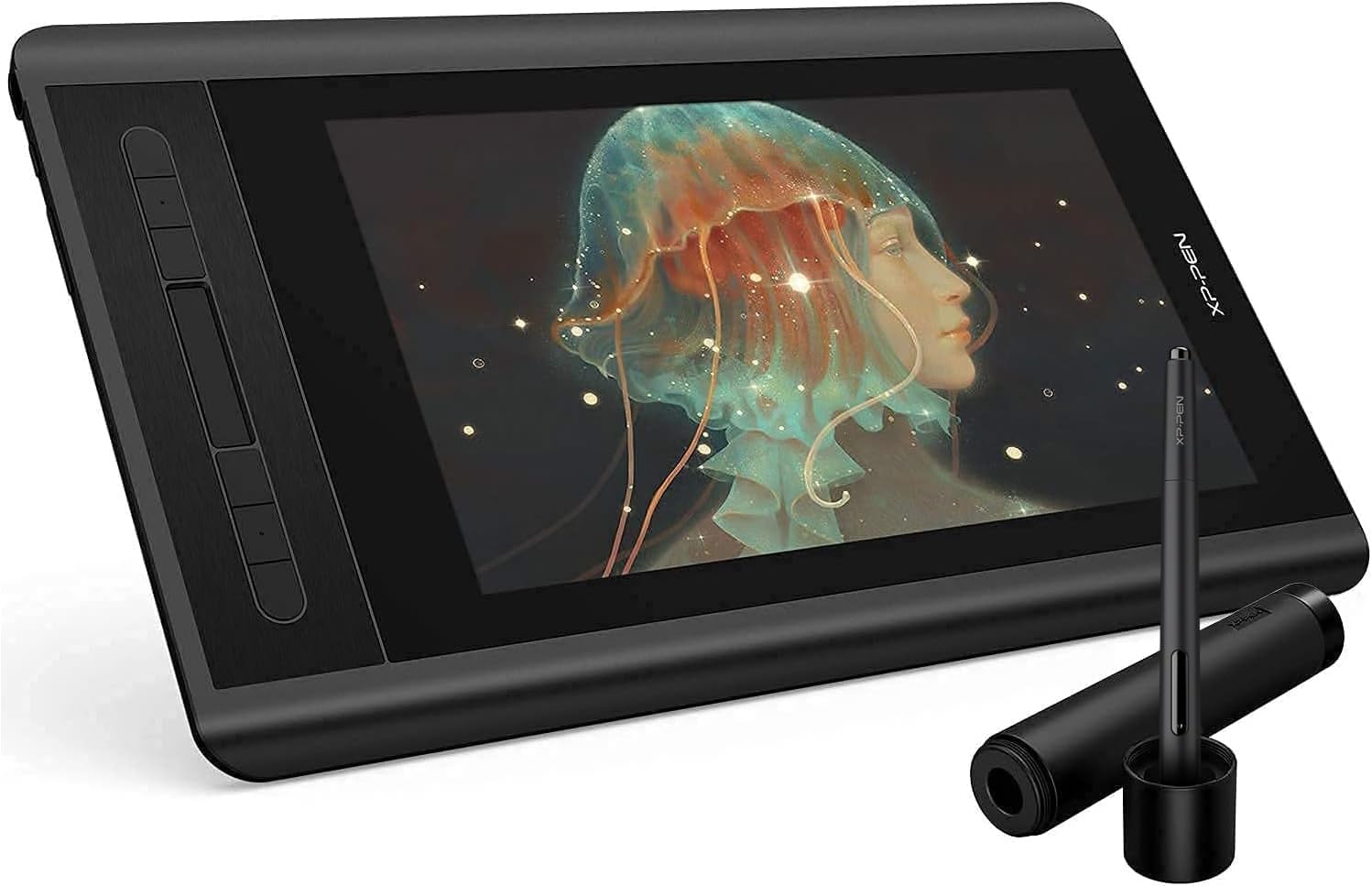
The XP-PEN Artist 12 Pro is a professional-grade 11.6-inch drawing pen display featuring a fully-laminated IPS screen with 1920x1080 resolution and anti-glare film. It offers 8192 levels of pen pressure sensitivity and 60° tilt support for precise, natural drawing. Equipped with 8 customizable shortcut keys and a red dial for enhanced workflow, it connects easily via a 3-in-1 USB cable compatible with Windows and Mac OS. Ideal for digital artists, designers, and educators, it combines portability, durability, and high performance in one sleek package.


| ASIN | B07GNK18VJ |
| Active Surface Area | B07GNK18VJ |
| Best Sellers Rank | #53,766 in Computers & Accessories ( See Top 100 in Computers & Accessories ) #200 in Graphic Tablets |
| Box Contents | 1 Pen Display, 1 P06 Passive Pen, 1 Pen Holder, 8 x Replacement Pen Nibs, 1 HDMI to Mac adapter cable, 1x USB Cable, 1 Cleaning cloth, 1 Black Drawing Glove, 1 Quick Guide |
| Brand | XPPen |
| Brand Name | XPPen |
| Colour | Black |
| Connectivity Technology | USB |
| Country of Origin | China |
| Customer Reviews | 4.4 out of 5 stars 11,636 Reviews |
| Display Type | LCD |
| External Testing Certification | nao |
| Importer Contact Information | M/s DNS Overseas: 1003, Raheja Chambers, 213 Nariman Point, Mumbai 400029 |
| Item Dimensions L x W | 35.5L x 23.4W Centimeters |
| Item Type Name | Graphic Tablet |
| Item Weight Unit of Measure | 907 Grams |
| Manufacturer | Hanvon Ugee Technology Co. Ltd., XP-Pen |
| Manufacturer Contact Information | Hanvon Ugee Technology Co. Ltd. |
| Manufacturer Part Number | Artist 12_SML |
| Model Name | Artist |
| Model Number | Artist 12_SML |
| Native Resolution | 1920x1080 |
| Network Connectivity Technology | USB |
| Number of Items | 1 |
| Operating System | Mac OS, Windows |
| Packer Contact Information | M/s DNS Overseas: 1003, Raheja Chambers, 213 Nariman Point, Mumbai 400029 |
| Pressure Sensitivity | 8192 Levels |
| Product Features | 60° Tilt Support, 8192 Levels of Pressure Sensitivity, Shortcut Key |
| Screen Size Unit of Measure | 11.6 Inches |
| Software Update Supported to Date | unknown |
| Special Feature | 60° Tilt Support, 8192 Levels of Pressure Sensitivity, Shortcut Key |
| Specific Uses For Product | Animation, VFX, Game design, Illustration, Graphic design, Interior Design, Teaching, Note-taking, Business meetings |
| Target Audience | Student, Teacher |
| UPC | 758232357309 |
| Unit Count | 1 Count |
| Warranty Description | 1 year manufacturer |
P**)
Great tool to up your art game.
Great tool for artists...I know ipad and procreate is amazing too but this gives me much more freedom to work with bigger files and cmyk file since I can use the power of my PC and software like photoshop. It has good response. Sometimes it gets disconnected but it happens on prolonged use... It has a matte screengaurd which is good since it avoids the screen glares. The colors are very nice and saturated. The pen is very responsive and very comfortable to use for long hours. The tablet comes with a stand which is very helpful. With dust prone atmosphere of India the screen needs extra care and cleaning to prevent scratches. I would like to know if the matte screen gaurd gets scratched can it be changed?. All in all it is a great budget friendly tool for artists.
P**J
Superb Build Quality
I am reviewing it after using it for 2 years. Currently I am using as an external display. its screen quality is great and its build quality is superb because it survived an accidental fall. no screen damage at all.
N**H
Best graphic tablet in this price range!
What comes in the box:- XP Pen Artist 12 Pro (of course), XP-Pen, Gloves (tho they are a litte big bigger),Power Adapter with 3 adapters, Waranty card, Software installation guide and manuals. Cables:- It comes with a 3 in 1 cable Which means that you have to Connect the HDMI and USB cable to your pc/mac, you have to connect the power adapter to a power source like UPS, plug the USB-C Cable into the tablet. Easy To Use:- it's not the easiest as other products have a single cable too but it's easy enough for a non-tech nerd to get it working, the software provided is easy to use if you go to ArtRage 5 rather then OpenCanvas. Build Quality:- The body made from mostly plastic and some metal, The cables aren't made from a great quality but it's good enough to last about 2-4 years without any problems, The pen is really good, its made of plastic but feels premium to hold. Requirements for running this tablet:- A PC(Desktop or Laptop)/Mac, Your PC/Mac has to have a HDMI Port and a USB port, if it doesn't then I'd suggest not buying this product or you can add some adapters like USB TO HDMI cable if you're okay with that. Delivery:- Arrived in 2 days, no damages :) Overall:- This tablet is very very good Value For Money and is cheaper then most of the other products!, I'd suggest go for it if you meet the system requirements if you don't, then go for a Huion Kamvas 13 2021 it's much more easy to use but it's more expensive and doesn't provide free software so... It's your choice.. Thanks!
A**N
Really Awesome
After one month of usage i am very much satisfied of this products. The pressure sensitivity is superb. We can use it as a monitor tablet also as a normal graphic tablet( off the screen and use). Also if its connected to laptop. It will take the power from laptop, so we can work remotely without direct power support also. The non chargeable stylus pen is very handy and Weightless. I am using it for Zbrush sculpting its works well. I love the product very much.
S**L
Bang for Buck
You what you pay for. No non-sense device and it does what its made for. Good screen, good stylus and good performance overall.
H**H
Excellent product with amazing features..
Excellent product and as always great delivery by Amazon. I love the tablet.
H**H
I am in love with this
Great product in very reasonable price
A**A
Disappointing product and even worse Customer Support .
I purchased this product in June ‘20. It worked fine for a half a month then it began showing display errors. Even though it is properly connected the tablet always show’s not display signal’ . I searched online and turns out many buyers posted the same problem on Reddit and other such online forums . The 3-in-1 cable has a manufacturing defect in most tablets , I contacted the customer rep, and they are the worst ever . I took me a month to successfully register my complaint and took them more than 3-4 months to get back to me on a replacement . They don’t even keep you updated I have to always call them to inquire when it should be their job to do so . It’s almost 5 months of my warrantee period wasted and I haven’t had the replacement cable yet . They have successfully managed to evade and nullify half of the warranty period . I myself am planning to return the product . So don’t buy this product at all . Not recommended, trust me I am a professional artist and this is not something you would want to have . Really not worth your money. Again , the worst customer service ever. It’s like communicating with zombies
G**A
Mesa artista 12 detalhes finos e precisos
A mesa é muito boa, era como imaginei tem uma ótima qualidade, tem bastante detalhes em cada trabalho.
B**A
Great display tablet
I have not had this for very long but I'm so far pleased with it. This is not my first graphic tablet but it is my first display one. The XP-Pen Artist 12 is a display graphic tablet which must be plugged into a laptop or monitor for it to work, it is not functional as a standalone product just to be clear. Inside the box includes wires to plug in, several wall mounts for different regions, a drawing glove, a screen cleaning cloth, some manuals, the pen (which also has an eraser on the other end of it as well as extra nibs in the holder) and of course, the tablet. There is no stand included. Display: The display matches the monitor almost perfectly. There may be a small difference color-wise but it is almost undetectable. The working space is slightly smaller than 12 inches (and forgive me if I'm off as I am not the best when it comes to measuring) so it may feel a little small at times. The contrast and color scales are customizable in the settings so you may adjust it to better replicate your computer monitor. But do be aware that turning up the brightness (buttons on the side near the input plug) on the tablet itself may also affect the contrast and cause things to look weird. If you have overhead lights on while using it, you may notice some glare issues that can obstruct your vision. As the display is not laminated, there is a small observable gap between where you place your pen and where your cursor appears on the screen. This parallax issue is easily overcomable in my personal experience and doesn't actually affect the way you draw but it may bug you if you are prone to being displeased by that. Pressure and Drawing Experience: The pressure sensitivity is rather decent (I'm no expert though) and though the display looks smooth, there is a grippy, textured feel to drawing on it. The pen detection distance is rather short, however, so the pen tip must be pretty close to the screen at all times if you want to hover over something without clicking or drawing. I am satisfied with the drawing experience though. Because there is no stand included, you may find yourself in awkward positions or practicing poor ergonomics so I do recommend purchasing one. Shortcut keys: The tablet includes short cut buttons to the side and a scroll wheel all of which are mappable in the settings. The scroll bar is not very sensitive but its still useful. The pen also has a shortcut button on one of its sides but is incredibly inconvenient to use as it rests flat and is therefore undetectable by feel. You'll have to stop what you're doing to look at it if you're determined to use it and there have been times where I gripped a little too hard after habitually rotating it and accidentally pressed it while drawing. Software: You must first uninstall any drivers from other brands you had installed and then search for the XP-Pen drivers on their official website. I have not had any driver issues but there may be select software incompatibilities that you should be aware of. I used Paint Tool Sai on my previous Wacom tablet before getting this one only to find that XP-Pen has some strange issues with the program. The pressure sensitivity completely stopped working and the pen eraser is rendered obsolete. The pressure sensitivity can be fixed by installing and using a special version/pack of Paint Tool Sai but I am not aware of any eraser end fix. Durability: I researched about this Tablet before buying and this aspect was completely inconclusive. I used to have a Wacom graphic tablet and I wanted a display (that wasn't Wacom prices) but I was concerned that I would spend a good 200 dollars for a month or two of use. Obviously the XP-Pen Artist 12 isn't a tank and should therefore be treated with utmost care. There is an included warranty but I hope to never need to use it. I will most likely update this aspect after further use down the line. Price: This one speaks for itself. The price tag is so good for a display tablet, its near irresistible. Overall, the XP-Pen artist 12 is a great display tablet, especially for the price and I can wholeheartedly recommend it.
M**O
Prima tablet
Ik heb deze tablet gekocht voor mijn vrouw. Ze wilde eigenlijk een "blinde" van Wacom maar tijdens onze zoektocht liepen we tegen deze aan die voor een vergelijkbare prijs een scherm biedt. Ik teken zelf niet, maar kon me voorstellen dat dit veel en veel fijner werkt. Dus we hebben de gok genomen, na wat reviews te hebben bekeken, en deze tablet gekocht. Ik ben niet bekend met de concurenten, ook niet met Wacom, dit is onze eerste tablet voor tekenen maar hij is erg prettig en mijn vrouw is er dolgelukkig mee. Ik raad hem dus ook zonder meer aan voor mensen die een keer willen proberen of digitaal tekenen iets is voor ze. Het werkoppervlak is groot genoeg en het scherm is erg scherp en mooi van kleur (al ben ik geen kenner en zal er natuurlijk voldoende op aan te merken zijn als je gaat kalibreren en zo, maar ok, in deze klasse (zowel van tablet als artiest :+ ) doet dat er niet zo veel toe. De pen zelf ligt lekke rin de hand en zelfs ik kon er prima mee schrijven, het is echt net of je op papier werkt.
D**N
Essential for artists new to digital art
I cannot praise this tablet enough! It's incredibly affordable, very simple to set up, and I like that there is a choice of plugs for the power adapter. The tablet itself has a fantastic screen resolution; the pen is insanely accurate; I love the fact that you can simply use it as a second screen (great for 3D modeling); it's lightweight, and come packaged wonderfully. I'm a traditional artist who has shied away from digital art due to what felt to me as a steep learning curve (as well as the price tag), but I took to it instantly. I cannot recommend this enough.
E**.
Für Künstler ein prima Einstiegsgerät!
Normalerweise mache ich mir nicht die Arbeit, eine ewig lange Rezension zu schreiben, wenn schon "Top Rezensenten" bewertet haben. Da komm ich mir höchst unnütz vor. Aber diesmal mach ich eine Ausnahme. ___ Für Künstler ein prima Einstiegsgerät! Kein Scherz! Ich zeichne seit 3 Jahren traditionell. Aber mein Motto lautet wie folgt "Nur Künstler die beiderlei Grundlagen beherrschen - traditionell und digital - können sich wirklich Künstler nennen, da dann bei beiden Erfahrungen vorhanden sind." Deswegen wollte ich unbedingt mal das digitale Zeichnen ausprobieren. Der erste Versuch war ernüchternd. Mir lag das Zeichnen auf einem Tablet und schauen auf den Monitor vom PC einfach nicht. Daher lag das alte Wacom One S nur noch herum. Ich war der Meinung, dass ein Pendisplay sich natürlicher anfühlen würde. Und tatsächlich. Ich musste mich zwar erst einarbeiten, aber dann fühlte es sich so natürlich an, dass die Zeit verflogen ist. Im Moment koloriere ich lieber mit ihm, als komplette Zeichnungen zu machen. Das liegt daran, dass ich Probleme mit den Proportionen habe, wenn ich nicht dauerhaft die gesamte Zeichnung sehe. Aber mit jeder Zeichnung werde ich immer besser. Mehr als ich mir je erhofft hatte! :O Nun zu den Fakten. Das Pendisplay ist schon recht groß, kommt relativ nahe an die großen ran, die ohne PC betrieben werden können. Der Bildschirm ist groß genug und reicht für mich völlig aus. Er ist deutlich größer als meine Hand und auch breiter (siehe Foto). Dass es aus Japan kommt, empfinde ich als sehr gut, da ich Manga Zeichnerin bin und meine Vorbilder natürlich die Mangaka sind. Japan = Qualität. Zumindest wenns nach mir geht. Es werden insgesamt 8 Ersatzminen mitgeliefert, die mitsamt dem Stift in einer Art Röhre stecken. Der Verschluss am Ende des Stiftes ist auch gleichzeitig ein Stifthalter, so dass man den Stift während des zeichnens einfach mal rein stecken kann. Der Handschuh passt mir wie angegossen. Die Tasten vom Stift sind sehr schwer zu bedienen - für mich ist das jedoch positiv, da mich eben dies beim Wacom One S gestört hat. Denn ich nutze weder die Tasten am Stift, noch die am Pendisplay. Dazu bin ich einfach zu unerfahren und es würde mir nur extra Mühe machen, weil ich mir sowieso nicht merke welcher wozu da ist. Außerdem ist Gimp recht zickig was das betrifft. Angesteckt ist das gute Stück auf meinem Mittelklasse Gaming PC "Cosmo". Das bedeutet, ordentlich power für FHD ist da. ;) Ein Manko gibt es aber: Manchmal flackert der Bildschirm. Vor allem wenn ich nebenbei am PC Musik aufgedreht habe. Jeder Bass macht ein Flackern. Ist nicht sehr angenehm, verschwindet aber nach dem Abstecken und neu anschalten. Fazit: Ein sehr leicht zu bedienendes FHD Pendisplay, für alle neulinge im Bereich digitales Zeichnen. Lohnt sich aber nur, wenn man ganz genau weiß, dass man ohne direktem Bildschirm am Tablet nicht zurecht kommt, wie es bei mir der Fall ist. Preis-Leistungsverhältnis absolut Top! Seit dem ich das XP-Pen Artist 12 besitze, zeichne ich sehr gerne digital, auch wenn es mir noch sehr schwer fällt! (Sorry dass einige Bilder falsch herum sind. Da kann ich nix machen. Am PC sind sie richtig herum.) 5/5 Sterne
Trustpilot
1 month ago
2 weeks ago