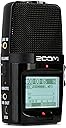
🎧 Capture Every Detail, Anywhere, Anytime!
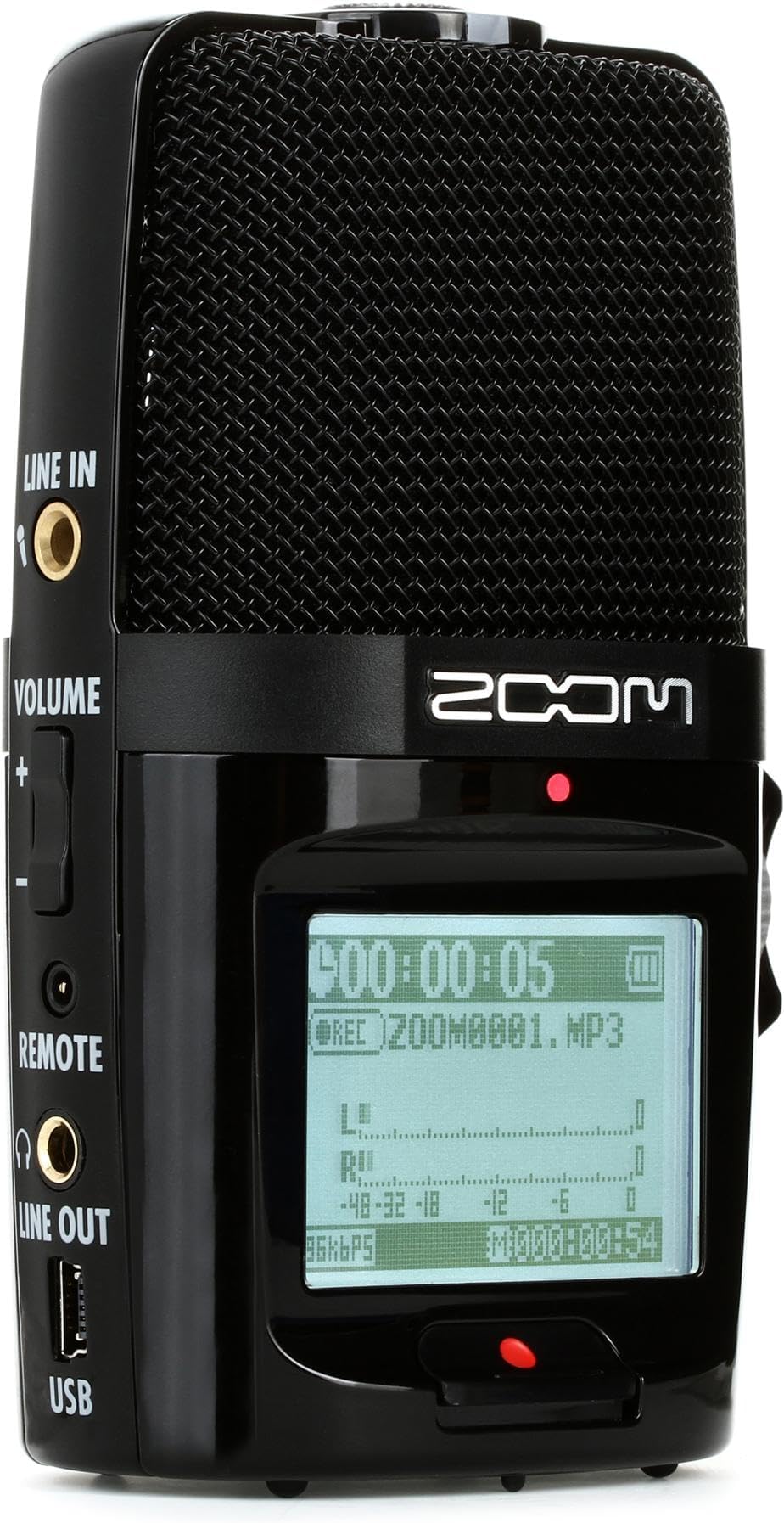
The Zoom H2n is a portable, professional-grade audio recorder featuring 5 built-in microphones for immersive stereo and surround sound capture. It supports high-resolution WAV recording up to 24-bit/96kHz and MP3 up to 320kbps, with over 20 hours of battery life on standard AA batteries. Compact and tripod-mountable, it includes advanced audio processing tools like compressors, filters, and auto gain, making it ideal for musicians, videographers, and interviewers seeking studio-quality sound on the go.


| ASIN | B005CQ2ZY6 |
| Best Sellers Rank | #149,980 in Electronics ( See Top 100 in Electronics ) #647 in Digital Voice Recorders |
| Brand | Zoom |
| Compatible Devices | Personal Computer |
| Customer Reviews | 4.4 out of 5 stars 2,780 Reviews |
| Digital Recording Time | 15 hours |
| Format | MP3 Audio, WAV |
| Global Trade Identification Number | 04515260010080, 04515260010097 |
| Hardware Interface | Secure Digital Card |
| Headphones Jack | 2.5 millimeters |
| Item Dimensions D x W x H | 1.68"D x 2.66"W x 4.5"H |
| Item Type Name | CD Recorder |
| Item Weight | 4.64 ounces |
| Manufacturer | Zoom |
| Memory Storage Capacity | 2 GB |
| Mfr Part Number | H2N |
| Microphone Form Factor | Built-In |
| Microphone Operation Mode | Stereo |
| Model Number | 10005121 |
| Number of Batteries | 2 Lithium Polymer batteries required. |
| Number of Items | 1 |
| Screen Size | 1.9 |
| UPC | 411378269171 210000050244 884354010065 003103006146 |
| Unit Count | 2.4 Ounce |
| Warranty Description | No warranty in us. |
S**N
An amazing recorder that solves a lot of problems
This is an absolutely fantastic little unit. It came out half a decade ago but even despite huge technological advancements in other areas (smartphones, computers, etc) this thing really does holds its own still and will be a great product for years to come. This thing is like a little Swiss army knife for general purpose recording. You can record high quality tracks directly on the unit itself, you can import these tracks to your favorite DAW (digital audio workstation) for further processing, you can use it as a great little USB mic, and it even doubles as an audio interface with a stereo input. There are some great options for mic configurations. You can configure it for X/Y, mid-side, 2 channel, and 4 channel, easily adjusted with the turn of a little dial. A pair of handy LED lights tell you which side (or sides) of the mics are active. These same lights will flicker when the signal is clipping, which is a very nice visual indicator. Furthermore, it can be mounted on a tripod or you can buy the super cheap mic stand adapter for around $10 which allows you to mount this unit on a mic stand (plus it doubles as a useful handle). It has an onboard speaker so you can listen back to recordings, or you can plug in a pair of headphones to the line out. The on board speaker is terrible, but what do you expect? It’s a recording device, not a mini boom box. You can also plug in a remote which is useful for creating WAV markers. I like this because with a DAW that supports it allows you to easily navigate through your recordings. There are some useful options, such as auto-gain (to help prevent clipping and such), a compressor/limiter, a low cut filter, and a few other options. This unit operates on a pair of AA batteries and it’s amazing how long the batteries last given the quality of recordings. Zoom claims about 20 hours of battery life which I find to be a bit optimistic, but even still at around ~15 hours the battery life is great. The interface on the device is quite nice. It has a backlit LED screen and navigation is simple with a selector switch that allows you to move up/down or press it in to make a selection. It only took me a few minutes to get used to it. This recorder uses a single SD card for storage, up to 32GB which is plenty adequate for my needs. I record at 44.1 kHz / 24 bit (any higher is overkill for something like this IMO) and with a 32GB SD card I can get about 33.5 hours of recording. If you record at CD quality, which is 44.1 kHz / 16 bit, then you get a little over 50 hours of recording time. The max setting of 96 kHz / 24 bit will give you over 15 hours of time, and if you don’t mind recording in mp3 then 128 kbps (said to be CD quality, but debatable) gives you over 550 hours! 256 kbps will give you half that. I primarily use this for recording band rehearsals and even demos. Recording rehearsals in the past was annoying, either I would use a smartphone which would provide terrible recordings, or I would use a laptop, dedicated recording interface, and microphones, which did give me better recordings but it became really cumbersome dragging that stuff around to every practice/demo session. Plus it’s annoying dealing with all the extra wires/cables and such. Also, I believe it’s a law that when you introduce a computer into the mix then you’re going to have glitches and other issues. The H2n solves all my problems, all I have to do is plop it down and hit record and I feel confident that my recordings are going to sound good every time. The negatives are pretty minor. The biggest issue being that it only has a single universal gain knob, it would really be nice to have separate gains for each side of the mic. A minor issue is that it doesn’t come with a USB cable in the box (my H6 did), I have plenty of USB cables lying around but including one in the box would have been useful for a lot of people. It does feel a little cheap-ish being all plastic, but I haven’t had any issues with durability yet, though thankfully I haven’t dropped it. Also for the best results you really need to mount it on something, whether that be a tripod or mic stand (using the adapter, not included), recording while handling the device introduces a lot of noise, though this is probably just the nature of the device. Despite the minor issues noted above, this is an easy 5-star product. 5 stars doesn’t mean “perfect in every single way” it means “I love it!” and I certainly do love this thing. It’s super useful and feature-rich, all in a device that can fit in my pocket.
S**.
My new high quality favorite recorder.
The primary use for this was intended to be informal recordings of band practices. After hearing how well it images though I've got some new uses in mind. I can't wait to record some ocean, or rapids for example. The mics are very sensitive and much quieter than I was lead to believe by some other reviews. Being able to record both x/y and mid/side at the same time is terrific too, although after my first attempt I didn't seem to be able to massage the M/S in post as I'd hoped. It seemed to be recorded with the depth set during the recorder rather than raw. I hope that will be resolved by some more manual studying. One recording is attached (unless blocked)- a few seconds of an old album, recorded in x/y, centered and a couple feet in front of 10'-seperated speakers PROS: Great sounding mic. Flexible recording methods 2/4 channel, x/y, mid/side with adjustable width. I use the 1/4" tripod mount with my insta360 selfieStick to set the height. When connected to a PC it prompts for use as a USB drive (to retrieve recordings) or as a mic (2ch/4ch). Zoom provides drivers that work well, allowing 4 channel capture in cubase for example. The controls are intuitive and well-labeled. CONS: MiniUSB? Come on, that was from 20 years ago. I had to scrounge around to dig up a cable to use. The case LOOKS terrific, but the plastic feels a bit fragile. That could be a good thing though, since I'll protect it (and more importantly, the mics) a bit more than if it felt bullet-proof. The black & white display looks a bit dated, and almost out of place on an otherwise futuristic looking recorder, but is functional. RF noise- I have one (very cheap) wireless TX/RX pair intended for InEarMonitors. The Transmitter picks up a horrible buzz from the Zoom anywhere within a few feet of it. None of my other wireless or wired device pick up anything, so I'll blame it more on the other device's poor filtering or shielding, but it's something to be aware of.
T**Y
Compact recorder thats easy to use, good for DSLR run&gun
Having used to Zoom H4n for several years, I happened to notice this product and thought it might be more useful for some recording uses. The H4n is still one of the best and most versatile pocket recorders available for the price. What sets it apart in particular is the simultaneous 4-track recording. I was astonished to find out that in a way, the H2n can record 4 tracks as well, for half the price. Here are some of the pros and cons between the H4n and H2n: H4n Pros: XLR (and 1/4" jacks) pro mic input with phantom power. True 4-track recording. Compact for the features. Solidly built. Uses easily-available AA batteries. H4n Cons: Somewhat antiquated interface and firmware, display readout. A bit cumbersome for true hand-held and on-camera use (although neither would be ideal in any quality circumstance). Slow to start-up. Eats the AA batteries very quickly for field use. H2n Pros: Small, light, and compact. Dual Mid-Side and X-Y microphone elements built-in. Capable of using all 5 mic capsules simultaneously to record to two pairs of stereo tracks. Can also plug external mic (in 1/8" stereo jack) to record to one set of stereo tracks. This disables the built-in X-Y elements and continues to use the M-S mics along with the plugged-in mic. So you can record in 4 tracks (using the "Dual surround" mode). Uses a pair of easily-available AA batteries, which can last up to 20 hours for field use. Can also be powered with Micro-USB cord. Large, clean and clear readout and interface. Starts up in 2 seconds flat. H2n Cons: Seems plastic-y and possibly not as durable. Build does not isolate mics well (handling noise is bad). No pro mic inputs. No accessories included with package, not even a power cord or a foam windscreen. So far, I like the unit quite well. A few things I was worried about include the one-touch recording. Most recorders, including the H4n, require you to push the record button once to put it in stand-by mode, then push again to commence recording. This is somewhat of a mixed bag. It enables the monitoring system to begin (and if you are using the system on a DSLR/camera, you can use the recorder as a mic input without actually recording to the unit itself), but also makes it confusing sometimes as to whether you are actually recording or not. The H2n starts recording immediately upon hitting the record button once. This is better. But I had worried that there would not be any monitoring available. Not to worry. The H2n starts monitoring immediately upon power-up! (But you can disable it in the preferences if you wish). I have a swivel hot-shoe mount that screws into the (plastic) thread on the bottom of the H2n and can then fit onto the hot shoe of my camera. Using the line-out jack, plugged into the mic input of a DSLR, the unit works quite well for run-and-gun video shooting. You do have to fiddle with the recording levels of your particular camera (Ive set my Nikon D4 to manual audio mode) and set the output volume of the H2n to an appropriate level. Mine seems to work well at 50% volume. You can then easily set the audio input on the H2n via the thumb wheel to suit your recording. The unit is small and lightweight and looks decently unobtrusive atop the hotshoe of the DSLR. The readout can be seen easily and the the red record/mic LED lights look like a Tally light. The all-black housing also looks good with a DSLR camera. All mics are susceptible to wind noise. This unit should at least come with a foam windscreen, but a "dead cat" furry windscreen works better anyway. I have a Rode StereoVideoMic, whose 'dead kitten' screen fits and works for the H2n fairly well for windy conditions. I'll continue to use the unit and add to the review as I go. Feel free to ask questions and I will do my best to answer them.
D**K
Unmatched sound quality at a low price point
This is a fantastic recorder in terms of quality, ease of use, of value for the money. It easily sounds as good as much more expensive recorders. I am very picky about sound quality. I also own a Rode VideoMic Pro and the H2n sounds as good as that, which is impressive. The primary reason for purchase was because this supports spatial audio with VR 360 cameras like the Insta360 Pro. The Insta360 Pro has poor sound quality without using an external microphone. When paired with the Zoom H2n, the results are superior. The benefit to using an external microphone in this case is so you don't have to sync the audio and video in post production. There is software to do this automatically, but it does add a few extra steps and I don't have time for that on a daily basis. This recorder has the ability to record 4 channel audio that can later be edited in post production. When you listen to the audio in spatial mode using headphones, it does give the impression of spatial presence. The sound is very clean with little noise, and voices are incredibly crisp. It has an auto gain setting that you can set to "meeting." So long as you don't have any fans or humming in the background, it adjusts the recording volume perfectly assuming you are recording voices in a medium size room. If you are in a very loud environment, you would need to dial back the gain and use headphones to make sure there is no clipping. You can also use external microphones with this recorder, such as a lav mic or any mic with a 3.5mm jack. It has a nice big screen to see your settings. It has a gain knob that is mechanical, which is nice. The record button is also big and clear. CONS The tripod thread at the bottom is plastic and will strip out in no time. They should have made it metal. The build quality is about average for this price point. You don't want to drop it. It is the older style USB input. I would have liked for it to be USB-C. The back battery door is very thin plastic. The battery life itself is fantastic. It seems like you rarely need to change the batteries considering how much it is used. CONCLUSION If you are looking to record interviews, use a pocket recorder, need to use external mics that have 3.5mm connectors, want to record spatial audio for VR on the cheap, or even want to use it as a desktop USB microphone for your PC, the H2n is a solid choice. If you are really wanting to do spatial audio that is a step even above this, then you could invest in the Sennheiser Ambeo VR and a Zoom H6 recorder. This is also an inexpensive alternative to a boundary mic for recording meetings. Would I buy this again? Definitely.
P**R
Stellar sound quality, and amazing battery life!
i purchased the h2n not realizing how closely it was in price to its big brother, the h4n, so after i realized that, while i was waiting for the shipment to arrive, i thought that i was starting to feel a bit of buyer's remorse, and was considering sending it right back for an h4n, but after using it rather extensively over the weekend, i have decided to stick with the h2n, here's why: Battery life!! The h2n seriously lives for up to 20 hours on just 2 double AAs, while the the h4n has a pathetic 2 hour battery life. That is such a huge difference. I plan on using the zoom mainly for filmmaking, as well as recording live bands. Changing out the batteries every 2 hours would be ridiculous. I also like how the h2n's internal mics are much more protected than the h4n's. Drop the h2n, and it's not a big deal, but dropping the h4n right on it's head could be disasterous indeed. The audio quality between the two seems very, very comparable, with some people actually favoring the h2n over the h4n. It is more portable, looks sexier with that glossy black, and is much more pocket friendly. The only real advantage that the h4n has over the h2n are it's two xlr outputs, but seeing as i don't actually own any high end xlr mics, this is not a drawback for me. I have recorded videos of just the zoom's internal mics grabbing dialogue, and the results are very, very impressive. Play it back on a computer, close your eyes, and you'd swear the person is right there next to you. No white noise to speak of. In the past i have really only used a Rode VideoMic Pro mounted to my DSLR, and so that terrible, hissing DSLR camera hiss has been present in all of my audio clips up to now. I could mix it down using denoiser effects in premeiere, but if you're editing a long project, it can get really tedious applying the same effects over and over. I'd rather just have good sound right off the bat, and i get that with the h2n, plus not having it tied to the camera is a plus for sure, as it allows for a lot more freedom, having it farther away, closer, up, etc. I have also used lavaliers plugged directly into the h2n's 3.5mm mic line in, and while not as crisp as the zoom by itself (i use CHEAP lavaliers) the audio is still leaps and bounds better than the rode videomic pro. As for recording live music, i was playing with the different settings, 2 channel or 4 channel surround, or the xy in front or ms to the front and to the sides. A lot of other reviewers had problems with the drums or loud audio peaking, even with the mic gain on zero, but i was able to place the zoom right in the middle of the band, with an audio gain of one or two, and be comfortablt sitting at averages of -12 db, as the manual recommends. I was blown away by the sound quality it picked up in this case as well. Very impressive. All in all, for my needs, as i don't use any XLR mics, the h2n is in every way preferable to the h4n. I plan on purchasing a camera hot shoe mount for it, just in case i might want it at some point (i wish it had been included in the 30$ accessory pack) but i am fully satisfied with the H2n. Tried it out yourself! You won't be disappointed.
G**N
Resolved major issues of the original ZOOM H2
So many great reviews have been written, and I'm not going to repeat. I was a ZOOM H2 owner. An excellent device. But it had terrible power management. For example, if the battery is out and not changed for a long time, you'd lose the user settings completely and will have to set up everything again. Extremely painful and frustrating. Also, if you happen to run out of battery in the middle of a recording, you will lose the entire recording. There is no safe-proof partial recording in any event of unattended battery exhaustion like the Sony recorders do. These things are extremely frustrating and essentially made an otherwise excellent device unusable to me, especially because I don't use it very frequently. Whenever I picked up the device when I needed it, the chances were that it had lost its settings because I had not used it for long time and the battery had run out long ago. I was hesitating before buying the Zoom H2N, because I could not confirm whether the new product had resolved those major issues even after I had read many of these reviews. But I finally went ahead and bought the H2N despite the unanswered questions. I'm glad I did. Here are the quick findings in my initial tests (yes, the first thing I did was to test): (1) The recorder would keep the file even after an event of unexpected power interruption. I intentionally removed the battery during recording, and lo and behold, the file was kept and could be replayed. This is a big save. For this reason alone, one should buy the new H2N instead of the old H2, which failed to do this. However, I tested only using the MP3 format. I'm not sure what happens when the wave format is used. I would assume that it should behave the same. Why shouldn't it? Also, I did not test the scenario when the battery runs out during recording, because it is difficult to artificially create that condition. However, if the unit keeps the file at a sudden removal of the battery, you would naturally expect it to do the same when the battery dies. I think sudden removal of the battery is the most severe test for this function. (2) Yes, the unit keeps the user settings except for the clock. I left it without power for about an hour, and put back the batteries. All settings are still kept, except that the clock is automatically reset to the default time. I then tested removing and reinserting batteries without much waiting in between to see what happens. I did not do an extensive test, but I can tell you that if you insert batteries quickly, say within a minute, the clock will maintain its user set time. This is great. But certainly, if you wait too long before you put batteries back, the clock will reset itself. I don't know how long you can wait, but certainly not an hour, and my guess is that it's it's probably under 2 min., just long enough for you to replace the batteries. This means that H2N uses an nonvolatile memory for user settings, and also has an internal battery to briefly power the clock when the device is not externally powered, but it uses that internal battery very frugally. This makes sense to me. If the internal battery has to keep the clock to run for a very long time when no batteries are present, it could significantly shorten the internal battery life. (3) User interface is much better than the original H2. I figured everything out without looking at the manual. It is very intuitive. (4) The display, although not a high-resolution one, works just fine and is better than H2's. (5) The record button is designed so that when the unit is on a tripod, or standing vertically on a surface, you can press the button using one finger without touching other parts of the recorder. This is very considerate because this could reduce the operation noise significantly. The original H2 is not like this. Unless the H2 is lying on a surface, you can't press the buttons without holding the thing using two hands. If you're making high-quality recording on a tripod, that would be a problem with the original H2. Besides, because both the H2 and H2N has microphones facing two directions, the vertical standing position on the surface is the natural position which properly positions the microphones. The H2's requiring that the unit lie on the surface was simply a mistake. So this is another welcome change with the H2N. However, pressing the record button still kind of shakes the unit, thus creating a bit of noise when you operate the button. So it's much better, but not completely trouble-free. (6) H2N is thicker than the original H2, but the handling is nonetheless very good. Overall size is about the same. Quite bulky if you are used to the smart phone slickness, but is not heavy and clumsy at all. Besides, you need to have a relatively thick base to place the recorder on a surface to stand vertically in order to properly use this microphones facing two directions. So there's absolutely no complaints on its size. (7) There is no Pause button. You will have to reprogram the Play button to make it a Pause button during recording (it can be easily done in the user menu). The bright side is that the record button is extremely simple and not confusing. You press it, it starts to record. If you press it again, it stops recording. Again, an improvement in my opinion. I have not found time to use the device much yet, and I can't comment on the performance. The microphone on the origin of H2 was so good, so even if the H2n is somewhat a step down the microphone quality, I would still be satisfied.
R**.
Perfect for an amateur guitarist
I bought my Zoom H2n here at Amazon just two weeks ago and already I love it. I am totally inexperienced in recording and cannot discuss technical details or how it compares to other mics or recording devices. I am a strictly amateur guitarist who has long wanted to record my playing so my kids (and someday grandkids, I hope) will have it to keep. In the past I had tried doing this with the skinny little mic that came packaged with my Dell computer (now 8 years old) and Magix software. The hiss was absolutely horrible and the depth of tone was also miserable, even after applying some of the filters and so on. The Zoom was recommended to me by a professional filmmaker two years ago, but I was hesitant. Then another guitarist said he had heard good things, too, so I finally bought one. Wow! I read through the manual once and then started recording. I set it on an end table, played into it, and then transfered the files to my computer through the USB port (cable not included, but the one I use for my GPS unit worked) and edited them with the Wave Lab 7 software that comes bundled with the product. It was so easy I couldn't believe it. I found I could just delete the flubbed parts with a keystroke. The audio quality was so much better than what I had ever experienced with my old mic I was floored. I've already posted several videos on YouTube of my playing and they're getting some looks and likes. I won't put links here because Amazon doesn't allow self-promotion or self-identification in their reviews, which I think is a good policy. The Wave Lab 7 software says it requires Windows 7, but I installed it on my old Win XP computer with no problem (it comes on a DVD, not a CD, so be warned if you don't have the right drive). I like the software a lot, but I think Magix or Audacity will probably work as well for you. For voice, I also have some experience. I record textbooks for the blind and dyslexic as a volunteer activity (Learning Ally). We do that in professional quality sound booths with boom mics. The sound quality there is outstanding as you would expect. When I hear my voice played back on those I think I sound pretty good. With the small computer mic at home I sound horrible -- hoarse, higher-pitched. With the Zoom I have that same fullness, a deeper voice timbre as I do at Learning Ally.
D**R
WHAT A DISAPPOINTMENT
I only wish I could upload the audio file so you can share in my disappointment. I found myself recording some music coming from the stereo speakers with the Zoom H2n AND my Android phone to see which one was better. You know when I'm comparing it to my phone recorder, something is terribly wrong. The music was constantly fading in and out during the playback. And just for the record, I changed the settings every which way possible to get the best recording. Strangely enough, the mp3 (320kbps) recording seemed to sound the best. Better than the best wav settings. One thing that seemed prevalent in the playback, besides the fade in and out, was the distortion when the letters "S" or "SH" was sung in the songs. No matter which setting I used, I couldn't filter that out. The only thing positive I can say about the Zoom H2n, is that it records voice very well. When I talked into the Zoom H2n, it was crisp and clear. But I didn't buy it to record my voice. I am a drone photographer and need to record sound on the ground to go along with the video. Events like an outdoor concert or wedding are the most common ways for me to record. The Zoom H2n does not meet that challenge in any way. If you're buying this to record your Podcast, you're getting a good mic. Anything other than that, you better look somewhere else. Although I am returning this for a refund, I'm not completely giving up on Zoom. I've just ordered the Zoom H4n Pro in the hope that the performance in the area where I need it will vastly improve.
F**T
High quality device for high quality recording and playback
Although I have yet to experiment with the multitude of settings, I can say the XY Stereo is outstanding. Aside from the quality of the recordings, I am impressed by the build quality and ease of use. All the knobs and buttons are firm and positive, and the menu system is a doddle! The screen is easy to read and has an adjustable contrast for comfort. Although photos make it look substantially larger than the alternative I was considering (the ZOOM H1), it's really very pocket friendly; not the lump it appears. For in-the-field monitoring, I bought some Audio-Technica ATH-M40X headphones which power easily directly from the ZOOM's line-out, providing a purely flat reference. Highly recommended for saving a lot of time and energy. Using these headphones revealed to me just how much detail the ZOOM's microphones can pick up! They are really amazing. That's not hyperbole - I am actually amazed by what tiny detail can be clearly recorded. There are already so many reviews of this device available here and elsewhere, so I'll not clutter the place with repetition. Suffice to say - it's great. UPDATE: Can also be used as an extremely high quality Mp3 player for music, audio books (in the right file format) etc. After connecting the ZOOM to a PC and entering USB > SD Card Reader mode, files can be dropped into the SD card's folders, and played back in the same way as recorded files. Excellent sound quality and album tracks played in the correct order, which apparently some dedicated Mp3 players inexplicably have trouble with. A very handy bonus feature.
M**S
buitenopnaemes zijn erg moeilijk
werkt prachtig heldere opnames wel wat aan de zachte kant bij grotere ruimtes
L**S
Exceletente gravador!
Ótimo gravador, sonoridade excelente! Recomendadíssimo!!!
A**X
Absolute Empfehlung (wenn man weiß was man will)
Lange habe ich überlegt, ob ich mir das Zoom H2n zulegen soll. Ich war schon vorher versorgt mit diversen sog. "Note-Takern" und Fieldrecordern, dass mir der Preis von 199€ zu hoch war für ein neues Spielzeug dieser Preiskategorie. Der Preis ist nun gesunken und so habe ich es mir doch gegönnt und bin vollends zufrieden. Natürlich habe auch ich in den Rezensionen geschaut und habe einige Einträge gefunden, auf die ich mal vernünftig und für Laien eingehen möchte. Vorab meine Anforderungen und Aufgabengebiete: Als Amateur-Vlogger auf einer recht bekannten Videoplattform benötige ich ein Gerät, welches ohne massive Störgeräusche zu 98% die Stimme ordentlich aufnehmen kann, ohne sie zu verzerren, zerreißen oder verfremden. Ich mache sehr häufig Aufnahmen im Auto. Bislang war das nur möglich im Stand und ohne laufenden Motor, da ich bisweilen ein Tascam DR-05 (eine Preisklasse niedriger und mit dem Zoom H1 vergleichbar) in Nutzung hatte. Ein gestarteter Motor war schon störend, aber eine Stimmenaufnahme bei der Fahrt war unmöglich. Ein Schlagloch, eine Bodenwelle oder gar die Fahrtgeräusche, haben sofort bis zum max-Anschlag geführt (Einstellungsunabhängig), da das Tascam absolut übersensibel ist und daher für andere Aufnahmen besser genutzt werden kann. Soviel zur Vorgeschichte und zur Grundlage des Kaufs. Das H2n habe ich mir genau aus dem Grund zulegen wollen, da ich wusste, dass es sehr viele Störgeräusche auspegelt und das automatisch, ohne große Fummelei. Mein erster Aufnahmeversuch war schon brauchbar. Ich habe das Gerät direkt während der Fahrt getestet, bis zu einem Fahrtgeräusch bei Tempo 220. Überhaupt kein Problem. (Pegel 7/10). Montiert habe ich es dazu auf einem Kamera-Traveller-Stativ mit Schwanenhals, sowohl an der Windschutzscheibe, wie auch an der Seitenscheibe. Abstand zu mir, ca. 40 cm. Hat vollkommen ohne Probleme nach Wunsch funktioniert. Ich war nur überrascht über die wirklich gute Ausgabequalität. Einige Leute haben sich in den Rezensionen darüber beklagt, dass das Handling mit dem H2n so schwierig sei. Nun, als jemand, der "so ein Teil" schon mal in anderer Bauform in der Hand hatte, muss ich gestehen, funktioniert die Bedienung dieses Gerätes sehr intuitiv. Wenn ich mir aber vorstelle, dass man sich im "Bürobedarf" so ein Gerät für die Aufzeichnung von Meetings zulegt, so muss ich gestehen, ist die Anschaffung eher zu umfangreich, als dass man das "mal eben" irgendwo hinstellt und dann das Meeting durchgeht. Was der eine oder andere Rezensionist schier übersehen haben muss, ist der Aufbau des Mikrofons, denn hier sind mehrere verbaut und dazu noch wirklich für JEDE Situation des Alltags (Nicht Profi-Studio) geeignet. Unter der schwarzen Abdeckung befindet sich nicht nur ein Kondensatormikro. Über dem Display (knapp über dem Schriftzug) befindet sich ein XY-Mikrofon, was man in der Regel für Interviews super ausrichten und nutzen kann. Auf der gegenüber liegenden Seite befindet sich die MS-Stereo Position. Hier sind ebenfalls 2 Mikrofone verbaut. Eines für die Zentralen aufnahmen (Center) und ein sog. Dipol-Mikro für äußere, bzw. Seitenaufnahmen. Auch hiermit lassen sich Interviews aufnehmen, ist aber eigentlich dann DIE Einstellung für ein Meeting. Zusätzlich findet man aber auch noch eine 2ch und eine 4ch Aufnahmeeinstellung auf dem Gerät. Auf 2ch nimmt das Gerät Sourround auf, mischt aber XY, sowie MS zusammen, während auf 4ch eine Sourrund-Aufnahme entsteht, in der beide Mikroeinheiten getrennt aufgenommen werden. Würde ich - wieder auf den Bürojob angewendet - nutzen, wenn eine Veranstaltung gegeben würde. Der Raumklang hier ist sehr gut. Was ich bislang noch nicht probiert habe, da ich keinen Bedarf an dieser Funktion habe, ist die Möglichkeit einer Aufnahme mit RAW-Funktion. So soll es möglich sein, die Aufnahme noch nachträglich zu bearbeiten. Funktioniert nur im .wav-Format und ausschließlich in der MS-Einstellung, wenn ich das korrekt verstanden habe. Positiv aufgefallen sind mir die Ein- und Ausgangsbuchsen (jeweils Klinke). Diese sind nämlich aus Metall und halten was aus. Als negativ empfinde ich jedoch die 1/4 Zoll-Stativaufnahme unter dem Gerät. Diese ist komplett aus Kunststoff. Ich kann mir vorstellen, dass hier ein Verschleiß nicht auszuräumen ist, wenn man das Mikro viel auf Stativen nutzen möchte. Es sind allerdings auch 4 Gummifüßchen angebracht, die puffernd wirken. Wer nicht raten möchte, ob die Aufnahme etwas wird, der nehme sich doch einen kurzen Moment, und schließt einen Kopfhörer an und macht eine kurze Aufnahme. Das Aufnehmen und mithören ist auch bei diesem Gerät verzögerungsfrei und gleichzeitig möglich. Auch bietet dieses Gerät sogar die Möglichkeit, eine Fernbedienung anzuschließen. (Nicht mit dabei.) Was mich extrem überrascht hat, war das Gewicht. Es ist unheimlich leicht, da viel aus Kunststoff verbaut wurde. Verbaut in mein Auto wackelt und knarzt da rein gar nichts und die Batterie soll angeblich 20 Aufnahmestunden aushalten. Ich habe allerdings noch die ersten drin, und b Fazit: Ich habe DAS Modell für mein Anwendungsgebiet gefunden. Es ist aber eher suboptimal für Leute ohne Zeit für das Manual, wobei einmal eingestellt eigentlich alles einfach von der Hand geht. Einzig die 2GB-Speicherkarte, die mit dabei ist, hat viel zu wenig Platz für lange Aufnahmen, wenn man die bestmögliche Qualität nehmen möchte. Qualitativ kommt dem Gerät aber derzeit bereits mit einem guten Preis-/Leistungsverhältnis mit dem Postboten an. Ich hoffe, ich konnte an dieser Stelle weiterhelfen.
B**E
Bon enregistreur à tout faire
Pas besoin de notice pur l'utiliser, le H2n est finalement assez intuitif, montrant l'intelligence de sa conception. L'enregistreur produit un son de très bonne facture, en fichier wav 16bits ou 24bits, de 44,1kHz à 96kHz ou en mp3 jusqu'à 320kbps. Le choix est très complet. Rien à dire. Il dispose en outre de quelques effets plutôt utiles comme un compresseur, très bien pour enregistrer un instrument ou une voix. A ce sujet, il peut être vissé à un pied de micro, peut aussi servir tout simplement de micro, mais aussi de carte son au besoin avec une entrée lin In mini-jack. Je l'ai testé sur Logic Pro X, ça fonctionne parfaitement. Seul doute : son côté plastique, mais d'après d'autres avis, l'engin est très solide. Enfin, il est livré sans aucun accessoire excepté une carte SD de 2Go : pas de câble mini-usb de connexion à l'ordinateur (il aurait pu quand même être livré !), pas de ricotte (j'ai acheté la Zoom à poil long, indispensable). Un set d'accessoires est vendu séparément : aucun intérêt à mon sens de l'acquérir, sauf à vouloir utiliser la télécommande qui n'est pas même sans fil, ou sauf à vouloir utiliser la poignée de reportage qui peut trouver remplaçant facilement ! Quant au câble mini-usb, vous devriez en avoir quelque-uns chez vous qui devraient faire l'affaire, notamment quand vous souhaitez alimenter le H2n par batterie externe si les piles fatiguent ou quand vous devez le connecter à un ordi. En tout cas, très bon outil, que je conseille pour enregistrer des entretiens, doubler ou remplacer un micro de camescope un peu faiblard ou, pour les musiciens, enregistrer son instrument ou sa répétition. Il dispose, enfin, d'un accordeur intégré et d'un métronome.
Trustpilot
1 month ago
3 weeks ago