

🎉 Level Up Your Game with Style!
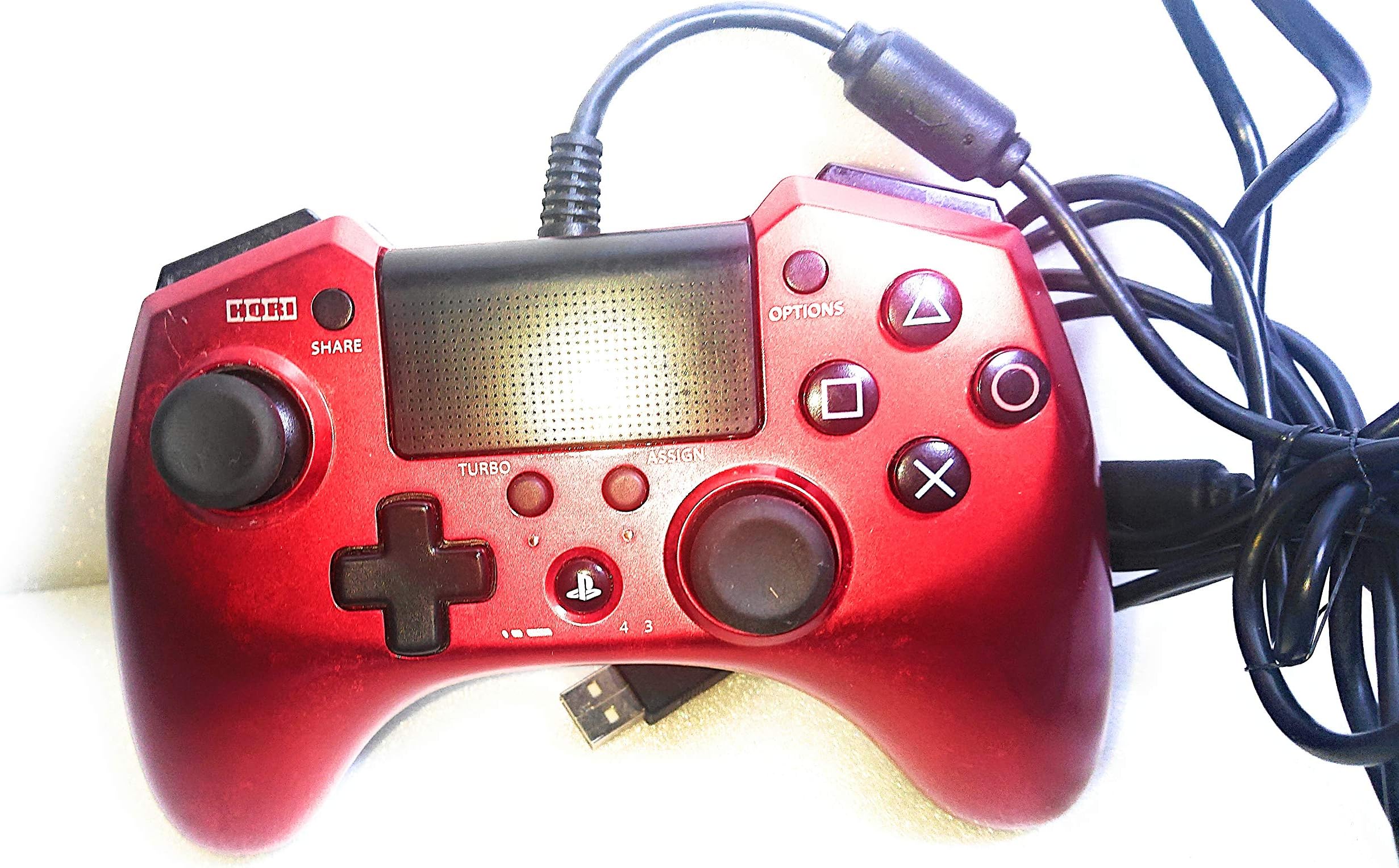
The Horipad FPS Plus (Red) is a wireless gamepad designed for gamers who demand performance and style. Compatible with US systems and Windows, this lightweight controller features a vibrant red design and is powered by long-lasting batteries, ensuring you stay in the game longer. With its Japanese import status, it offers a unique touch for those looking to elevate their gaming experience.
| Additional Features | Wireless |
| Power Source | Battery Powered |
| Hardware Platform | 14210711, playstation 4 |
| Controller Type | Gamepad |
| Compatible Devices | Windows |
| Package Quantity | 1 |
| Item Weight | 11.36 ounces |
| Color | Red |
A**R
This review is for those who get the controller with the intention of using it for more than FPS games. EX: Racing Fighting Etc.
So I am one of the few people that bought this pad with the intention of using almost exclusively for Fighting Game tournaments. As most FGC members are aware Sony does not make wired first party controllers and disconnecting a wireless controller from a tournament was so tedious and annoying we have had situations where they are banned because of syncing issues. Since I a veteran UMVC3 player from 360 I figured I would find a pad that suites the execution that I am already used to but will allow me to play on PS4. However I did test this controller on a assortment of PS4 and PS3 games (later in the review). Oh and I did test it on some PC games which already detect it as a PS4 controller.Lets start with whats wrong with this controller for normal people:First thing you will notice is how light the controller is compared to a 360 pad or PS4. This is due to several functions which many people who play FPS may be curious as to why they decided to take them out. Most important thing they took out is the ability to use the Mic. Yes there is no Mic support so if you are going hard with team in whatever I recommend a wireless headset. There is also no battery and no vibration function on this controller. Honestly the vibration was something I am used to not having playing a PS4 pad on a PS3 but when your playing a racing game like split second or doing a puzzle in Resident Evil Revelations 2 it does feel like something is missing from the game play. Also this isn't really a break or make situation but the analog sticks are a bit looser than a normal 360 but after a few matches I got used to it easily. Oh another thing to mention is that it uses a shinny gloss effect instead of a PS4 plastic effect as far as the look. I do not recommend eating before picking up the controller because it will smudge.Alright lets talk about what makes the controller good:Wired is the king when it comes to any type of pad. Having a lagless connection, no need for batteries, and a simple plug out to desync is a god send for fighting game tournaments or any type of tournament that requires you to play you match and leave asap. The buttons are more spaced out than the 360, allowing quick transitions between pressing a button to holding two. One of coolest features of the controller is the ability to simply map with a button if you want it to be a PS3 to PS4 on the fly, so no more figuring out who is player one to reset to a menu. Another really cool function is there is an option to control the sensitivity on the analog stick. I tested this out on Unreal Tournament 3 and in a nutshell I used the high sensitivity to control my movement than switched to low sensitivity to aim and get a headshot. This will give you an advantage in most shooters. The biggest feature for me was the replacement of triggers with buttons. Never have I felt more in control when playing a racing game and once I started to wave dash in Marvel (two buttons [mapped to R3] down motion repeatedly) I never wanted to go back. Thats was the selling point for me.Heres some stuff the controller has but I really don't have a use for it:Like almost every Hori product this comes turbo buttons. I have never had a use for turbo buttons but you got them so whatever. Oh and to those who don't know what turbo buttons are its basically an option that when you hold a button it presses that button multiple times like a keyboard. Turbo buttons are banned in tournament. You will also notice a small button on the bottom of the controller. There is a pretty neat option on the controller that allows to assign a button to another button. For example if you played Mirrors Edge R1 is your jump button but with this option you can assign it to X or that little button on the back. Say you prefer to use a button instead of a trigger for a racing game you can change that two. Options will reset after you unplug the controller so just a heads up. Also little fighting game knowledge but macros are banned in tournaments so you can still assign a button (EX: X to the button on the bottom) but you can not assign it move sets (EX: Foward Down Forward X to button on the bottom).So that covers pretty much everything so far with controller, here is a list of all the games and systems I played it on:BlazBlue Central Fiction, PS3 PS4Ridge Racer 7, PS3Ultra Street Fighter 4, PS4Ultimate Marvel Vs Capcom 3, PS4Skullgirls, PS3 PS4Unreal Tournament 3, PS3Vanquish, PS3Split Second, PS3Modern Warfare 2, PS3Resident Evil Revelations 2, PS3Sonic Heroes, PCMirrors Edge, PCMetal Slug X, PS3 (PS1 emulator)
Y**N
Not worth buying for fps game upgrade
Originally bought to fix the unresponsive R2 button on the dualshock controllers, since i am a heavy fps player on PS4, the dualshock R2 button sometimes slows down my rate of fire while using semi-auto weapons. So I looked up and got this Horipad product and hoping for some improvements.Turns out, nah, R2 button is not even as responsive as the R1 button on Dualshock, I found I perform even better with the R2 reassigned to R1 button on dualshock, and this so-called upgraded controller does not give me any feeling of better performance. In addition, there is no audio output for this $50 controller, no vibration, very flimsy feel sticks (R3,L3) and it does not even come with an english user manual.Very disappointed for its quality at this price. I played almost a thousand hours of battlefield games on PS4 and controller ergo matters a lot. I have been able to maintain a 2.0+ K/D ratio in the past so I know when a controller is helping me or lagging me. Eventually returned this item and went back to my dualshock for now.
S**O
A Great multifunction controller IF you know how to set it up
So I needed a new controller because the thumbstick on my older controller was wearing out, and I know Hori has excellent stick quality based on a Xbox 360 Gem Pad I've had and they still hold up. That is indeed what I got here, they feel perfect, and the bonus of a lever on the bottom of the controller which when held lowers the sensitivity of the right stick, perfect for precision aiming. The face buttons are very responsive and the handy switch between Playstation 3 and 4 modes is just what I needed.-The drawback-There is one catch to this controller, the triggers, they're actually bumpers on this controller, L2 and R2, rather than a full analog pull its more of a press. This is how Hori usually does things, their main market is fighting games, after all, so button responsiveness is top priority. Using this controller on PC however you'll run into a problem where it'll not operate correctly and you'll need to press extra hard to get it to fire, and often it'll "give out" on a hold, even with a moderately hard press. To fix this, you will need to do two things, calibrate the controller in Windows and when it wants you to press the triggers, press as LIGHTLY as possible, this will set minimum and maximum zones of response, so a lighter touch and it'll give it the proper input in a game.Second, you'll need to also do this with either a driver application or Steaminput itself, which has a handy feature of complete controller configuration. You'll want to find your layout, edit, go to triggers, and set a command of "soft pull" for each trigger respectively, and then for each trigger, hit the gear and change the minimum threshold to 0 and set the maximum analog input to about 9000 (just more left on the slider). Doing this will make it actually do what it's supposed to, a more digital trigger and it'll fire with lighter presses. You'll need to set this with each game you want to play on. It doesn't seem it has this issue on the actual Playstation 3/4 consoles it was meant for.If set correctly, this can actually be a boon in a lot of games, with higher responsiveness on input on the triggers, and easier to repeatedly tap. Speaking of, the controller has a "turbo" function, which just when the turbo button is pressed, pressing another button sets that button to rapid input when held down, which can be useful in certain things but can also be dubious on if its cheating or not. I don't really use it.- The Future -So far the controller, after proper tweaking, is a great controller for PC. If you have no way of setting controller configurations like with steam or a third party driver, then you should pass on this because the triggers will give you trouble, that's what other reviewers complain about and its understandable. It took me a lot of fiddling to make them behave properly. On Ps3/PS4? Fantastic out of the gate. I will update my review, if within 6 months, something goes wrong or if the sticks wear out fast.
Trustpilot
2 months ago
1 month ago