Desert Online General Trading LLC
Dubai, United Arab Emirates
Desert Online General Trading LLC
Dubai, United Arab Emirates


🚀 Level up your home network with speed, style, and security!
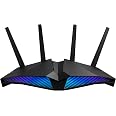
The ASUS RT-AX82U is a cutting-edge WiFi 6 router delivering up to 5400 Mbps speeds, optimized for gaming with a dedicated port and Mobile Game Mode. It features customizable Aura RGB lighting, commercial-grade AiProtection Pro security, Instant Guard VPN, and supports AiMesh for seamless whole-home coverage. Compatible with all major OS and existing WiFi devices, it’s designed for professionals who demand speed, reliability, and style.


| Wireless Type | 802.11a, 802.11ac, 802.11ax, 802.11g, 802.11n |
| Number of USB 3.0 Ports | 1 |
| Brand | ASUS |
| Series | RT-AX82U |
| Item model number | RT-AX82U |
| Operating System | Apple iOS, Linux, Mac OS, Microsoft Windows |
| Item Weight | 1.57 pounds |
| Product Dimensions | 10.96 x 7.26 x 6.5 inches |
| Item Dimensions LxWxH | 10.96 x 7.26 x 6.5 inches |
| Color | BLACK |
| Voltage | 110 Volts (AC) |
| Manufacturer | ASUS |
| ASIN | B08BJJ3RGW |
| Date First Available | August 3, 2020 |
S**H
Solid Upgrade for AiMesh – Stable Wireless Backhaul and Better Coverage
I upgraded to the ASUS RT-AX5400 to serve as the main router in my home network, pairing it with my older RT-AC68U as a secondary AiMesh node. Setup was straightforward, and the wireless backhaul between the two routers has been impressively stable. I was pleasantly surprised to see a noticeable bump in speed during testing—likely helped by the Cat 5e cable included in the box, which was an upgrade over the older one I had been using.Most importantly, this setup completely eliminated a persistent WiFi blind spot in my home. We now get consistent, strong signal throughout, even in areas that used to struggle. Stability has been excellent so far, with no drops or hiccups.If you’re looking to extend your network using AiMesh and want better performance and coverage without running an Ethernet cable, this is a solid option. Recommended especially for those upgrading from older ASUS routers.
C**H
Easy setup
This router is an absolute beast! From the moment I plugged it in, the performance boost was undeniable. Setup was a breeze with the app, and within minutes I had blazing-fast, stable internet throughout my entire home—including areas that were previously dead zones.The design is sleek and futuristic, and those glowing LED lights give it a high-tech vibe that fits perfectly in my gaming setup. Streaming 4K, online gaming, video conferencing—everything runs smooth with zero lag or buffering.The multiple antennas really do their job with extended range, and I’ve noticed faster speeds even when multiple devices are connected. It also has advanced security features, which give me peace of mind.If you’re looking for top-tier performance, whether for gaming, working from home, or just handling a ton of devices, this router delivers in every way. Highly recommend!
S**T
Great router.
Outstanding router for the $$, feature packed and easy to set up and use. Very happy with the range and performance.
M**S
Have 2 of this and love them work great plug and play
Great speed, great signal just overheat to fast and resets some time to time, built quality is great and not as expensive as other ones
J**S
Serious firmware bug that ASUS has not fixed after many months
Update: After using this router for several months I am downgrading my review to one star. The guest network function is buggy to the point of being unusable. Periodically everything on the guest network drops connection until router reboot. The fact that ASUS has not fixed the well documented bug many months later is completely unacceptable. The router does not do what ASUS claims it does.Original review: I have been looking to upgrade my home router system from an older ASUS router and I grabbed this after seeing it on sale. I have had somewhat mixed experience with ASUS routers (more good than bad), but I am familiar with the software and all routers seem to have their quirks. So I jumped on this at a good price.Overall almost everything about the router is positive. It is easy to set up and worked with my fiber gateway right out of the box. As is often the case the default settings were not as secure as I would like, but the AiProtection wizard did a good job of identifying weaknesses I could easily close.My house isn't all that big, but I have had problems with other routers getting signal in the far corners of the basement or with outside devices. However, signal strength has been very good. I have had zero problems with dead spots or dropped signals. The router also handles swapping between 5 and 2.4 GHz bands automatically, so I don't have to worry about whether I am too far away to use 5 GHz.Now for the one bug. The guest network software has a well known bug that has been discussed extensively online. The problem is that devices connected to Guest Network 1 will drop access to the internet unless intranet access is enabled for Guest Network 1, which, of course, largely defeats the purpose of a guest network. I try to put my IoT devices on a guest network and found out about the bug when they all stopped working after a couple of days.There is a workaround, which is to only use Guest Network 2. I enabled it a couple of weeks ago and deleted Guest Network 1, and so far all has been good. (I have seen online that Guest Network 2 might not be compatible with mesh networks, but I am not running mesh so I don't know if that is actually a problem.)All in all I am happy with the router. But it is frustrating that the Guest Network bug has been documented for so long and apparently still not patched.
W**T
SEEMS LIKE A WORTHWHILE UPGRADE
I just replaced all of my Netgear Home/Office LAN hardware and decided to give the Asus RT-AX82U a chance.Ease of setup - Very good. The auto configuration worked as expected but you can also set up the network manually if you choose. One area for improvement here is assigning SSID to your wireless channels. For some reason the setup names your 2.4 and 5.0 channels the same name even if you are trying to manually assign them during setup. This means that you must correct that if you want a unique broadcast SSID for each band.GUI - Once familiarized with the web GUI the interface if excellent. For the most part options are clearly presented in common sense easy to understand fashion. All "pro" tools are easily accessible including WAN, LAN, Wireless, Guest Network, QOS, etc. The best part about the web GUI is when making changes to the options. Never once locked up, failed to respond, or save and remember setting changes.2.4 Band - excellent signal strength throughout a 2,100 sq. ft. two story home.5.0 Band - nothing stellar, but not terrible either. All devices operating on the 5.0 band were able to connect and hold a signal. This included TVs, laptops, tablets, and cell phone in use from one corner of the residence to the other.Appearance - I didn't buy this router for the gaming aesthetics, but for potential performance and ability to support 12 -18 devices connected simultaneously. It seems to handle that workload well. As long as I can game on my wired PC, while the wife or grandkids stream movies, videos, YouTube etc. everyone is happy. In that regard no complaints yet.
Trustpilot
3 days ago
1 month ago