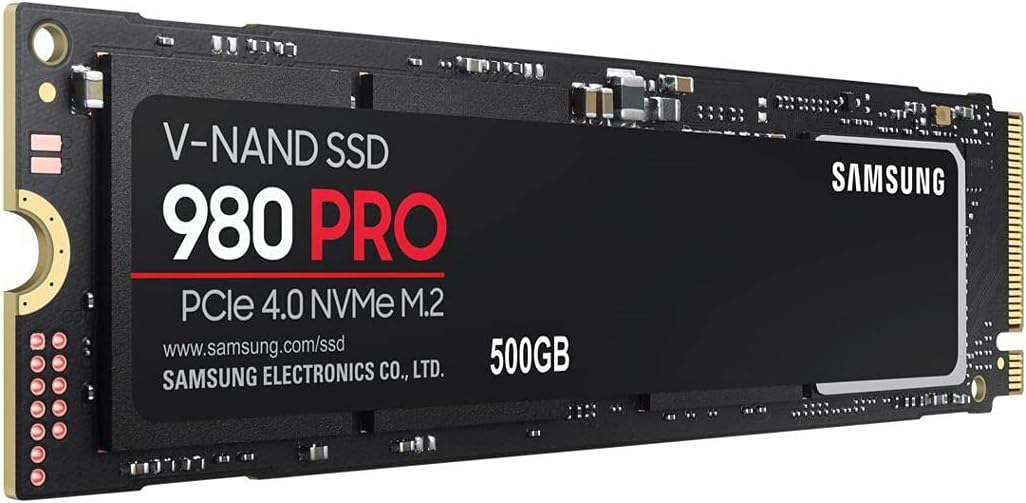


🚀 Upgrade your workflow with lightning-fast storage that keeps you ahead of the curve!
The Samsung 980 PRO 500GB NVMe M.2 SSD leverages a custom Elpis controller and PCIe Gen 4.0 x4 interface to deliver blazing sequential read speeds up to 7,000 MB/s and write speeds up to 5,000 MB/s. Its compact M.2 form factor and backward compatibility with PCIe 3.0 make it a versatile, high-performance storage solution for professionals demanding speed and reliability.


| Brand | Samsung |
| Product Dimensions | 8.01 x 2.21 x 0.24 cm; 8 g |
| Batteries | 1 Lithium Ion batteries required. |
| Item model number | MZ-V8P500BW |
| Manufacturer | Samsung |
| Series | 980 PRO |
| Color | Black |
| Form Factor | M 2 |
| Hard Drive Size | 500 GB |
| Hard Disk Description | Solid State Hard Drive |
| Hard Drive Interface | NVMe |
| Hard Disk Rotational Speed | 7200 |
| Number of USB 3.0 Ports | 3 |
| Voltage | 3.6 |
| Wattage | 7.4 watts |
| Optical Drive Type | DVD |
| Hardware Platform | PC |
| Are Batteries Included | No |
| Lithium Battery Energy Content | 2 Kilowatt Hours |
| Lithium Battery Packaging | Batteries packed with equipment |
| Lithium Battery Weight | 2 Grams |
| Number Of Lithium Ion Cells | 5 |
| Number of Lithium Metal Cells | 5 |
| Item Weight | 8 g |
B**D
Just perfect 👌🏻
I got 6600/7000 Mbps in reading and 4600/5000 Mbps in writing, which is very good. Of course, the temperature and the PC specs affect the performance, but 6600 out of 7000 writing Mbps is very good for me, and the temperature is always between 30 and 40 degrees, which is perfect for the speed I’m getting. I used the Samsung Magician software to clone my old SSD, and everything worked easily and perfectly. I didn’t face any issues, thankfully. I set it to full performance mode, and it’s pretty much good and fast—nothing to say other than that. Go for the 990 Pro, the newer version of the Samsung SSD, if you want more speed. The price is almost the same, but for me, this is just perfect and all I need.
ا**ز
Worth it
You need this for your ps5
F**D
Very good product
Replaced my TB SSD on a DELL XPS 13. I got write sector error when I tried to clone the disks so I formatted the SSD then repeated the cloning and it worked like a charm. I used the free tool DiskGenius through Windows PE. It took 45 minutes.
G**E
Very fast transfer rate
As expected , good quality very durable. I use it in and external enclosure, no problems. Just remember to partition the drive before you can use it. I'm sure you know that. Invest in a good external enclosure if you want to use it that way, it can get a bit too hot, need a good heat sink.
K**D
Amzing
After i did a research on the best memory extensions for ps 5 i found the samsung is ranked either the second or third in all the reviews. When i bought i was surprised on how easy to install and how fast the data transfer. And the most important the gaming experience
A**R
Good performance
Brand Quality and Best-performing consumer drive.
A**M
Perfectly fit for PS5
High quality product & easy installation on the Playstation 5 without any issues
Y**F
Perfect for the price
High quality, easy to install and runs very fast. You get what you pay for.
ب**د
منتج ممتاز جدا جدا وانصح بشرائه
B**4
Works well with my playstation 5, no issues.
J**L
Fast SSD, just make sure you're updated on firmware.
J**E
El SSD funciona de maravilla. La instalación fue sencilla y el sistema lo reconoció al instante. La velocidad de lectura y escritura es impresionante, se nota mucho en el arranque del PC y en la carga de juegos o programas pesados. Silencioso, estable y con un gran rendimiento. Totalmente recomendable para quien busque calidad y rapidez.
S**.
Öncelikle belirtmek istiyorum ki, bilgisayar takım söküm işlemleri konusunda pek bilgili değilim. Ancak, kısa bir araştırma yaparak M.2 SSD'yi kolayca takmayı başardım. İlk başta anakartın M.2 vidasını bulmakta biraz zorlandım, ancak sonradan fark ettim ki M.2 vidası anakart kutusunun içindeymiş. Şu anda SSD'nin okuma-yazma hızı yaklaşık 3500 MB/s seviyesinde. MSI B450M-A PRO MAX anakartını kullanıyorum ve anakartım sadece PCIe Gen 3 desteği sağladığı için hızlar yarı yarıya kadar düşüyor. Tam hızları kullanmak için, anakartınızın PCIe Gen 4 destekli olması gerekiyor. Ayrıca, 1 TB'lık olanını öneririm. Ben soğutmalı versiyonunu 2300 TL gibi bir fiyata aldım. Daha önce 128 GB SSD kullandığım için oyunları ve uygulamaların çoğunu HDD'ye kuruyordum. Ancak şimdi, önceki SSD'den aktardığım oyunlarda çok fazla fark görmesem de, HDD'den aktardığım oyunlarda/uygulamalarda açılış hızları ve yükleme ekranı sürelerinde önemli bir fark görüyorum. Bu arada, eğer önceden bir SATA SSD kullanıyorsanız (hangi tür SSD kullandığınız önemli değil, önemli olan eski SSD'nizi çıkarmadan yeni SSD'yi takabiliyor olmanız), ve eski SSD'niz yerel disk (C:) olarak kullanılıyorsa, Samsung'un "Data Migration" adlı bir yazılımı var. Bu yazılım, eski SSD'nizdeki tüm dosyalarınızı (sistem dahil) yeni SSD'nize kolayca taşımanıza yardımcı oluyor. Son olarak, Samsung Magician adında başka bir yazılım daha var. Bu yazılım sayesinde, SSD'nizin sıcaklık değerlerini ve yazılan veri miktarını görebilirsiniz. Performance benchmark diye bir özelliği de var. SSD'nizin performans ölçümlerinizi oradan da yapabilirsiniz. Ben son ölçtüğümde önceden dediğim gibi yazma ve okuma hızı 3500 MB/s gibi değerlerdeydi. Sıcaklık değerleri ise ölçüm sırasında 34 dereceden 41 dereceye kadar çıkmıştı. Sonuç olarak, eğer ihtiyacınız varsa ve bütçeniz müsaitse kesinlikle öneririm.
Trustpilot
3 days ago
2 months ago


