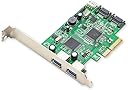


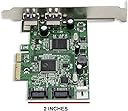

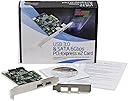

Syba SD-PEX50055 2 Port USB 3.0 and 2 Port SATA III PCIe 2.0 x4 Controller Card Green Grey
Product ID: 2797961
⚡2.5Gbps Transfer
💾SATA III Support
🔌2 USB 3.0 Ports
Desertcart purchases this item on your behalf and handles shipping, customs, and support to Tunisia.
🚀 Elevate Your Tech Game!
The Syba SD-PEX50055 is a high-performance PCIe 2.0 x4 controller card featuring two USB 3.0 ports and two SATA III ports, designed for seamless data transfer and enhanced connectivity. With a data transfer rate of up to 2.5Gbps and compatibility with various SATA drives, this card is perfect for tech enthusiasts looking to upgrade their systems.
| Number of USB 3.0 Ports | 2 |
| Brand | Syba |
| Series | SYBA MULTIMEDIA INC |
| Item model number | SD-PEX50055 |
| Item Weight | 3.53 ounces |
| Product Dimensions | 5.6 x 1.2 x 4.4 inches |
| Item Dimensions LxWxH | 5.6 x 1.2 x 4.4 inches |
| Color | Green, grey |
| Manufacturer | Syba |
| ASIN | B00CHYOQIE |
| Is Discontinued By Manufacturer | No |
| Date First Available | April 23, 2013 |
P**7
Overall, performs well and a lot cheaper than a new computer!
My old Intel P45 Mobo has always had its share of problems with new hardware. I was unable to run my Samsung SSD 840 EVO 500 GB drive under AHCI and had to set up the BIOS for RAID before I could even install Win8.1. This isn't surprising given that the BIOS hasn't been updated in a dog's age - typical for Inte. To add to that, one of the Intel "drivers" RST (Rapid Storage Technology) seems to cache some drive data, so the Samsung Magician shows throughput well in excess of the drive's capabilities - 2100 MB/s. The drive is supposedly capable of streaming at about 540 MB/s, so there's some trickery going on there making any estimate of drive throughput difficult to either measure of estimate.The Syba drivers are also old, though not as old as the Intel drivers are, and the install instructions state that if you have Win8.0 or above the drivers aren't necessary. I emailed Syba and asked about the PCIe lanes and was told that "this device utilizes four PCI-e (sic) lanes. The lanes are a shared throughput for all ports on the card. When accessing multiple devices at a time the lanes will then begin to split to accommodate the larger workload."When I went to the Syba card's website (http://www.drivers-download.com/Datasheet/ESU30A/ESU30A_DataSheet_20130118.pdf), unless this site shows an older card, the card only uses two lanes. This is not necessarily a bad thing, and I suspect that if the site cited is for this card, the confusion on the part of Syba tech support was perhaps due to either their documentation, or their interpretation of it. PCIe v2 supports 4 Gigabits per second (Gbps) or 500 Megabytes per second (MBps) per lane, so the aggregate of a two-lane card is 8 Gbps or 1 GBps, far more than what either SATA 3.0 (specified at 6Gbps/600 MBps) or USB 3.0 (specified at 5 Gbps). I don't see any problem there since the commonly expressed question of "but what about when two devices are sending data at the same time?" is really moot at these speeds, first because two transfers arriving to the board at exactly the same nano-second in time is highly remote, and if it does, they are queued and we would not note any discernable time lag.I further suspect that limitations or failures to perform at the expected speed for any device attached to this card are more likely to be on the PCIe side of the equation than on the card's. Just a cursory look at the card reveals that there are only two main chips, and they contain all of the circuitry necessary for the card's operation, which, I can only assume, were designed to meet the specifications they claim. In the case of my old P45 Mobo, who really knows how closely to the PCIe v2.0 specifications was the board designed "back in the day." Overall, I'm quite impressed with SATA throughput, and I did have some benchmarks to compare the card to, namely the one SSD and three Hard drives formerly attached to the SATA ports on my MOBO. As for the hard drives, they neither gained any throughput when moved to the Syba card, nor lost any, a pretty good sign that the card is performing to specifications. Had they increased the hard-drive throughput I would have been surprised. On the other hand, had the Syba card reduced their respective throughputs it would have indicated that the card was underperforming. I know, "The question though is whether or not it improved the throughput of my SSD?" and that's more difficult to assess. Boot time is much faster, but again, throughput using the Samsung Magician is all but obscured, so I can't site figures on this. For the record, Magician says 1561 and 1289 Megabytes/sec. In addition to whatever Intel RST did, there's also the Samsung "Rapid Mode" obscuring the actual throughput, but maybe I'm picking nits. Even though there has to be some RAM caching going on to account for these numbers, I'm satisfied.As to the USB speed, I have no way to determine that, but I can say that under Windows 10, I don't think I'm getting the full charging current promised, probably because the card is not really recognized by Win10 as being a Syba card, let alone which Syba card it is. Because the company that manufactures these cards (undoubtedly not Syba unless that's just their American name) manufactures a whole line of single- and multi-purpose cards for USB as well as another SATA 3 card, all of which I'm pretty sure share identical PLAs or circuit-on-a-chip, I would suspect that drivers would be the same across the board. I would also suspect that had the cards been submitted to MS or been tested using MS driver DDK, the device manager would recognize them - which it does not. A little more work here by Syba would ensure that the correct drivers were written and would run under Win10 properly. The default of "Generic Microsoft drivers identifying the card and it's functions" leaves something to be desired. On the other hand, my clunky BIOS might also explain that as well.By the way, I should also note that with the card installed I was able to set my BIOS to AHCI, and boot properly with Win8.1. However, there was a complication - again, my clunker-of-a-bios - in that I had to find the card under USB, then upgrade the drivers for the USB port before the SATA ports were correctly identified, a point that some owners of older Mobos might find useful. As advertised, when I upgraded to Win10 no drivers were necessary (and installing them didn't seem to make any difference whether accepted by, or rejected by Win10 - I couldn't tell which). Still, my tablet says that it would charge faster, even after installing the charger drivers, if I'd plug it into the charger it came with, an inconvenience, but not a deal-breaker if indeed true, and yes, I did hook up a floppy power connector to the card as described.One final nit-pick: would it hurt to include the (optional, as stated on the web site cited above) drive activity cable necessary to bring the Mobo activity signal to the Syba card? Personally, I don't care about the power cable as I have plenty of both connectors on my P/S and spares lying around, but I'm sure that makes me a little unusual compared to the average user who might need that power cable to complete their setup. Since these cables are literally only pennies wholesale I can't see where it would add to the price of the card, and since it has dropped $5 since I bought it 10 days ago or so, really, would it hurt to include the cables? My picks are minimal and my appreciation of the card maximal which is why it got five stars. It was a far cheaper solution that buying a new processor chip to replace my "old" $1,000 chip, a new Mobo, and all new DDR4 RAM, so I'd call that a bargain.
I**E
Only the USB ports on the rear were functional Windows 10 Pro said the software could not be repaired with the card installed.
I really liked the design of this card (PCIe Syba 4 port USB 3.0 & 2 SATA III Ports) as I had to purchase two cards to takes its place. Windows 10 Pro installed Microsoft drivers for the cards two chipsets (USB VIA®) (Asmedia 106x SATA Host Controller)The USB section functioned and I could see a Flash Drive attached to it, I did not run a speed test as I was at the point of installing drivers, etc.I attached a raw drive to one of the SATA ports and Windows saw the raw drive but could not initialize the drive and my machine would hang in the Disk Management screen (Hour Glass when hovering the mouse pointer over this window). I then placed the drive on one of MB SATA ports and successfully initialized-formatted the drive, then placed the formatted drive back on the cards SATA port but could not access the drive.The drivers supplied on the CD could not be installed because the CD was bad. I downloaded the drivers for the Asmedia Host Cntrl from SYBA's web site and installed the SATA Host Cntrl drivers, I had to reboot the machine and Windows would not return to the desktop, all I had was the whirling dots on the screen so I reset and Windows said the fresh install was damages and that Windows could not repair the build.I shut the machine down and removed the SYBA card and Windows booted normally. I read that many here have had similar problems with this card. This was my warning but I purchased it anyway. I decided not to try it again and decided to go another route and I have informed SYBA hoping they can correct the problems. SYBA did respond to my message to them. It may be related to my new build only because I do not think the drivers are up to date because my new build has some of the latest devices on the market today: Asus ROG Strix Z370-E, Intel 8700K, Samsung 970 NVMe M.2 Pro 512G, Samsung 960 EVO 120G, Corsair 3200 16G 2x8, 3x Western Digital 1TG 7200rpm Black Hard Drives plus several other PCIe cards to compliment my system, I never had any error triangles in the Device Manager. This card may work in older builds?
C**S
Works
Works and connects as SATA 6GB/USB 3.0. PCI slot/interface creates a bottleneck keeping speeds reduced. Additionally, a device shows up in the device manager that cannot be resolved with customer support. Regardless, card still works but addon cards to achieve USB 3.0 and Sata 6gb are not the way to go in older systems.4 stars for device manager issue. Card otherwise works as advertised. Users need to understand they won't achieve true throughput speeds due to PCI interface and slot limitations. Slight increase over SATA 3GBs & USB 2.0 using Samsung 840 Pro and Buffalo Ext. HD.
Trustpilot
2 weeks ago
2 weeks ago