

Desert Online General Trading LLC
Warehouse # 7, 4th Street, Umm Ramool, Dubai, 30183, Dubai
Desert Online General Trading LLC
Warehouse # 7, 4th Street, Umm Ramool, Dubai, 30183, Dubai
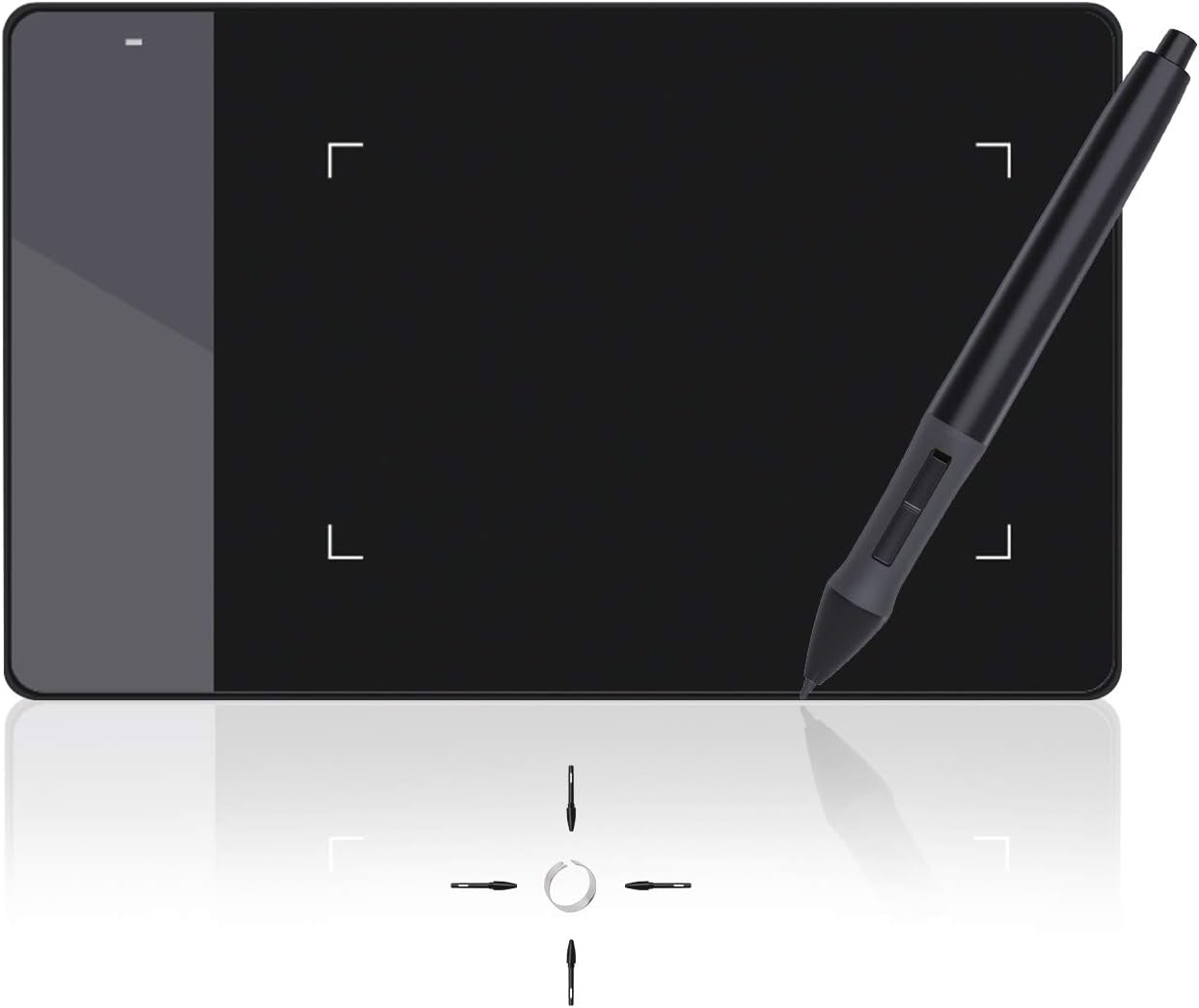


🎨 Elevate your digital art game with precision and speed!
The Huion 420 Drawing Tablet offers a compact 4 x 2.23 inch active area with an ultra-high 4000 LPI resolution and a rapid 200 RPS report rate, ensuring precise and smooth input. Compatible with both Mac and Windows systems, it supports a wide range of professional creative software. The package includes a battery-powered pen, multiple nibs, USB cable, and installation CD, making it an ideal entry-level graphics tablet for digital artists, animators, and OSU! players seeking responsive and portable design tools.


| Brand | HUION |
| Product Dimensions | 17.7 x 0.8 x 11.2 cm; 125 g |
| Batteries | 1 AAA batteries required. |
| Item model number | Huion 420 |
| Manufacturer | HUION |
| Series | uk huion 420 |
| Colour | Black |
| Standing screen display size | 5.6 Centimetres |
| Screen Resolution | 4000 LPI |
| Computer Memory Type | MicroDIMM |
| Voltage | 0.01 Volts |
| Operating System | mac |
| Battery description | battery_type_aaa |
| Average Battery Life (in hours) | 40000 Hours |
| Are Batteries Included | No |
| Lithium Battery Energy Content | 0.3 Watt Hours |
| Lithium Battery Packaging | Batteries contained in equipment |
| Lithium Battery Weight | 3.7 g |
| Item Weight | 125 g |
| Guaranteed software updates until | unknown |
C**A
The best gadget ever for the children and not only .
My youngest(10years old) found it I don’t know how and he wanted it for Christmas. The only thing I can say is that this is AWESOME! One thing I don’t know is what is that sticky paper that comes with it?🤷🏻♀️ Apart from this very nice and easy to use. I think I’ll get one for myself as well.
T**S
The disk was unnecessary, as windows has native tablet device support
Functions perfectly plugged in straight out of the box. The disk was unnecessary, as windows has native tablet device support, and the Huion420 seems to work with that just fine. The drivers just made my experience worse. The shipping itself was mostly fine. Package took about twice as long to arrive than estimated, the exterior packaging was busted up pretty roughly around the edges, but It was thick solid cardboard, so the product box was mostly intact, except for a moderate bump on the bottom of the box, all of that, however, is a non-issue. As for the tablet itself, it's a very solid tablet for the price, much more so than I expected. The input is very responsive and feels easily comparable with my low latency gaming mouse in delay time. The input resolution is phenomenal, as I'm only using about 1/4th of the tablet active area for my entire desktop as the full area is too tedious to swipe around for desktop use, and It's not too difficult to hit a tiny task-bar icon, which on the active area measures about 1/4th of a millimeter! I mainly bought this tablet for playing 'Osu!' with, and it just feels.. 10/10. I mean, it's something you'd expect from a tablet after playing with a mouse. Again, comparing to a 2ms latency mouse, the 3ms of the tablet feels negligible, it's exactly the same. And to add on top of that, 'Osu!' has native Huion420 integration, as in, scaling up the mouse sensitivity option scales down the active area, pretty intuitive! I'm not too much on the artistic drawing side, but I've tried writing and sketching a bit, and it just feels finicky. The area feels too small to draw consistently, as any amounts of shaking on the hand get well exaggerated, again, by the small area. However as mentioned, point to point motion is where this tablet shines at. Disclaimer: in my opinion. Osu!? - Get this tablet, drawing? - get something with a larger area.
S**Y
A very nice piece of kit
The HUION 2023 New Huion Note Smart Notebook has proved to be a very useful piece of kit. Firstly it looks and feels just like a regular notepad because it is. It links to an app on your phone, in the app you can change the colour of the ink being recorded. It has quite a few other features that I have yet to explore, but one tool I can't see that would be a real benefit is OCR - this is why my overall rating 4 & not 5. One other thing to be aware of is that you can only write on one side of the paper, to get around this, you could use loose-leaf paper and simply turn it over then click on the next page icon. Other than that if you are looking for a smart notebook, and this does look smart, and to have real paper notes, the Huion is a great product at a reasonable price for what it does; recommended
A**X
A steal for the price, Wacom beware...
I have been using a Wacom Intuos Draw tablet for a couple of months, before eventually deciding to go for something larger. Deciding where to spend my money was a tough decision, as the market is full of similar looking products from quite a few brands at various price points. I ended up choosing Huion h610pro v2 and after a month of heavy use I'm ready to share some thoughts. To begin with, I absolutely LOVE this tablet. I find ridicoulous the fact that it is similarly priced with my previous one from Wacom, when it can easily be compared with the Intuos Pro, at least feature-wise. Here are some great things about it straight out of the box: - 8000 pen pressure levels. I can only compare it to my Intuos Draw, but boy it makes a difference. - Battery free pen, 8 extra nibs safely kept on the pen holder. - Very nice drawing feel, good quality plastic overall - Companion software is very nice. Works straight away as expected, even the buttons are already set to the default options, which I find ideal - Tilt support that works great. - I used to encounter a problem with my intuos, where all shortcuts (even keyboard ones) would stop responding after a couple of hours at photoshop (some windows 10 users may know what I mean). No such problems anymore! - Mini usb connection. You can get a cheap replacement cable if ever needed. I didn't find any serious flaws, but here are some questionmarks: - The pen tip movement has quite some travel compared to my Intuos. It took me a couple of days before I adjusted to it. Nothing unbearable, just something to consider if you are a Wacom user. - The zoom in/out buttons on the tablet feel like they could break or get stuck. I haven't had any problems yet, but makes me feel unsafe. - The tablet itself doesn't sit totally even on the desk. Again, not an issue when drawing, I noticed it by accident while cleaning my desk. - Software doesn't allow you to set up the buttons for multiple apps like Wacom. You have to go with a universal setup. Considering all the above, it seems my next upgrade will only be for a draw-on-screen tablet. I just wanted a larger surface to be more comfortable, was even willing to pay the almost £200 for a feature-less Wacom, until I found out about this one. All the features that are considered "premium" and "pro", Huion sells them to you at a starter pack price. I think this product is a sweet spot for most consumers out there and I can't recommend it enough.
M**N
Just didnt work for me
Delivery - wast, design - nice, but although I downloaded a driver as per the installation guide, I wasn't able to make it work. It also installed 2 apps, and only 1 was possible to uninstall. I am running an antivirus check to find out what the risk is. Not worth buying in my eyes. I expected plug and play type of device.
P**B
Embarrassing for Wacom
This tablet is embarrassing for Wacoms overpriced alternatives. The Huion is superb for the money, really well made, easy set up, great value…
S**K
Good product
S**E
Sono un digital painter ed illustratore, posseggo da anni una Wacom Intuos 4 Pro medium, e visto che ultimamente stava dando segni di cedimento e non volevo spendere una cifra enorme per continuare a lavorare senza problemi in questo periodo di crisi, ho puntato su questa entry level della Hunion. Il confronto coin la wacom mi viene spontaneo, e quindi sarò avvantaggiato in questo proprio perchè sono anni che lavoro con la wacom. Punti in comune con la Wacom Intuos 4 Pro medium: - Molto simile l'area di disegno per consistenza e grana. - la penna è quasi identica e non farete difficoltà ad utilizzarla subito, anche i pulsanti sono reattivi e personalizzabili, veramente una buona penna. - La forma della tavoletta grafica con il design ricurvo verso il basso è simile a quella della intuos 4 pro - Pennini di ricambio come per la wacom - Pulsanti preimpostabili sulla tavoletta come per la wacom, gli expression keys vengono gestiti anche qui dal driver/software della tavoletta grafica - Inclinazione della penna presente - Packaging ottimo come per la wacom Punti a favore della HUION H610PRO V2: - Superiori livelli di pressione rispetto alla wacom, quasi quadruplicati. - Costo irrisorio - Penna molto più leggera di quella della wacom (per non parlare del costo della penna nel caso vi rompa, che è circa 1/5 di quella di una intuos. - I pulsanti preimpostabili sono più comodi della wacom, perchè sono distanziati tra di loro nella giusta proporzione, al contrario della wacom intuos 4 pro dove gli expression keys sono pressoché attaccati l'uno all'altro. Questo dei pulsanti più distanziati e ben equilibrati tra loro vi permetterà di evitare di premere per errore un pulsante per un altro. - Dimensioni della struttura esterna sono più piccole rispetto alla wacom medium, 1 cm in meno di larghezza e 1 cm in meno di lunghezza, e non è poco se la utilizzate insieme ad una tastiera in una scrivania per pc molto piccola, sarà molto molto utile quel centimetro in meno. - L'area attiva per disegnare è più grande di quella di una intuos wacom. - In questo modello HUION H610 Pro 2 non c'è il ring a sinistra, che nella wacom si poteva utilizzare per esempio per ruotare il foglio in photoshop, e menomale che non c'è! Sono stati inseriti 2 pulsanti + e - con i quali possiamo zoommare in avanti e indietro, questo è utilissimo in photoshop mentre si disegna. Comunque potete impostare uno dei pulsanti (expression keys) con il tasto "R" della tastiera, in questo modo utilizzerete il comando di photoshop per ruotare il foglio..e sinceramente è molto più comodo di quello della wacom che al minimo tocco della mano sul ring partiva la rotazione. - ALTRO PUNTO A FAVORE: la possibilità di poterla utilizzare sia con un tablet che con uno smartphone, significa trasformare questo gioiellino HUION in una tavoletta grafica portatile (la tavoletta si autoalimenta dallo smartphone o tablet, quindi vi consiglio di portare un powerbank a carica veloce sempre con voi, che non è necessario, ma solo consigliato. Differenze con la Wacom: - Il porta penna è leggero, sarebbe stato il caso di fonirlo di zavorra interna per tenerlo molto più stabilmente su una scrivania... fa però il suo lavoro egregiamente, ma fate attenzione a non intrupparci per sbaglio perchè cadrà. - Sempre il porta penna non ha la gomma anti scivolo nella parte inferiore, sarebbe stato opportuno metterla. - La tavoletta grafica tra la parte magnetica dove disegnate e la scocca inferiore credo sia vuota e meno piena di materiale plastico rispetto ad una intuos, infatti anche il peso della HUION è notevolmente inferiore, quindi sono stati utilizzati materiali più leggeri che comportano una leggera flessione della tavoletta quando disegnate ed appoggiate la mano con troppa forza. Ma fate attenzione, avendo molti livelli di pressione non potete andare con la mano pesante, vi abituerete comunque a dipingere e disegnare in digitale in pochissimo tempo e non vedrete più flettere la tavoletta appoggiando la mano. - In sostanza la Wacom sembra più di plastica di qualità rispetto la HUION, ma del resto ci passi sopra perchè il prezzo della HUION è bassissimo. - Non è presenta il pulsante "gomma per cancellare" nalla parte alta della penna, ma del resto c'è qualcuno che veramente la utilizzava nella wacom? A chi può servire questa tavoletta? - A principianti di sicuro, è un approccio ottimo al digital painting e all'arte digitale in generale - A chi come me vive e lavora di illustrazione e pittura digitale che non vuole spendere cifre enormi e comunque lavorare tranquillamente con delle caratteristiche tra le mani niente male. Ripeto, una cosa che noterete è solo la differenza di peso e leggerezza della scocca, ma ci potete passare sopra tranquillamente, perchè è un'ottima tavoletta grafica per lavorare e divertirsi. Vi ho messo un filmato qui nella recensione dove mostro come e quanto flette la scocca verso il basso.
E**N
Vengo de usar una intuous draw tamaño s, utilizo la tableta para programas de dibujo y zbrush y estoy encantado. En 24h no se puede sacar todo el jugo a nada, pero la sensación es fantastica desde el principio. No podía ecitar tener mis dudas. Al tener una wacom. Me temía que en comparación fuese a peor, pero la verdad es que es al contrario. Lo primero es, que entra por los ojos. El embalaje es sobrio y bonito y la tableta en mano, dá la sensación de ser un producyo robusto pese a su ligereza. El tacto de la superficie de trabajo es mebos consistente que en la wacom, pero al ser algo mas suave, la sensación con el boli es fantastica, muy similar al lapiz real. Al tener un area de trabajo de tamaño casi A4, es muy comoda para trabajar y las express keys funcionan genial. El "boli" me resulta también mas comodo que el wacom. Quizá por la punta que tiene un tacto mas gomoso que las wacom y eso hace que rasque menos al pasar por la tableta, ademas, claro de tener 4 veces mas sensibilidad a la presión y eso se nota una barbaridad al trabajar. En resumen, un producto que a falta de ver como se comporta con el tiempo. De monento es una compra muy recomendable Ah! Lo olvidaba el tema drivers. Es tan sencillo de utilizar como cualquier raton u otro periferico. Te bajas las drivers de la pagina oficial y eso es todo.
A**A
Dla osób które nie wymagają zbyt dużo nada się idealnie. Wszystko działa jak należy, jakość dobra, nie zacina się przy rysowaniu i jest bardzo wygody w użyciu. Polecam :)
E**R
Ein ganz OKAY Grafiktablett! Der Stift vom Tablett ist sehr leicht... wenn man keine Batterie ( AAA ) im Stift ist! Macht man eine AAA - Batterie rein, ist der Stift sehr schwer, aber mach gewöhnt sich nach ner Zeit. Außerdem ist die spitze vom Stift ist sehr Spitz heißt, das Tablett zerkratz sehr Schnell! Das Tablett hingegen ist klein, und perfekt für spiele wie Zum beispiel: "osu!". Es ist sehr gut für Anfänger, da der Preis sehr Niedrig und das Tablett auch eigt. nicht schlecht ist! Für erfahrene Tablett Nutzer, würde ich es nicht empfehlen, da würde ich ein Tablett für mind. 50-100€ suchen, ein gutes Beispiel ist das "Wacom Intuos Art Small Black Grafik-Tablett" für 100€! Für Anfänger würde ich das Tablett empfehlen, da es sehr einfach gehalten ist, nicht schwer zu installieren und sehr billig ist! für Anfänger nur zu empfehlen!
Trustpilot
1 month ago
2 weeks ago