
DOWNLOAD THE APP


Customer Services
Copyright © 2025 Desertcart Holdings Limited
DOWNLOAD THE APP

🎮 Elevate your game with precision, power, and pro-level customization.
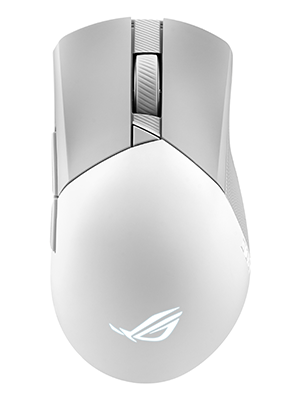
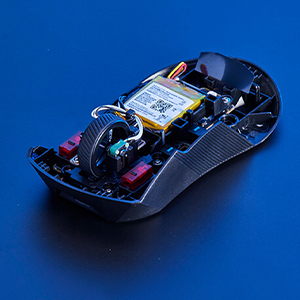
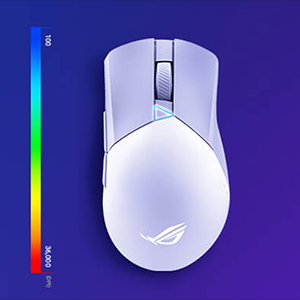
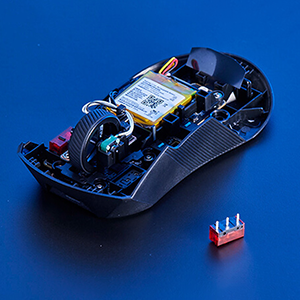
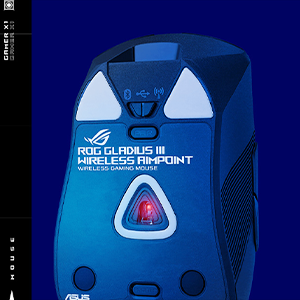
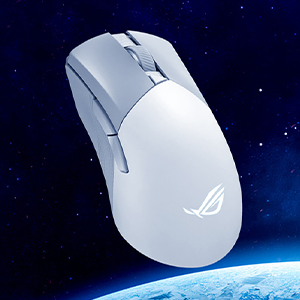
The ASUS ROG Gladius III Wireless AimPoint is a right-handed gaming mouse featuring a cutting-edge 36,000 DPI optical sensor, tri-mode connectivity (2.4 GHz RF, Bluetooth, wired), and an ultra-long 119-hour battery life. Weighing only 79 grams, it offers ergonomic comfort with hot-swappable mechanical switches for ultimate durability and customization. Compatible with PC and Mac, it’s designed for serious gamers seeking precision, endurance, and seamless versatility.





| ASIN | B0BRTJNQQ8 |
| Additional Features | Lightweight, Portable, Pro gamer, Wireless |
| Antenna Location | Gaming |
| Are Batteries Included | Yes |
| Are Batteries Required | Yes |
| Battery Average Life | 119 Hours |
| Best Sellers Rank | #3,148 in Video Games ( See Top 100 in Video Games ) #64 in Mac Gaming Mice #165 in PC Gaming Mice |
| Brand | ASUS |
| Built-In Media | 2m ROG Paracord, Micro switches (2),ROG switch remover, P711 ROG GIII WL AIMPOINT/WHT mouse, ROG mouse grip tapes (4),USB dongle, USB dongle extender, ROG sticker, 1 set of ROG Mouse Feet, user manual, warranty booklet |
| Button Quantity | 6 |
| Color | White |
| Compatible Devices | Personal Computer |
| Connectivity Technology | Bluetooth |
| Customer Reviews | 4.6 out of 5 stars 395 Reviews |
| Enclosure Material | Plastic |
| Hand Orientation | Ambidextrous |
| Hardware Platform | Mac, PC |
| Item Dimensions L x W | 4.86"L x 2.8"W |
| Item Type Name | Computer mouse |
| Item Weight | 4.48 ounces |
| Manufacturer | ASUS |
| Model Name | P711 ROG GIII WL AIMPOINT/WHT |
| Model Number | P711 ROG GIII WL AIMPOINT/WHT |
| Mouse Maximum Sensitivity | 36000 Dots per Inch |
| Movement Detection | Optical |
| Movement Detection Technology | Optical |
| Number of Batteries | 1 Lithium Ion batteries required. (included) |
| Number of Buttons | 6 |
| Operating System | macOS, Windows |
| Power Source | Battery Powered |
| Range | 10.0 meters |
| Special Feature | Lightweight, Portable, Pro gamer, Wireless |
| Style Name | Wireless |
| UPC | 195553757737 |
| Unit Count | 1.0 Count |
| Warranty Description | 1 year |
K**D
Great mouse, very comfortable and slick with minimal RGB.
Best mouse I have ever owned. Very comfortable for someone with above average hand size (depending on grip style ofc). Its buttery smooth with no input lag from what I can tell. Battery has lasted days, and it works wired too. Comes with a dongle, or you can use it with bluetooth. Appearance is pretty slick, minimal RGB for those who DO want RGB but not too much of it. The scroll wheel is NOT lit. In the package you get some stickers, replacement switches and replacement slip grips. Armory Crate really isn't as bad as people say, at least not anymore. I don't find any issues with it and it hasn't slowed down my PC. Easy to update peripherals through it and easy to manage/sync lighting. So far, 10/10 recommended mouse. I will update if anything changes.
A**R
Excellent ergonomics and seamless wired/wireless performance on Linux
I'm using this mouse full-time on Arch Linux for gaming, art and design. I really like the textured sides since they provide good grip and the shape is ergonomic for my hands (right-handed). For reference, my previous mouse was a Logitech G403 Hero wired. As a varying claw/palm grip user who enjoyed the shape and size profile of the G403, I find I'm enjoying the Gladius III quite a bit more. I think the side texture and better shaped right side of the mouse make it a lot easier to grip regardless of task. My primary reason to switch away from Logitech mice is that I've had 7 various Logitech mice break in 7 years. It always came down to double-clicking issues or broken scroll wheels. Unacceptable to the degree that they've permanently lost my business. Since I've had so many subpar Logitech mice break from regular usage, budget was not a factor and any price-point was acceptable to get a durable mouse. I went with ASUS because of the replaceable switches rated at 70 million clicks. They have a qualified vendors document on their website that lists compatibility with Omron and Kailh for the Gen 2 push fit sockets this mouse has. Here's the current list of compatible switches for reference: Omron Model D2F-01F, D2FC-F-7N (10M), D2FC-F-7N (20M), D2F-F-3-7, D2FC-F-K (50M) Kailh CMI126603D08-5 (20M), CMI126603D09-3 (30M), CMI126601D01 (60M), CMI126601D03(80M) ~ Clicks are satisfying and not particularly louder or softer than I'm used to, a click is a click. The DPI button works great and feels good, side buttons are solid across their width like a balanced spacebar. The bottom profile button is great, I use the green light profile that reacts to clicks since I don't like RGB. Performance is the same across wired and wireless (dongle) for me. I like that it saves on battery by shutting off the mouse when I step away for an extended period of time. A couple clicks and it's active again. Battery life is excellent, I've been running it wireless full time with zero charges for over a week and it's still holding up strong. Included cable is braided and so soft, reminds me of a couch pillow's plush cotton knit. It slides across my large mouse pad and doesn't catch on anything in my cable management. Speaking of, I always hated playing shooters with a wireless mouse but I've noticed no difference playing wired or wireless with this mouse. In my mind, it boils down to excellent shape, texture and ergonomics because I'm not having to counterweight the mouse's cable drag against a poorly designed mouse body to feel centered. I've also seen no discoloration with heavy use despite this being a white/grey colorway. This must be due to the plastic appearing to be a smooth injection-style color (Legos) instead of a low quality spray-on paintjob (Logitech G203). ~ I'll wrap up with a deep dive on the daily experience with this mouse and Arch Linux. This mouse is incompatible with Piper, the software I previously used to manage my Logitech mouse's DPI, shut off the RGB and remap the side buttons into media keys. I knew that going into this (search for libratbag devices list on Github), so I utilize my Keychron Q3 for media key functionality and actually prefer it. I'm limited to managing the features of the Gladius with the built-in hardware buttons and yet I have no regrets. The DPI settings out of the box are perfect for the full range of settings I switch between and one of the onboard profiles has reactionary RGB based on clicks, which is very close to my optimal no-RGB setup. ~ TL;DR Gladius III is my favorite mouse I've ever used out of Corsair, Logitech and now ASUS. No discoloration with heavy use despite being white/grey colorway. Great out of box experience even without software manageability (for Linux), robust profile / DPI selections and the best ergonomics I've ever used as a hybrid claw/palm grip user coming from the G403. Reminds me of my original Corsair Sabre mouse, but improved. I have high hopes for this mouse long-term with the hot-swappable switches.
T**S
BEST MOUSE!!!
The craftsmanship of this mouse is remarkable. It operates really well and the accuracy is unmatched to other companies. I have owned several differnt brand mouses and this one fits perfects and operates smoothly. It is easy to use and easy to install. The software can control the lights and changes the DPI. The mouse movement can change speed with the click of the button and has 4 functions. This mouse is for the price!!
J**N
Great mouse for productivity!
This is about as good as it can get for a productivity mouse as a gamer. Its ergonomic, VERY lightweight (for a productivity mouse), and most importantly to me, it has a high polling rate. We can debate all day over whether 8k polling rate is better than 1k, but the abysmal polling rate of the Logitech productivity mice, 125Hz, is awful if you use a low sensitivity (Use your arm, not your wrist people!). The dang thing skips with just about every move of the mouse. 1k polling rate basically never has this issue. The replaceable switches are pretty cool too. I can imagine that if you're a little more discerning with your click feel/sound, not having to desolder and resolder switches probably saves you a massive headache. I'm sure I'll be replacing the switches as soon as they give me problems. What would normally be a death sentence for a mouse is but a simple 2 minute procedure. Almost forgot to mention the battery life: I charge it once a month. I can't imagine ever buying another mouse, and that's all I need to say.
T**N
Great product in spite of crap software.
Mouse comfort is based on preference, but it is a generally comfortable mouse. The rechargeable battery lasts almost a week and charges in about 30min to an hour, and can be charged while in use. The mouse is light and produces some nice consistent clicks. Despite the weight, and the plastic it feels like a quality product. I like a lighter mouse anyways. The only complaint is the software armoury crate used for updating the firmware and rgb lighting. However, if your an ASUS customer that information is nothing new.
D**.
Once you go wireless ROG mouse, you won't go back to wired
Why did you pick this product vs others?: I am an Asus ROG fan for years. I was looking for a gaming mouse that didn't have to be wired and would perform as it should. This one, did that with ease. Easy setup. Mouse speeds were perfect on each setting. It is very smooth and responsive. Mouse quality: It is a durable little guy lol. It fits comfortably in your hand. Clickers feel good and respond as they should. Value for money: Perfect price tag for a ROG mouse, especially wireless. Functionality: It's top tier functionality! You will not be dissapointed!
H**D
My review of the Gladius III compared to other similar ROG mice
ROG CHAKRAM X ORGIN - This is my daily driver. By far the biggest of this bunch coming in at 123g. While it does not take the cake as the biggest mouse Asus has to offer, It is still a much bigger profile than the other mouses I've tried. It is also one of the most comfortable mice I've owned, and naturally feels great in my lengthy hands. I opted for this mouse over Asus's Spartha mouse (which is the largest they have) because I wasn't a fan of how many side buttons the Spartha had, kinda making it seem overwhelming. The Chakram seemed like the perfect compromise. When it comes to the joystick feature the Chakram has, I can say I don't use it at all. I could see how it could be handy for those looking for some more functions , but when i tried it it felt cheap and I immediately put the little cap cover it comes with over the joystick. The 4 other side buttons the Chakram has it plenty for me. My biggest gripe is the that the entire body of the mouse is that slippery smooth matte plastic and it has little to no grip. This doesn't bother me much since i hardly game with this mouse but I felt it was worth mentioning. Battery life is easily the best in this one as well, usually lasting me a few days before needing more juice. Keeping this one for sure. (hot swappable switches) ROG GLADIUS 3 - The best way to describe this mouse would be to call it a hybrid of the larger and smaller models Asus has to offer. Holding it in my hand feels similar in size to the Chakram, so its a bigger mouse. But you'll immediately notice how much more lightweight it is, with this mouse coming in at 89 grams. It seems to fit more into the lightweight category of the ASUS mice, just in a different body. It has a sort of odd concave in the main right button , which I'd imagine is to help grip the mouse when claw gripping, but I was never able to get used to it. While I do usually maintain a claw grip, something just felt a bit funky with this one. I could see people absolutely loving this mouse , but I could also understand if it feels weird. Will end up getting rid of this one. (hot swappable) ROG HARPE ACE Aimpoint Edition- This is my favorite so far of the bunch. Like I mentioned earlier, my hands are not small and I wanted a mouse to account for that. I believe I've found the perfect balance of size and weight in the Harpe. It's definitely falls into the ultralight weight category coming in at just 54 grams. I also love the placement of the side buttons, as they fall right above where I rest my thumb (this was an issue for me on the mice I will discuss next) . I hated how most of the ultra light weight mice out there have such a small frame, but the Harpe is seemingly my saving grace. They also make an Extreme version of this mouse that is like carbon fiber or something but its well over 3 times as much so I never really considered that one. Also a HUGE plus I should mention is that this mouse IS compatible with OMNI dongles (It does not come with one though) so if you have an ROG keyboard like me that uses an omni dongle then you can pair this mouse with it. I believe this was recently added to its firmware , so it does not advertise this feature on like amazon and stuff. It also gets 4000k wireless polling rate and 8k wired , when using the ROG's polling rate booster. I'm not sure if the Gladius is also capable of this, but I can confirm the Harpe does. (not hot swappable) ROG KERIS 2 ACE- Before trying the Harpe, I thought this was the one I'd be using for fps and gaming. It also falls into the ultra lightweight category at 54 grams, same as the Harpe. It has a much shorter frame than the Harpe, and is a bit taller . Don't get me wrong, I love this mouse. It feels good to claw grip and It's the newest Mouse from Asus right now and comes with a polling rate booster and omni dongle. Similar to the Harpe (minus having to update firmware for this) this mouse has a wired 8k and wireless 4k polling rate with the booster in use. If I had smaller hands I'd probably prefer this one. The biggest gripe I have is the placement of the side buttons. I find them much too high above where my thumb rests and struggle to press them without having to quickly adjust my grip. I assume those with smaller hands that prefer a claw grip wouldn't experience the same issue. ROG KERIS 1 ACE- Not actually called the "KERIS ONE" , just the Keris as this is the original version of the previous mouse. The best way I could describe this mouse would be to call it a mini version of the Harpe (yes i know there is an actual HARPE MINI that Asus sells but idk how else to describe this mouse lol) in terms of shape and size, as I find it more closely resembles its shape more so than its newer model. I doesn't protrude as much upwards like the Keris 2 does and I find the side buttons much easier to access. It is heavier than the previous two, as it is a bit older. Still a very capable mouse, and they are less than 50 bucks used on amazon. I probably could've just gotten this mouse originally and never looked back. While it doesn't have the polling rate or weight of the others, It is still very capable at 1000hz polling rate in wireless mode, and for the price I'd be happy to roll with this mouse.
K**S
Product is a perfectly good mouse
After using the mouse for a couple weeks now I can say I have had zero issues with it. I have read the other issues people have with the sensor on the mouse. Did multiple tests and my sensor seemed to just work perfectly fine. The battery life is very nice for a rechargeable mouse (with RGB off) and I only paid 50 dollars for it through amazon warehouse. The mouse comes with a very nice grip tape that works really well. The charging cord for it is also quite long. I put it on a mouse bungee so that there is no drag when the mouse is plugged in. The mouse is quite light but not as light as my previous mouse (glorious model o) and feels way higher quality. If you do not care about RGB that much and are willing to turn it off for higher battery life this mouse is great. The software known as armory crate is a little annoying to use but its not worth dropping a star over. Will update the review if anything changes.
Trustpilot
1 month ago
2 weeks ago