Desert Online General Trading LLC
Dubai, United Arab Emirates
Desert Online General Trading LLC
Dubai, United Arab Emirates


🚀 Unlock ultra-fast Wi-Fi freedom and stay connected like a pro!
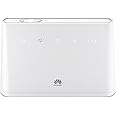
The Huawei B310 is a sleek, unlocked 4G/LTE Wi-Fi router delivering ultra-fast internet speeds with support for up to 32 devices. Featuring advanced parental controls, guest network access, and robust security, it offers flexible SIM compatibility and a compact design ideal for home or office use.


| Brand | Huawei |
| Product Dimensions | 18.1 x 3.6 x 12.6 cm; 226 g |
| Item model number | B310s-22 White |
| Manufacturer | Huawei |
| Series | Huawei B310 |
| Colour | White |
| Connectivity Type | Wi-Fi |
| Wireless Type | 802.11ac |
| Number of HDMI Ports | 1 |
| Operating System | Versatile Routing Platform |
| Are Batteries Included | No |
| Item Weight | 226 g |
| Guaranteed software updates until | unknown |
M**T
Unbelievable change in speeds. This must be the future for rural broadband!
Bought this router and paired it with Poynting 4G-XPOL-A0001 Cross Polarised 4G Omni LTE Antenna which I've mounted on the outside of an upstairs window. It picks up a 4G signal (when my mobile can only get 1 bar of 3G in the same position) I'm now getting download speed of 30-35Mb/s and uploads of 4-5Mb/sLike many reviewers of this item I live in the countryside a long way from the exchange in an old granite house. Wifi speed topped 2.6 Mb/s which was the best amongst my neighbours but meant streaming video and on line gaming was a struggle at best and impossible to do at the same time. To make matters worse the only mobile signal I could get was through vodafone who didn't offer unlimted data sims.... Until now.I was honestly thinking that I was never going to be able to sell my house as the speed was so bad. To finish off the connection, I've bumped the signal round the house with an Orbi Mesh network that I was already using (one base unit and one satellite) and sent it to the TV with wall plugs and get the same signal everywhere! (with the exception of the TV - I seem to loose speed with the wall plugs and the signal drops through the wifi). I really didn't believe that it was going to work so unboxed everything really carefully incase I had to return it all. Final icing on the cake, plugged in my normal phone and it works from router through the sim so great quality calls and bye bye landline! No more heart ache from openreach, BT or Plusnet! I'm cancelling it tomorrow and it will give me so much satisfaction!
G**T
THE DADDY OF MOBILE HOME BROADBAND ROUTERS - NUMBER !
So scenario you have absolutely ridiculous slow fixed line broadband what do you do USE MOBILE PHONE as your Data Line or use this which allows you to basically make a full network in your office with existing computers hardwired using the ethernet and also others connected via wifi can also share in HDD connected via built in USB port but the best part of all is the SIM card PORT.If you get a EE SIM CAR you can gain speeds of uptown 89-90MBS which isn't too shabby at all and works and performs extremely wells to the point you wouldn't even realise you were one Mobile broadband.has all the usual Security features but also other options, Firewalls, Data allowance so you don't go over your Data allowance.An amazing Router and would advise adding on the extra external wifi aerials
J**N
Very limited web user management page
Bought this SIM router for use in my holiday home. Have a similar Huawei router at my actual home and that's why I bought it. Super easy to set up and use. Insert the SIM and turn it on. Activate the SIM from the supplier (if not activated already) and away you go. Connect via WiFi or LAN cable. Good clean signal of 3 bars out of 3. Have to move it around though to find the "sweet spot". Also bought the 2 antenna just in case. Turns out they do nothing to improve the signal. In fact, they make it worse.But, my biggest issue is that I cannot change the default SSID or associated password. All I get is a VERY basic option for "SETTINGS" once in the Web Management Page. Please see attached picture. I have the exactly the same issue with my own router at home, but I assumed it was the telecoms provider who "dumbed it down".I go through the process of changing the SSID and password but when I type in the current password to confirm, it says the current password is incorrect. So nothing changes.In fact, if I select to auto-update on the main page, I am forced through to the next page where it asks me to change the SSID and password even if I don't want to.So extremely annoyed I cannot change the SSID or it's password. Does anyone else have this problem?Huawei, if you're listening, how do I change my default SSID and password AS PER YOUR RECOMMENDATION?
L**Y
* It just works : its quick and simple and has surprising good wifi range.. very happy *
Just got this very simple and easy to setup router. Plugged in our GiffGaff SIM and it just worked. Very simple DHCP setup, includes file sharing (yes it has a CIFS - SMB) server built in, just buy a USB SSD /HDD to use it. Wifi range is surprisingly good and the signal seems impressive for such a small box with no aerials. Just take it off auto and select the best channel for your environment.
C**A
Make sure that you buy a plug adapter as well ...
Make sure that you buy a plug adapter as well as the unit comes with a Euro plug and won't work unless you get an adapter.
D**D
Loaded with features and compatible with multi-SIM cards such as those supplied by EE
Having used a few 4G routers such as the Solwise product and having nothing but trouble I can't believe how Amazing this router is and the features are comparable with the best aftermarket Broadband routers.One thing that was a bit misleading is that you can plug an analog phone directly into the router and make voice calls. You actually need a separate SIP account for this rather than it being able to make traditional voice calls over your SIM card. I actually have a separate SIP phone already so I've not tired this but it's a nice little feature nevertheless!The build quality is pretty solid and you can use either the Internal antenna if you are lucky to have good indoor 4G coverage or remove the back panel and connect to a dedicated outdoor 4g antenna (directional recommended)One really important factor to consider when buying these routers is the tendancy for mobile providers to now provide what they call a multi-SIM (usually a nano SIM inside a cut-out of a micro SIM inside a cut-out of an actual SIM)My previous 4g router used a spring loaded mechanism to retain the SIM and that didn't agree with these kinds of SIM cards as it would often apply too much pressure and cause the various cut-outs to come away effectively stopping the router from functioning.Thankfully the Huawei B315 has a more traditional slide in SIM slot with a metal bar to hold everything in place and as yet I haven't had a single Internet drop-out
Trustpilot
3 weeks ago
1 month ago