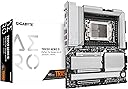
🚀 Elevate your workstation game with the ultimate Threadripper motherboard!
The GIGABYTE TRX50 AERO D motherboard is engineered for professionals demanding uncompromising performance and stability. Featuring AMD sTR5 socket compatibility with Ryzen Threadripper PRO 7000 series, a robust 16+8+4 phase digital VRM, DDR5 memory support, cutting-edge thermal solutions, and next-gen connectivity including PCIe 5.0, USB4 Type-C, and ultra-fast 10GbE networking, it’s the definitive platform for content creators, AI experts, and power users seeking future-ready, high-efficiency computing.
| ASIN | B0CPW1F841 |
| Best Sellers Rank | #139 in Computer Motherboards |
| Brand | GIGABYTE |
| Color | black |
| Customer Reviews | 4.0 4.0 out of 5 stars (28) |
| Date First Available | November 20, 2023 |
| Item Dimensions LxWxH | 3.1 x 13.6 x 11.6 inches |
| Item Weight | 4 pounds |
| Item model number | TRX50 AERO D |
| Manufacturer | GIGABYTE |
| Number of USB 2.0 Ports | 2 |
| Product Dimensions | 3.1 x 13.6 x 11.6 inches |
| RAM | DDR5 |
| Series | TRX50 AERO D |
C**A
Nice board. Great for workstation use.
I paired this with a 7960X Threadripper and even though the CPU and board are both new, I've had no issues with drivers or support. I'm not a gamer, but for simulations and compiling this is insanely fast. I've got it loaded with 128 GB of EEC Kingston Fury Renegade Pro Expo DIMMs and several M.2 drives and I've had no issues under Windows or Linux.
J**O
Excelent motherboard for TRX50
Works well just out of the box with the kingston fury I go with this kingston KF560R32RBEK4-128 because of price is like 300 less and work's well with this mother board and 7970x and a Noctua NH-U14S TR5-SP6 you just need a case with good airflow like the fractal torrent
C**I
Overall a good and affordable 7000-series AMD Threadripper motherboard.
First off, this is a nice TRX50 motherboard. I paired it with the AMD Threadripper 7960X w/ 128GB RAM and installed Microsoft Windows 11 Pro 64-bit. This is my first AMD system, and its a Threadripper. I have the v1.1 revision motherboard, so the S3 sleep state functions nicely. I had some issues with driver & chipset support, but once I cleared the CMOS after doing their latest BIOS update, booted into the BIOS to Load Configuration Defaults, reboot into the BIOS again to make other changes, etc., then most of my "Unknown Device" problems went away. The only other problem was with the AMD TRX50 Chipset Setup. This is with Gigabyte's installer, by the way, and I strongly suggest that you always go directly to the AMD web site for the TRX50 Driver & Support web page to get the latest & proper chipset and RAID setup files. Otherwise, using Gigabyte's installer, I had to run the downloaded package from Gigabyte's website to have that installer actually install the actual Setup program, that I then had to discover that I had to locate it in my Program Files folder to run the setup!!! In other words, after extracting the ZIP file and running that setup, it runs a setup that adds the actual setup in your Program Files (x86) folder (especially on 64-bit Windows). It is NOT obvious that you have to reboot and actually hunt for the particular setup folder to actually run the AMD Chipset Setup from there, but once I did, then I was able to install the rest of it and all of the Unknown Devices that were showing up in Windows Device Manager were all found. Geez!!! So, this is why you're better off going directly to AMD's website to get the latest chipset & RAID driver files, period! LOL I will say that Gigabyte's eMail support has been responsive and they tried to help solve the problems, which they did make some good suggestions. For the price, this is a good (5th Gen?) AMD Threadripper motherboard. I love that Gigabyte provides USB 4 (Thunderbolt 4) ports with this and 4 slots for M.2 SSD's. The UI/UX for the BIOS is nice and GUI'fied, more pleasing (to me) than what ASUS launched with for their TRX50 motherboard. I am curious to know what the difference is between the REV 1.1 motherboard and REV 1.2. Hopefully, it's nothing that anyone would notice (knock on wood / knock on BIOS - LOL).
S**Y
GIGABYTE TRX50 AERO D
I recently built a system around the GIGABYTE TRX50 AERO D motherboard and an AMD Threadripper 7970X CPU. On paper, this board’s specs are truly impressive: sTR5 socket support, DDR5, PCIe 5.0 (for both expansion slots and M.2), USB4 Type-C, Wi-Fi 7, and 10GbE networking. Unfortunately, while it shows a lot of promise, my personal experience with reliability and support has been far from smooth. Pros High-End Features: The integration of PCIe 5.0, USB4 Type-C, Wi-Fi 7, and 10GbE is cutting-edge and should future-proof your setup for quite some time. Strong Performance: When the system does boot up properly, it runs very well—smooth operation for CPU-intensive tasks and content creation. Broad Connectivity: Plenty of ports, expansion options, and support for multiple M.2 drives for those looking to build a heavy workstation. Cons Extremely Long Boot Times Inconsistent POST: On some cold starts, it reaches the Windows login in about a minute; on others, it has taken up to 1 hour and 45 minutes of sitting at a blank screen. No Clear Indicators: The monitor stays blank, so there’s no diagnostic readout or BIOS message to show what’s causing the delay. Fan Speed Issues Running Loud After Prolonged Use: Around the 15-hour mark, the fans ramp up noticeably. Setting them to “Silent” doesn’t seem to resolve the noise as expected. Potential BIOS/Monitoring Bug: Updating fan curves or toggling modes doesn’t consistently bring fan noise back down. AI Feature and GPU Requirement Requires NVIDIA GPU: Gigabyte’s “AI” feature apparently needs an NVIDIA GeForce card to function properly. This limitation could be frustrating if you prefer other GPU brands or have a different workflow in mind. Early-Stage BIOS/Memory Quirks Initial Memory Incompatibility: I had to update to the latest BIOS using Q-Flash just to get the board to recognize my DDR5 modules. Support Response: While the support team did reply, I was asked to record a video of the blank screen for over an hour—an unrealistic request that didn’t inspire confidence. Price and Availability Premium Cost: With pricing near or above $900, finding a more affordable Threadripper-compatible alternative is tough, especially with limited stock on workstation boards. Final Thoughts The GIGABYTE TRX50 AERO D is packed with advanced features and shows strong performance when it’s running. However, the extremely long and unpredictable boot times, fan control issues, and a support experience that left me feeling unheard have overshadowed its positives. If you need a rock-solid workstation immediately, you might consider waiting for more mature BIOS releases, looking into alternative TRX50 boards (when available), or planning for a more established platform. For me, unfortunately, these issues were significant enough that I decided to return the board and the processor. I hope GIGABYTE addresses these quirks soon—on paper, this motherboard has enormous potential, but in its current state, it just wasn’t the reliable solution I needed. Disclaimer: This review is based on my personal build, components, and experience. Results may vary depending on your specific hardware and future BIOS/firmware updates.
A**R
Great product poor delivery
This product functions as advertised. The amazon shipping container had minimal packing protection, little to no bubble protection. The delivered package was left under my mail box on the street. Left on the ground with now plastic bag/rapper to prevent water intrusion.
M**T
Defective Motherboard
Took me a bit to figure out, but the new Gigabyte Aero D TRX50 motherboard has more than one issue. One R-DIMM slot was bad. Thought it was the RAM at first. Then the USB 3.0 port is also defective. Have to send back (sigh). Will try one more time. I have been building computers for some time and have never had this issue. Think twice about ordering Gigabyte Motherboards. My second board arrived DOA. Would not power up— multiple remedies attempted to no avail. I read one review of this board which stated it was a great motherboard if you could find one that works. Unfortunately I have been unsuccessful in that venture. I am done with Gigabyte. I am going to try an alternate manufacturer.
K**R
Everything I needed and more
I choose this 1 because it will fit my case better and it support 4 nvme drives which I like a lot.
M**Y
Me encanta, calidad precio, refrigeración pasiva sin ventiladores (que a la larga serán un problema de ruido), quizás el único detalle que una ranura pcie extra hace falta
S**A
No complaint about this, works on first try. Actually bought the Amazon warehouse one for half price. Be patient on first boot, it can take upward of a few minutes. I think is the nature of rdimm.
A**R
Packed With Features, BUGGY AS... Like the one reviewer already mentioned, this motherboard is plagued with demons. The waiting around some days for it to boot is insane. Or you get frustrated and power on and off a few hundred times until you might finally get into the bios, where your mouse and keyboard move the cursor so slowly you might rather be dead. Yes it has Thunderbolt (USB4) which is why I got this, and to be honest my 5950x rig was just as fast if not faster overall especially considering the inconsistent reliability. Was ao excited to habe a threadripper rig and its been 15 months of more hell than not. Find something else.
Trustpilot
2 months ago
1 month ago