Desert Online General Trading LLC
Dubai, United Arab Emirates
Desert Online General Trading LLC
Dubai, United Arab Emirates


🎶 Elevate Your Audio Game with Effortless Switching!
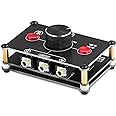
The Little Bear MC102 Mini Audio Switcher is a compact and efficient 2-way audio selector that allows users to seamlessly switch between two audio sources without the need for external power. Designed for professionals and audiophiles alike, it features user-friendly controls and high-quality construction to ensure an exceptional audio experience.


J**N
Feels well built. Works well.
Nobsound Little Bear MC102 Mini 2(1)-in-1(2)-Out 3.5mm Stereo Audio Switch..... :This switch is fantastic! I initially bought a small 1in 2 out A/B switch from another manufacturer, but it was small and very lightweight. The pull of the cables would move it and flip it around. This one doesn’t do that! It is much smaller than I imagined it from the photos - it’s about the size of a deck of cards. It also has no outer case which I love, aesthetically but that means it’s still pretty lightweight and possibly susceptible to dust problems. It isn’t moving around now that I put the included rubber feet on it, but I might still add a small piece of flat steel to the bottom just to make it feel better.Another problem I had with the other switch is that the contacts got dirty and every time it would move around, I would get this horrible crackling and of course the 60 Hz hum. So far this one feels solid.The design is thoughtful insofar as you can use it as a 1x2 OR a 2X1 and the Jack in the front is bidirectional.I love the look of the open frame. I just hope it doesn’t become a dust problem and therefore a noise problem.I am using this to switch between active speakers and headphones. It works perfectly. And it allowed me to free up a different volume controller I was using. It also has a mute button which is nice.Good buy.
E**A
Works well
This works well as a passive switch and includes a volume knob useful to lower volume (but not increase). There are other brands where engaging the mute button causes hum, but in my system, this design adds no hum (though if you already have hum, it won't remove it).I am using this to switch inputs to a subwoofer and am glad that the cables can all attach to the rear though there is a front jack which when used switches off the rear middle jack. In my system, it doesn't make any electrical switching noises, the volume control is not scratchy either. It is visually interesting, a little bit SteamPunk in appearance though it's not very large and in my circumstances, not very noticeable.If you need such a switch, this could be a good choice. It's inexpensive, well made, and works well. It doesn't include any cables so you may want to order some cables along with the device according to need.
J**Y
Doesn’t work at line level
There are two issues. First is that it introduces a static even though it’s a passive device. Second if line level is provided as an input with output to a PC line-in, it sends vol reduce to the OS. If you press the mute button the volume reduction stops.In addition the volume doesn’t seem to attenuate any of the line level audio that goes through it. At Minimum it just cuts off. Like other reviewers mentioned it looks sturdily built but a shame that it isn’t working. Unfortunately had to return as this would’ve perfectly fit my needs if it had just worked as there is not a lot of affordable options out there in the market.
Q**R
Working Well, and Hints
I'm using an MC102 with a single set of stereo speakers to allow selection of two computers as sound sources. It's working fine for me. I set the MC102's volume knob at maximum, then set my computers' volume controls as desired. I can then use the MC102's knob for a quick volume reduction when needed (about 1/4 turn from "normal listening" to "barely audible"), or use the mute button if needed. In either case, I don't have to bother with which computer I'm listening to or how (in?)convenient its volume and mute controls may be.Mounting Hint: The lower screw heads are somewhat shorter than the thickness of a pair of 3M Command picture hanging strips. So, two pair of the small size strips (NOTE: check seller & listing to avoid international shipping AFTER you select your quantity, AKA "Size Name", on the Amazon page) allow convenient mounting to almost any flat surface. I've got mine mounted vertically, on the side of a computer stand. It's light enough so you might even be able to mount it upside down underneath a shelf, though that's a NONrecommended use of Command products (they hold well in shear, but tend to slowly give way to tension, so beware).Usage Hint: The open-frame construction of the MC102 has a secret advantage. I can see the button positions (looking in through the side) from angles that block view of the face of the switch. So, I selected my cabling connections to the MC102 mnemonically: when the A/B switch button is more to my left, the computer more to my left is connected to my speakers. Likewise, button more rightward connects the computer more to my right. I can also see whether mute is engaged (button bottom more inboard of circuit board) or released (button bottom nearly even with circuit board).Another Usage Hint: The dual IN/OUT jacks on the MC102 are not in parallel. Using the one across from the A and B jacks cuts off the one between the A and B jacks, so the "far" jack is the one to use for headphones if you want to cut off speakers whenever you use headphones.
Trustpilot
2 months ago
3 weeks ago