We remain fully operational. Our teams are working around the clock to ensure your deliveries continue safely.

DOWNLOAD THE APP


Customer Services
Copyright © 2025 Desertcart Holdings Limited
DOWNLOAD THE APP


✨ Light up your life, smartly and stylishly! 🌈
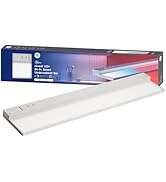
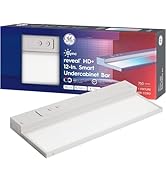
The Cync GE Reveal HD+ is a 24-inch ultra-thin smart undercabinet light fixture offering millions of colors and tunable white light. It connects directly via Wi-Fi with no hub required, supports voice control through Alexa, Google Assistant, Apple Home, and Samsung SmartThings using Matter protocol, and allows linking multiple fixtures up to 500 watts. Designed for easy installation with a sleek edge-lit design, it delivers bright, flicker-free task lighting with customizable schedules and remote control for a modern, connected kitchen experience.




| ASIN | B0D4ZN5QT8 |
| Batteries required | No |
| Customer Reviews | 4.6 4.6 out of 5 stars (415) |
| Date First Available | 27 November 2024 |
| Finish types | Painted or Polished |
| Included components | 1 FIXTURE 1 6FT POWER CORD |
| Is assembly required | Yes |
| Item Weight | 1.87 Pounds |
| Item model number | CFIXUNCBR24CRVDMS |
| Product Dimensions | 60.96 x 12.29 x 2.74 cm; 848.22 g |
| Specific uses | Cabinet, Home |
| Specification met | ETL, FCC |
B**E
This GE Cync Reveal HD+ undercabinet light has been excellent. There’s no flickering at all, and it’s very bright with clean, even light that works perfectly for task lighting. It makes a noticeable difference in visibility and looks great once installed. I really like that it’s hardwired—no batteries to deal with and no charging. Once it’s in, it just works. It integrates smoothly with Google Home, responds quickly to commands, and makes adjusting brightness or color easy. The fixture feels durable and well-made, not flimsy or cheap. Installation was straightforward, and the finished look is clean and professional. Overall, it’s a reliable, high-quality undercabinet light that delivers on performance and smart features. Highly recommended if you want bright, dependable lighting with smart control and no battery hassle
R**S
Have used a lot of matter devices. I have a mixed network of Apple Home with 5 border routers, 8 echo’s of various types and 5 Google homes including 3 nest’s. WiFi is powered by a UniFi system with enterprise access points. I have been trying to use as much matter over thread as possible but lights are mostly matter over wifi. I have 140 lights that are matter over WiFi and getting them connected to Apple has been difficult and then sharing them with Alexa and Google harder. These worked amazing and on the first try for Apple - then Amazon and then Google; FIRST ATTEMPT! Easiest provisioning I have done yet with a matter over WiFi light. Have a mixture of Hue, Govee and Linkind and these have done the best so far. Not to mention they look great and have pretty good color saturation and brightness. I don’t normally write reviews but when something works really well they deserve the praise!
R**.
These lights are awesome! You get what you pay for. They are well built and have excellent lighting. They get incredibly bright, and the colors are nice. The "reveal" function is interesting, and I'm curious to try it out in my kitchen the next time I'm prepping food. Installation was very easy. It came with the mounting screws already screwed into the mounting holes, which took me a minute to figure out. The functions in the GE Cync app are nice, and it works well with Alexa. I also love that I can group the lights together with the GE Cync app, and then if you push the power button on any single unit in that group, they all turn on or off together. These are fantastic lights for using manually or virtually.
K**A
We bought two units to replace the basic ones we installed with the home. We also like smart-enabled lighting, so these were the perfect fit. We prefer to use a central hub for smart devices. SmartThings is the hub of choice, and Alexa is the voice assistant for voice control. If you don't have that kind of setup, it's A-OK. Once you set up your lights in Cync, go to Alexa and look for the Cync skill. Authenticate and approve access. Alexa will pick up the new devices almost instantly. They look great as undercabinet lighting and function perfectly. The ability to dim, apply themes, automate lighting schedules, and control them via voice is a fantastic convenience. Despite a lack of competitors in this space, these units are priced exceptionally well and reasonably—we feel they are worth every penny. The way the lights diffuse light into the acrylic panel makes it appear as a smooth light source with no "harsh" visible individual LEDs that plague most fixtures when viewed from different angles. Try their Reveal mode to see a different spectrum of lighting that enhances visuals. I would keep it enabled were it not for the lighting on my stove. I want them to match when daylight white is on, and that is the only way for me to achieve that. Now that we know about GE's smart lighting line, we're going to shop for more of their goods. Thus far, they've been of great quality and at a much more competitive price point. The physical installation of these units was much more straightforward than I thought it might be, given some review comments. Here are some guidelines and feedback: * First, plug the units in with the provided wall cable. Then, set up and configure your lights using the Cync app. This process ensures you don't have to deal with resets, etc., if you have trouble. It's the same if you intend to use them with HomeKit. I did not have issues pairing with the Cync app AND Matter, but some reviewers have suggested they are mutually exclusive. I tested it, and it worked, but then I removed them from HomeKit (as I don't use it). Download the Cync app from your app store to configure using the app. Select the option to add devices and then scroll down to undercabinet fixtures. They should pop up immediately. Set their properties, save, and let the units update their firmware while at it. After this step, you can proceed to hardwire if desired. * We wanted ours hardwired. POWER OFF YOUR CIRCUIT. Then, remove the back plate by removing the screw in the back of the unit. The plate will come loose. The wires to the unit are tucked just inside. Pull each of them out by their push-in connectors. There will be a green, white, and black one. The fixtures come with two-port push-in connectors. If you insert wires (from the wall) that are too long, it will be challenging to remove them later. Keep the slack from the wall wires long enough to work with the fixture, and you won't have this problem. I would only keep 5-6" of slack. Once trimmed, plug the wires into their corresponding units, and you're done with power. I learned this the hard way for the first fixture. If you forgot and need to open the unit, unscrew the access plate (there is a tiny screw on each side on the bottom of the unit) and reattach the plate once the wires are secured. * Position the unit and prepare to screw it in. However, before you do, I recommend having the screws partially exposed when positioning. You can then apply some pressure on the screw to imprint on the cabinet (or mounting surface). Then you can drill some pilot holes to ensure you don't break the screws. This was a concern one other owner mentioned. Each fixture should take about 15 minutes, but your mileage may vary.
C**L
These are great lights! I purchased them to replace the generic white lights that came with my kitchen. The colors are spot on, and they were extremely easy to install with the self-driving screws. I was initially excited that they came with 5-foot cables connecting to existing outlets. However, I quickly found that the wires were not long enough to reach behind my fridge or above the microwave, as I wanted to hide the cables. Additionally, the connectors were quite large, meaning I would need to drill considerable holes to feed them through if I tried to conceal the wires. Ultimately, I purchased several extension cords with low-profile plugs at Lowe's. I used these to connect the lights from the backs of the units instead of the push-in plugs on the side. Additionally, if you are measuring for lights and want to use the included power cables, the lights are 12, 24, and 48 inches, but with the power cable installed, you need 12.25, 24.25, and 48.25 of clearance. If your cabinets are of exact measurements, you may need to wire them from the back, which requires more work but is manageable. A couple of things i have found after a using them, the app is quite buggy. After adding 15 or 16 Cync devices (five under counter lights, two light strips, and eight can lights), the app has become very slow and frequently lags after I launch it. When I turn on a light, there can be a delay of up to three to four seconds before the app becomes responsive again. Sometimes, when I switch off a light, the app will lag and remain unresponsive, and the switch will still appear on in the app. Another issue I've had while installing the lights is that the app shows an error when updating the firmware on every light—not just these. I believe the firmware is updating, as the app keeps spinning and eventually times out. If I attempt to update it again, I receive an error. I can skip the update after an error occurs, but the light remains unresponsive for several minutes after installation. Overall, I find the app to be very buggy. Moving forward, I’m transitioning my house to Home Assistant, so this should not be an issue.
Trustpilot
2 weeks ago
2 days ago