
DOWNLOAD THE APP


Desert Online General Trading LLC
Warehouse # 7, 4th Street, Umm Ramool, Dubai, 30183, Dubai
DOWNLOAD THE APP
Desert Online General Trading LLC
Warehouse # 7, 4th Street, Umm Ramool, Dubai, 30183, Dubai


❄️ Cool your Ryzen in stealth mode — power meets silence in a tiny package!
The Noctua NH-L9a-AM4 is a premium, ultra-low profile CPU cooler designed specifically for AMD AM4 sockets. At just 37mm tall, it fits perfectly in slim HTPC and small form factor builds while maintaining full RAM and PCIe compatibility. Equipped with a quiet NF-A9x14 fan featuring PWM speed control and delivering 57.5 m³/h airflow at only 23.6 dB noise, it ensures efficient cooling without disruption. Installation is simplified with the SecuFirm2 mounting system and NT-H1 thermal compound. Trusted by professionals, it comes with a 6-year warranty, making it an ideal choice for moderate-heat Ryzen CPUs and APUs.





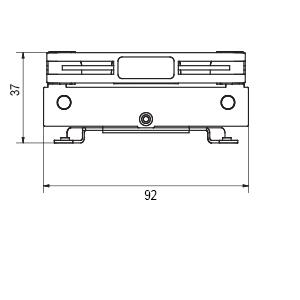
| Product Dimensions | 1.46"L x 3.62"W x 4.49"H |
| Brand | Noctua |
| Power Connector Type | 4-Pin |
| Voltage | 12 Volts |
| Cooling Method | Air |
| Compatible Devices | Desktop |
| Noise Level | 23.6 Decibels |
| Material | Copper (base and heat-pipes), aluminium (cooling fins), soldered joints & nickel plating |
| Maximum Rotational Speed | 2500 RPM |
| Air Flow Capacity | 57.5 Cubic Meters Per Hour |
| UPC | 841501100093 |
| Global Trade Identification Number | 09010018000092 |
| Manufacturer | Noctua |
| Number of Items | 1 |
| Series | NH-L9a-AM4 |
| Item model number | NH-L9a-AM4 |
| Item Weight | 1.03 pounds |
| Item Dimensions LxWxH | 4.49 x 3.62 x 1.46 inches |
| Color | Beige, Nickel |
| ASIN | B075SG1T3X |
| Is Discontinued By Manufacturer | No |
| Date First Available | September 20, 2017 |
M**E
Perfect for an APU build. But hear me out. I have some details that may help you.
Will it fit? This is obviously a very low profile cooler. But please do check out the dimensions. It fit even on my mini-ITX motherboard (that's TINY), but do have some oversight with how things are spaced on your motherboard. The heatsink is short, but fairly spread out. Temperature talk/overclocking: Firstly, let me address something at least I was concerned with while I was researching this. YES, you can lightly overclock your APU while using this, just test stuff out until you find something that works. And please do be careful, your computer is a sacred baby, go easy on it. Anyway, for example, I overclocked my Ryzen 3200g CPU to 4000mhz, and my GPU to 1500mhz. At least in games I play (GMOD at 1080p full settings, Payday 2 1080p medium), I get 60fps while also staying around 55 degrees Celcius. That's about 30 degrees BELOW what would be considered ALMOST dangerous for an APU. But what about idle/light workloads for non-gamers? Idle Noise and the noise adapter: The fan is much more quiet than any stock AMD cooler, and although it can be made even more quiet with the noise adapter, that's because the adapter slows the fan down. In essence, the adapter WILL affect cooling performance, but most often that's not even necessary. The fan is very quiet and cool on idle or with light workspace stuff. Installation: Installation is easily the only "flaw" this cooler had in my case (even then I still gave it five stars). To install it, I recommend taking the fan off the heatsink, place the heatsink upside down atop a well balanced, sturdy cylindrical object. Apply thermal paste to your CPU (or APU ; ) ), then with your motherboard upside down, line up the heatsink holes with the holes on your motherboard. Keep your motherboard pressed down and balanced on the heatsink. Then take that metal plate included and put the PLASTIC side on your motherboard's bottom. Keep it balanced, and lightly screw it in the with "cross" method. Once the heatsink is secure, flip your motherboard. Not which direction the fan blows the air. You can screw the fan back into the heatsink so that it will blow the majority of air where you want it to. Now, clearly, that's much more complicated, and arguably more risky than a standard installation. But with patience, top-of-the-line thermal paste, and some luck, it will be so worth it. Appearance: People say Noctua fans are ugly, but there's a charming, almost nostalgic look to the fan. It will hardly match any color scheme at all (for instance, mine is red and black, and this fan looks like the nerdy kid at a party), but there's an eccentric, signature feel to that. Extras: You get some extra fan screws and a cool little metal Noctua pin. This looks quite nice and adds character to a PC case. Mine is proudly located above my Ryzen 3 and Vega Graphics stickers.
S**2
Works amazing for its size
This well built tiny cooler does an amazing job at keeping my Ryzen 5 4600G at an awesome 40 C at idle. Just at silent mode it is great, at Normal mode which turns the fan speed up, cools it down to 37.5 C at idle. I can see the fan spin, but it is dead silent. This is in a mini ITX case with not too much room to spare. Wonderful product. I highly recommend it. Oh, and did I mention that this is SO EASY TO INSTALL? Backplate and 4 screws after applying thermal paste and then snug it up with a screwdriver for even pressure. A walk in the park.
B**B
perfect mini-itx build fan
wow the build quality of this was really tops. pulls down tight and level. Very very quiet. and of course its the lowest you will find. perfect for mini-itx builds
T**T
Great little fan that fits in the most compact scenarios
If you’re looking to build in a super compact case, this fan won’t disappoint! In fact, it’s in a class of its own size wise and may be your only option if you have extremely low head room. It’s whisper quiet once setup and provides adequate, although not trend setting cooling. My daughter was excited to build her first PC with me and wanted to go for a Mac Mini look because they have those at school, and she thinks they look cool. This unit was easy to install, although, having to flip the motherboard over and go in with the screws from the opposite side from what I’m accustomed to threw me a little bit of a curve ball. Once setup, temps were in the 40s and lower 50s, which isn’t great, but it’s within the range of acceptable. Setting the performance to power saver mode brought temps down to upper 30s and 40s which is a good range to be in if you’re looking to extend the life of your CPU and keep electrostatic levels down. ***Pros*** • Extremely small and compact • Whisper quiet • Unbeatable life-span estimated arrival 150,000 hours ***Cons*** • A tad pricey for what it is, but there’s really nothing to compare it with at the moment • Only provides adequate cooling under normal operation. I wouldn’t dream of overclocking with this
S**L
Great Build Quality and Packaging. Solid Results.
Installed this on a Ryzen 2600 to replace the loud stock wraith stealth cooler. This cooler's fan is LOADS quieter under all circumstances. Installation was very straight forward, it comes with Noctua brand thermal paste and longer screws for a thicker fan if you ever wanted to upgrade down the road. I only bought it for improvements in noise levels as the stock Ryzen cooler was annoying. But this does allow me to overclock slightly with peace of mind. I have clock levels of 4.0 GHz @ 1.30625V and temps are good, about 62C on a stress test. I have an NZXT H500 which doesn't have the best airflow, so I'm good with the results of this cooler. Even on a stress test the cooler remains very quiet, you can hear it but it's mostly air noise. Packaging is fantastic. The actual cooler is well built and solid. Would recommend.
S**U
Really good if you need a small form factor cooler and don't need to overclock
-This is a review for Noctua NH-L9a-AM4 My Experience: installation was pretty simple, apply the included thermal paste, which is a nice added bonus, flip your motherboard around and stack your motherboard on top of the cooler, place the backplate on the motherboard and screw in, it's about as simple as it gets when installing a cooler and really did not take me longer than 10 minutes. When you open the box you get a real premium feel with a small thank you letter, a small metal logo with adhesive on the back, the screws, and the paste, even includes a little adapter of some sort and the manual of course. I'm running a Velka 5 revision 1.1 and it manages to fit into my case extremely easily and I was able to have enough space between the fan and the side panel to put in a 2.5 SSD, with that option being impossible with the included Ryzen 5 3600's cooler with the shroud taken off, actually if you look at my pictures you can see I posted one with the two of them right next to each other, again the Ryzen's cooler having the shroud taken off. Unfortunately noise and size are the only thing this cooler has going for it, idle the temps of my Ryzen 5 3600 are around the high 50s and low 60s on idle and while doing any kind of gaming it can go up as high as the low 80s and that's with no overclock. Speaking of noise it's very quiet, the only fan I can hear from my computer would be the fan of my Vega 56 blower style cooler, which you can imagine would be quite loud. Positive: + Able to fit in my case really easily + Installation was really simple + Included thermal paste that you can easily store for future use + Packaging is top notch and really gives it a premium feel + Very quiet + Includes a cute little metal logo with adhesive on the back to apply to your case Neutral: | The color of the fan, however there's always the black fan model you can go for Negative: - Expect little to no overclocking to be done on your CPU with this cooler Recommended: Definitely recommended if you are running a small form factor PC
J**M
Great product
I did test it and it works beautifully. I’m sad if didnd work or me. I have nothing negative to say against it. It was my fault. The airflow is strong. I had to get something smaller and weaker :(
C**.
Super quiet and fits around components great. Kind of annoying to install.
Used this to replace the AMD supplied cooler in a small home media server. Seems to keep the CPU p,entry cool, but it is only a 65W AMD CPU. Pros: Super quiet. At the speed it normally runs I can’t even hear it and barely noticeable even at full speed. Low profile, plenty of clearance with the top of the case in this small server case. Plenty of cooling for this CPU and could probably handle COUs in the 125 watt range just fine as well. Cons: Nothing major but kind of awkward to install. You need to take the mother board out of the case since unlike other AMD coolers which mount from the top (though the stealth wraith that came with the COU dies need a new bottom plate under the mother board. This one screws in from the bottom. Not a big deal, especially if you’re just building things anyway. Unlike most coolers I’ve used, this one comes with a tube of heat transfer compound you need to apply rather than pre-applied to the cooler. Again, not a big deal, just something to be aware of. Overall, I like it and plan to buy another one for another server I’m building.
Trustpilot
2 weeks ago
2 weeks ago