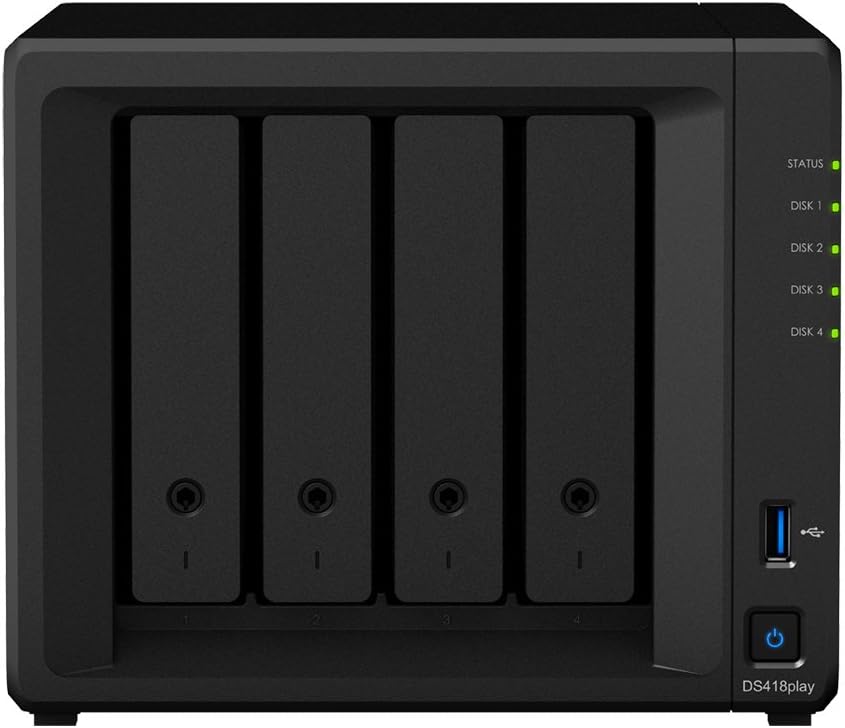


Synology DiskStation DS418 Play Network Attached Storage Drive (Black)
Product ID: 83337898
Full description not available
A**V
Very nice product
Very nice product
E**S
WoL nur mit Dauerspannung: Das Gerät vergisst sonst seine WoL-Konfiguration
Es gibt zunächst durchaus Gutes zu berichten: Software und Updates laufen problemlos. Es gibt aber zwei Ärgernisse, von denen eines vorher nicht klar war:1. Zunächst das, was ich mir hätte denken können: Das Netzteil kann nur spannungsfrei gemacht werden, indem man den Netzstecker zieht. Einen richtigen, netztrennenden Schalter gibt es nicht. Das mag bei Netzteilen zwar "so üblich sein", weshalb ich mir das hätte denken können. Ist aber nicht der Punkt: Ich finde das auch bei anderen solchen Lösungen einfach nur schlecht. Erstens stellt ein Gerät unter Spannung immer eine Brandlast dar. Da mag mancher drüber lachen, aber ich finde das gar nicht lustig. Denn mittlerweile schlummert hier im Haus ein Dutzend solcher "Lösungen", und ich habs einfach dick, dass nicht für ein paar Cent ein ordentlicher Ausschalter verbaut wird. Ja klar, ich kann mir selber eine Kippschalter-Steckdose davor setzen, weiß ich. Ich habe aber keinen Pollin-Restposten-NAS gekauft, sondern eine, WOW, "Synology".In diesem Detail jedenfalls ist das Ding keinen Deut besser als all der China-Schrott, den man auch sonst wo bekommt. Und neben der Brandlast bedeutet jedes einzelne Watt Standby-Verbrauch solcher Netzteile einen Jahresverbrauch von rund 8,7 KWh. Interessiert irgendwie keine Sau, wo doch sonst alle so Klima- und Energie-sensibel sind ...? Fünf Sterne gibts aber nur für makellose Produkte, was die Synology so schon nicht mehr ist. Und abgesehen davon ist die Netzabschalt-Option ohnehin nur theoretischer Natur, wie im nächsten Punkt deutlich wird. Dafür also einen Stern Abzug.2. Der wahre Knaller ist nämlich, und das konnte ich erst nach dem Kauf feststellen, dass WakeOnLan nicht mehr funktioniert, wenn man das Gerät einmal spannungsfrei geschaltet hat. Wenn man die Steckerleiste dann (z.B. wie bei mir über ein KNX-Telegram) wieder einschaltet, reagiert es nicht mehr auf WoL Pakete: Man muss es dann erst manuell per Knopfdruck am Gerät hochfahren, also z.B. in den Keller runter gehen, was die ganze WoL Funktion natürlich ad Absurdum führt.Ironischerweiser würde ausgerechnet das tatsächlich das nicht abschaltbere Netzteil rechtfertigen. Nur heißt das im Klartext: Eine eigene Kippschalter-Lösung beraubt mich der WoL Funktion, womit das Gerät für meinen gedachten Zweck schlicht unbrauchbar wird.Die Box sollte als Massenspeicher für aufgenomme Filme von der Dreambox fungieren. Beim Einschalten der Dreambox wird auch die Steckerleiste, an der die Synology hängt, eingeschaltet, und etwas später geht ein WoL-Paket übers Netz zur Synology, und fährt diese hoch, so dass sie als Mount-Point in der Dreambox zur Verfügung steht, sowohl für Aufnahmen als auch als Film-Archiv. Das war der Plan.War die Synolgy aber einmal spannungsfrei, (was tageweise wegen Abewesenheit bei mir der Normalfall ist), dann nützt auch das Einschalten der Steckerleiste im Keller, wo die Box steht, nichts mehr, weil sie dann schlicht und ergreifend ihre IP- oder MAC-Adresse oder jedenfalls die zugehörige Konfiguration vergessen hat. Dem First-Class-Hersteller "Synology" war ein geeignetes Bios oder die 15 Cent für einen nichtflüchtigen Speicher offenkundig zu teuer. Und dafür ziehe ich zwei Sterne ab, weil das nämlich bedeutet, dass das Ding nur dann das tut, was beworben wird (nämlich WoL), wenn es permanent unter Spannung steht. Und das automatische Hochfahren der Box nach einem Stromausfall ist keine Option, weil sie ja genau das nach dem Einschalten der Steckdose (an dem auch andere Geräte hängen) NICHT tun soll, sondern nur, wenn sie benötigt wird.Klar, dass sowas nicht vorne in der Produktwerbung steht. Wäre aber nett gewesen, dann hätte ich mir nämlich was Vernünftiges gekauft, gerne auch von Synology. Und gerne auch für ein paar Euro mehr. Aber so nützt mir das Ding gar nichts."Kann ja Synology nichts für, dass Du das so machen möchtest", wird jetzt mancher sagen. Jou, können sie nicht. Ist aber trotzdem billigst und damit beschissen implementiert. Und genau dafür ziehe ich eben diese zwei Sterne ab.Update 21.11.2018:Ich stelle fest, dass meine Befürchtung hinsichtlich der Synology-Fans> " 'Kann ja Synology nichts für, dass Du das so machen möchtest', wird jetzt mancher sagen."genau so eingetroffen ist:> Um ehrlich zu sein, kann Synology aber wirklich nichts dafür, dass du es so machen möchtest.Was war denn da an meinem Nachsatz "Jou, können sie nicht. Ist aber trotzdem billigst und damit beschissen implementiert" nicht verständlich?Denn die Spezifikation definiert ja nicht, was ein Hersteller _höchstens_ machen darf, sondern was er _mindestens_ machen MUSS. Und Synology hat genau das getan, und kein Jota mehr. Deshalb ist das hier> darüber aufzuregen, dass sich ein Hersteller an festgelegte Spezifikation hält, find ich dann doch etwas seltsam.schlicht eine grobe Verzerrung dessen was ich geschrieben habe. Da steht nämlich mit keinem Wort, dass mich die Einhaltung der Spezifikation stört, sondern nur, dass sie eben _nur_ genau diesen lausigen Mindestandard unterstützen und keinen Deut mehr. Für ein Spitzenprodukt, was Synology ja zu produzieren behauptet, ist das zu wenig. Das geht nämlich auch anders: Es gibt eine Reihe von Boards, die die WoL Fähigkeit auch nach Spannungsverlust behalten, eine Frage der Bios Implementierung. Eine Reihe von Asus-Boards kann das zum Beispiel, die Intel DQ77KB und andere.Ich hatte ansonsten nicht viel zur Hardware gescheieben, weil die wirklich ausgezeichnete Software und die gute Unterstützung durch den Hersteller da vieles wett macht. Aber wenn wir nun schon dabei sind: Die ganze Kiste ist, wenn man mal rein schaut, absolut unteres Niveau hinsichtlich des Aufbaus und ebenso der Komponenten. Ein Board mit vernüftigem Bios gibt in dieser "Kampfklasse" wahrscheinlich gar nicht. Dazu müsste man ja dann wirklich was solides zusammen bauen.Und damit hatte ich für knapp 500 Euro (ohne Platten) eigentlich gerechnet.---Noch zum Kommentar von Synology: Wenn Sie eine Box mit der Fähigkeit WoL auch ohne Dauerspannung zu unterstützen anbieten, wäre das eine echte Verbesserung. Noch besser wäre es, dann auch ein gutes Trade-In für Kunden anzubieten, die dann gerne umsteigen würden. Ich wäre dabei. :-)
H**R
Only way to go for data centric people.
Disclaimer: Non-Technical ReviewI don't know why I didn't do this years ago; yes I remember now, my kids needed food and clothing.In these data heavy times we live in with smart TVs and wireless this and that, a NAS with the right hard disk options is the perfect solution for having access to all your data. I love the fact that I no longer need my laptop on to gain access to documents or media. I can even access them all from another country.I know I am not going to use even 70% of the functionality but I has still brought joy to my life. I will take take to learn more and more about the features and functionality but so far so good.The Diskstation Software used to manage it is easy to use and the mobile as are just the same.
B**E
An Investment in the Future
Who needs their own NAS drive at home? Not me I thought, and not at that price. But when I asked around the family “Do you have backups” the answer I received was a universal “No”. So no backups of college work, no backups of school projects, no backups of tax documents, letters, photographs (25,000 of them) or music (1,100 albums). OK, time to act.I looked at Synology first because we have the Synology RT2600ac wi-fi router in the house which is, without a word of a lie, excellent. In our opinion, their approach to customer support is unique – once you have bought a Synology product you get access to a whole ecosystem of additional free apps, plus regular software updates. So they were an obvious choice for a NAS. We chose the DS418play 4-bay drive, and packed it with 4x4TB new drives (2 Seagate and 2 Western Digital). All in, it cost nearly £900 – quite an investment.Setup was a piece of cake. The unit automatically set up the 4 drives using Synology Hybrid RAID, which guarantees data availability. If ever a drive is to fail, it can be hot-swapped without loss of data. Imagine that. What took a few days to figure out was how to enable secure authorized access to data so that each family member has private storage (the default option bizarrely was open access to all, and a trawl of the forums was needed to figure out how to change it). But with that done, each family member now has their own space.We’ve only just touched on the full capabilities of this drive, as there are more apps and features available than you can shake a stick at. The dual 1GB Ethernet ports are a nice feature, we use one for storage and the other for streaming. The web UI (called DSM) is simple to use and has more features that we will probably ever need. The drive itself is almost silent and it blends in nicely on a book shelf where it now lives.For network access there are so many options available, but the simplest ones we have found are NFS from Linux (mount the NAS as a drive on Linux) and simply mapping the drive onto Windows (and using ROBOCOPY as you might use rsync on Linux). It took a couple of weeks to copy everything across, but we’ve ended up using just 4% (400GB) of total capacity. I think you’ll agree that this is definitely an investment in the future.
D**�
Top !
Auparavant j'utilisais un vieux DS211j qui saturait à la moindre action et je souhaitais passer à la vitesse supérieure. Je me suis orienté sur ce modèle conseillé par un ami et bien vu par la presse spécialisée.Au niveau logiciel ce DS418 Play est strictement identique à ce que l'on trouve sur les autres modèles, le NAS s'administre avec une interface d'administration réactive et simple d'utilisation. En cas de besoin la documentation en ligne est de bonne qualité et la communauté est toujours active, il existe donc de nombreuses ressources, tutoriels, vidéos ou forums pour vous aider à réaliser les opérations plus techniques.Côté matériel, à la différence de la version DS418J ce modèle est sobre et plutôt compact, il peut se glisser dans n'importe quelle armoire informatique, placard ou étagère. Il embarque la connectique plus que nécessaire à une utilisation domestique (2 ports Ethernet et 3 ports USB). Le NAS est bien ventilé, assez silencieux et ne chauffe pas même placé dans un endroit confiné.DSM permet d'administrer le NAS mais aussi d'installer facilement divers applications depuis un catalogue en ligne, en quelques cliques le NAS est donc capable de rendre de nombreux services :> Téléchargement de fichiers à distance> Console de vidéo surveillance> Partage de contenus vidéo, photo ou audio> Sauvegarde de notes personnelles> Sauvegarde de postes utilisateurs> Serveur web pour héberger un blog personnel> Serveur VPN> Serveur de virtualisation> etc.J'utilise le NAS de manière intensive pour sauvegarder des données, virtualiser une machine Linux, piloter la vidéosurveillance de la maison et partager du contenu multimédia au sein du foyer. J'utilise donc DS Audio, DS Video, Download Station, Note Station, Synology Drive et Surveillance Station et je dois dire que le NAS se montre toujours très réactif.Concernant les fonctionnalités de partage multimédia, j'utilise les applications sur différents périphériques (smartphones et box Android). Mon ressenti est bon même s'il faut admettre que les applications ne sont pas les plus conviviales ni les plus poussées mais elles couvrent la plupart des besoins. Aussi les applications souffrent d'un manque de mise à jour, ce qui occasionne quelques anomalies, crashs ou une surconsommation de batterie mais globalement les applis sont utilisables et font ce qu'on leur demande.Note Station et Surveillance Station sortent du lot, ces applications sont de mon point de vue assez abouties en terme de fonctionnalité. Par exemple Note Station ressemble parfaitement à Evernote et Surveillance Station est très complet car il faut plusieurs jours pour découvrir toute l'étendue des possibilités et maîtriser son fonctionnement. Gros bémol cependant l'application Surveillance Station limite le nombre de caméras à deux périphériques, cela signifie qu'il faut ajouter une nouvelle licence supplémentaire avoisinant les 150€ (oui vous avez bien lu) pour pour pouvoir piloter davantage de caméras. Pour s'équipe à moindre coût je recommande la Caméra "Dericam P2" qui est un modèle compatible surement le moins cher du marché (60€ environ).[Mise à jour] Finalement les bugs même mineurs étant assez fréquents, j'ai arrêté d'utiliser DS Vidéo au profit de Plex qui est une solution équivalente, plus ergonomique et fiable mais cela occasionne un surcoût (pour le moment 5€ afin d'acheter l'application Android).Tout comme DS Vidéo, Plex permet d'utiliser le transcoder le flux vidéo mais de quoi s'agit-il au juste et est-ce vraiment utile ?Cette fonctionnalité permet de convertir à la volée la qualité de l'image pour pouvoir la visionner à distance de manière fluide.Sans transcodage, il est impossible de lire du contenu HD à distance avec une connexion ADSL car la lecture est très saccadée. Grâce au transcodage, la qualité d'image est réduite en temps réel et la vidéo peut être lue de manière fluide. Cette fonctionnalité est inutile pour lire le contenu depuis le réseau local, elle est par contre très intéressante pour profiter de son contenu à distance depuis un hôtel ou une résidence secondaire par exemple. Dans les transports, elle peut avoir un intérêt mais la connexion doit être parfaitement stable...Pour les plus geeks d'entre nous, le NAS permet d'héberger quelques machines virtualisées mais n'imaginez pas monter de grosses configurations. La moindre petite machine virtuelle consomme une partie des ressources et cela réduit considérablement les performances, à utiliser avec parcimonie donc même si bien pratique. Attention la virtualisation nécessite obligatoirement l'ajout d'une nouvelle barrette de mémoire vive. La bonne nouvelle est que la mémoire compatible n'est pas très cher, comme par exemple la "Crucial CT51264BF160BJ 4Go" qui est vendue aux alentours de 25€ sur Amazon.Enfin en tant que photographe amateur, la sauvegarde de mes dizaines de GO de clichées était une vraie problématique. J'ai essayé plusieurs solutions et aucune n'était vraiment satisfaisante, entre la lenteur des sauvegardes ou la nécessité de les lancer manuellement. Avec Synology Drive le problème est complètement résolu car mes sauvegardes sont effectuées en temps réel et de manière transparente, je ne m'en préoccupe plus, le client Synology Drive scrute les répertoires et transfert des copies sur le NAS... Que du bonheur!Personnellement je recommande ce NAS qui se montre évolutif, performant, fonctionnel et simple d'utilisation. Ce matériel ravira les geeks comme les moins techniques malgré deux gros défauts :- le prix de revient non négligeable en considérant l'achat des disques, de la mémoire vive et des licences potentiellement supplémentaires- les applications Android qui ne sont pas assez optimisées et suffisamment maintenues mais pour lesquelles il existe des alternatives plus intéressantesSi vous avez appréciez mon retour d'expérience, faites-le savoir en appuyant sur "Utile".
M**W
Couldn’t ask for more!
Software is amazing and I love that I can jump on my machine from anywhere and access my files while acting like an integrated harddrive when I’m at home. I’ve had this for a little less than a year and I can’t imagine life without it, and I’ve only scratched the surface of DSM...For anyone like me who’s a creative and you need a lot of space for designs, photography/media etc then a NAS box is a must and you won’t get better than Synology...The apps are amazing too like Synology Chat which is basically slack but hosted on your network allowing for unlimited file uploads unlike slack itself where you have to pay monthly...I hate the idea of multiple cloud services paying per month for different ones so this was the viable option for me and I’ve not looked back since. Apart from my software on my SSD all my files go on my NAS and I never have to worry about HD space or my machine slowing down due to cluttered hard drives. And like I’ve said the added extra apps you get with the DSM are just bonus and they are really well made which I never expected. It’s my first NAS so I can’t comment on the competition but they’d have to be pretty extraordinary to compete with Synology.
Trustpilot
1 day ago
1 week ago