Buy anything from 5,000+ international stores. One checkout price. No surprise fees. Join 2M+ shoppers on Desertcart.
Desertcart purchases this item on your behalf and handles shipping, customs, and support to Tunisia.
🚀 Power your network like a pro — no compromises, just pure speed.
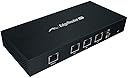
The Ubiquiti EdgeRouter Lite ERLITE-3 is a professional-grade 3-port router delivering 1 million packets per second throughput via three gigabit Ethernet ports. Its fanless, compact metal design ensures silent, durable operation. Ideal for advanced users, it supports dual-WAN load balancing and granular traffic management through an intuitive GUI, making it perfect for managing multiple internet connections with rock-solid reliability at a consumer-friendly price.
| ASIN | B00HXT8EKE |
| Antenna Location | Home |
| Best Sellers Rank | #48,993 in Computers & Accessories ( See Top 100 in Computers & Accessories ) #1,224 in Computer Routers |
| Brand | Ubiquiti Networks |
| Built-In Media | Part |
| Color | White |
| Compatible Devices | Personal Computer |
| Connectivity Protocol | Ethernet |
| Connectivity Technology | Ethernet |
| Control Method | App |
| Controller Type | App Control |
| Customer Reviews | 4.4 out of 5 stars 674 Reviews |
| Data Transfer Rate | 1 Megabits Per Second |
| Frequency | 500 MHz |
| Frequency Band Class | Single-Band |
| Global Trade Identification Number | 00810354020612, 00810354022210, 03663311000199 |
| Has Internet Connectivity | Yes |
| Has Security Updates | Yes |
| Is Modem Compatible | No |
| Item Type Name | Ubiquiti EdgeRouter Lite 3-Port Router |
| Item Weight | 12.17 Ounces |
| LAN Port Bandwidth | 1000 Mbps |
| Manufacturer | Ubiquiti |
| Maximum Upstream Data Transfer Rate | 3000 Megabits Per Second |
| Mfr Part Number | ERLITE-3 |
| Model Name | ERLITE-3 |
| Model Number | ERLITE-3 |
| Number of Ports | 3 |
| Operating System | EdgeOS |
| Other Special Features of the Product | WPS |
| Router Firewall Security Level | True |
| Router Network Type | wired |
| Security Protocol | WPS |
| Special Feature | WPS |
| UPC | 810354022210 799975436234 515403568625 810354020612 799020406144 798527580869 053926223909 |
| Voltage | 24 Volts |
| Warranty Description | 1 Year Limited warranty |
| Wireless Communication Standard | 802.11n |
| Wireless Compability | 802.11n |
J**.
Commercial-grade routing at an affordable price.
This is an extremely powerful router for a small office/home office situation. This router would be sufficient and appropriate for a larger office/branch office situation and can easily support several dozen concurrent users - total overkill for my house and home office - but at the same time absolutely perfect for that application. Think of this router as a miniature commercial router rather than a hardened residential one. In my experience, many aspects of this device are more akin to "real" Cisco-type iron than the type of router you might buy in a consumer electronics store. Don't let the price point fool you - this is a serious piece of computing hardware. With that stated - it's not just plug and play. If you expect it to work just like the consumer routers you're used to, you might be frustrated or disappointed. It takes some configuration - probably an hour so initially, though I could do it much faster now that I've done it once - and some planning about how you want your network to work. Here are some things to consider: * It's a router. It routes packets from one place to another. * It routes packets fast. Really fast. * It's happy to just work with almost everything - VPN, etc just work * You can configure it to work with IPv6 just fine as well * The web interface is nice, but there may be features that you want that can only - or are best - configured from the command line * It features hardware offloading for some types of routing - making it even faster and keeping CPU loads quite low in my application * It features a "configuration wizard" which works well to get your initial configuration up and running Please do think a bit about your needs, because it's important to remember what this unit is not: * It's not a "plug and play" solution - you need to configure it to do what you want * It's not a wireless router. It's not a wireless access point. It's just plain not wireless in any way. Regarding the wireless item above - in my opinion, that's a feature, not a bug. In terms of capability and reliability, I am now a big advocate for separating my routing from my wireless access. Initially, I am using my old wireless router - an ASUS RT-AC66U - as just an access point. As an access point, my old router seems to work well and has not had to be reset, etc for over a month. The Edgerouter has never had to be rebooted since I first got it configured and working. Using my old router as an access point was actually more complicated - and required more configuration and programming - than getting the Edgerouter configured. If you don't already have a wireless access point or solution, I'd strongly recommend looking at the Ubiquiti Unifi access points - you can find the AC-capable units for under $100 in some cases (model dependent) and these are a real step up from consumer-grade hardware. They work well with the Edgerouter and are easily managed. And best of all, they're designed to just provide wireless access with high reliability and low maintenance. I know that my next step will be to retire my old consumer gear and upgrade to one of these. Online support in the Ubiquiti forums and elsewhere is fantastic for this solution. My summary is that this is a great router and great part of a larger network solution. It's powerful and stable enough for a business environment but the price point makes it appropriate for purchase and use in a home environment. I'm delighted with the purchase!
M**G
Pro grade gear at consumer prices, easy to set up to for dual-wan
Wow! Rarely am I this impressed. I bought this for one and only one reason: my primary Internet provider has ridiculously low data caps on our plan, and keep forcing us to "upgrade" to higher speeds (so that we can blow through the cap even faster!). So I recently signed up for a secondary, slower connection with no caps, for the things like backups that require lots of data, but don't need the speed. This led me to the question of how I could manage two internet connections coming into the house in an automated way. Lo and behold, searching turned up that there is a whole class of router devices that have a "dual WAN" feature, meaning they can manage two (or more) internet connections at once. I did a lot of research on the various brands, and almost went with a device from a very popular name brand. However, reading the reviews on these "consumer grade" devices was a real turn off: flaky, cheap hardware seemed par for the course, unless you're willing to pay hundreds for something that's more of a "professional" type device. I hate wasting my time on flaky stuff, so I kept searching. I almost ended up paying hundreds more for a top-shelf (in terms of price) device that could do what I wanted. Then in some search I ran across this. The reviews were mostly stellar, though people were warning that this is "not easy" to set up. I have a computer science background, but not in networking. I also hate wasting time on complex configurations. So I was concerned that it could be a big time suck. But given the low cost and good reviews, I took a gamble. I'm so glad that I did! The device arrived - it is compact, clean looking, and sturdy. No cheap plastic. I fired it up, and within just 10 minutes had my first internet connection running through the device to the residence. I then tried it with the second, and it only took another 10 minutes to get that one working. Then I set out to combine them together into a "load balancing" configuration, where internet traffic to/from our place is split between the two connections. Maybe this used to be a pain years ago, but now Ubiquiti has built-in "wizards" that take you through common configurations like this, step by step. I followed the wizard, and within another 15-20 minutes, I had a full "load balanced" configuration running. That was great. Getting to that point was super easy and hassle free. This would be enough for most users, and can be done by wizards alone. The next step was to configure it so that certain traffic (such as backups) only go through one of the connections, but not the one with the data cap. I was concerned that this might be complicated, because it wasn't part of the wizard. However, some searches at their forum revealed a step-by-step post showing how to do this at the command line. While I've done tons of command line stuff, these days I don't like learning whole new command sets unless I have to. So I figured out that I could do everything they described in the posts through a little-described but powerful feature of the GUI: The "Config Tree". Here's a complete GUI to ALL device settings, with at least a bit of guidance in the form of tool tips as to how to set things. Using the instructions provided in the forum posts for the command line, I was able to browse through the Config Tree to find the same settings, and to set those as described. Then I rebooted.... And it was working perfectly! I started a backup and all the traffic was going through the unlimited internet connection. Everything else was still being load-balanced between the two. I really like the gui - especially the network charts and analyses that show how much data is going where. You can even drill down into the specifics of which devices on the network are using what data - and from what sources. A great feature for making sure we don't go over the caps with our one provider. The speed so far has been great. I did one speed test today, and I got more than the full bandwidth of my faster connection coming through. It's a 150mbp/second connection, and according to speediest, it was running at over 160 to my system. The test system in question was connected to the router via a wired cat6 ethernet cable via the switch. Based on several comments in other reviews, I was worried that enabling some more complex configuration features might peg the CPU, but so far, it has remained low - usually below 20%. I haven't seen any signs of glitches; it's been rock solid so far. The only caveat is that this is a router, not a switch. What that means is that if you have multiple devices you want on the same network, you need a separate device with switching to connect them all. I use a professional grade switch I already had, but it would work just fine to use a home wifi router plugged into this, to provide the switching functions to both wired and wireless clients. I have my own wireless (Airport) base station attached to my switch to provide wireless to the mobile devices, and it works without a hitch. For this low price, to have such a positive experience out of the box, this earns my rare five star review. It's pro grade gear at consumer prices.
K**N
nice!
Great little router. I bought this to replace a cisco ASA5505 that is now in my lab. I wanted something newer that had gigabit interfaces and was of good build quality for a low price...this hit all the marks. This thing was fairly simple to install. I had a working configuration in less than 10 mins. The web interface is very nice and provides simple access to the most common changes. There is also a CLI, from what I understand can do a little more advanced configurations...but i found the web interface to provide the security i needed for my home network. The CLI seems intuitive as well, I was able to use the CLI to make some basic changes after watching a couple of vieos on youtube. This thing is fast and comes in such a small package. I would recommend this for a home install or even a small/medium business install. From the other reviews I have read, I expect this to be the type of device you set and forget.
B**D
Great Router That Blows Away Consumer Grade Routers
Probably one of the best purchases I've made along with the Ubiquiti AC Pro access point. I was having a lot of issues with my 4 year old Airport Extreme. Lots of hiccups and dropouts streaming video and when using Facetime, users on the other end would complain of choppy or freezing video. In addition the range of the wifi was never really great even in the same room as the router. I tried a Netgear Nighthawk X4S router after reading some great reviews on it but found the wifi range lacking on that as well. Enter the EdgeRouter Lite combined with a couple of Ubiquiti APs. Setup is going to be quite different then your normal consumer grade routers but with a little internet research and browsing on the Ubiquiti forums, you can find an answer very quickly. I used the WAN+2LAN2 wizard and it set up everything very quickly with a basic firewall and NAT. I made some minor tweaks to the settings afterwards and was up and running in less than 15 minutes. Routing performance blows away my old router. I first ran a test using Facetime as I always had complaints of freezing and choppy video. The person on the other end said that the video was very clear and smooth this time around and I also noticed it clearer on my end as well. In addition, streaming on Netflix or other streaming sites works flawlessly without any hiccups or buffering. Considering that the cost between the Netgear X4S that was highly rated and this router along with an AP are pretty much identical, I would definitely recommend this setup above any consumer grade solution out there. In addition, if you every have any issues or questions on how to setup or configure something, the Ubiquiti forums provide a great resource. I've posted a few questions in there for clarity and have had a response back within 30 minutes! You can't beat that kind of response time. Highly impressed and will definitely keep recommending to other people.
P**B
Great wired router as part of an enterprise-grade a-la-carte home or small-office networking setup
This wired router is pretty much exactly what I was looking for. I have now been using it for about a month and a half and very happy I purchased it. For the price, it is very capable and powerful for my needs at home. I was tired of using the consumer grade routers offered by Netgear, Linksys, etc, and wanted to build a setup that would be more reliable and hopefully future-proof. Also, I wanted to separate my wifi radio from my router function, and this, along with a Ubiquiti AP-AC-Pro, allowed me to do just that. My only reason for this being a 4 start rather than 5 star review: Beware of the fact that if you are expecting to use two of the ports for your home network and one as the WAN port, there is a notable performance penalty for bridging the two "LAN" ports. You would be better served to simply leave one of the 3 ports unused, and simply connect a properly sized gigabit switch to the desired LAN port to avoid this performance penalty. This router simply lacks the hardware for offloading switching duties (unlike the more expensive Ubiquiti TS-5-POE which does have this extra hardware), so the switching goes through the same processor as all other functions, creating a bottleneck. I wasn't aware of this when I finally pulled the trigger on this purchase; had I realized it I very well might have spent the extra 50% to get the Ubiquiti TS-5-POE. I ultimately decided to put the money saved toward buying a better/larger managed gigabit switch, and I'm equally happy with that choice. Still, this is worth mentioning in case it surprises anyone else. Regarding complexity of the interface and setup...your first task should be to upgrade the firmware to the latest. Once you do, you will find a "Wizards" tab appears, and this tab provides quick and easy work of common initial setup choices. Running the wizard should be your next order of business after upgrading the firmware, as it will wipe out any other custom settings you might have made. Yes, the interface overall is still a bit more complex than your average home all-in-one consumer router, but with that complexity comes more capabilities, so it's a worthwhile tradeoff. With the addition of the wizards, you don't HAVE to dig into this added complexity for most situations, which makes it an even more easily justified purchase. For the price of this AND the access point, I still spent less than a medium-high-end consumer router, and am confident my overall setup ended up being at least as performant, far more versatile, and very likely much more durable & long-lasting than the consumer-grade alternatives.
T**M
We went from 50/50 Mbps to an unreliable piece of garbage single digit speed
Verizon screwed us by selling their FiOS internet to Frontier Communication. Yuck. I’m mad as hell. We went from 50/50 Mbps to an unreliable piece of garbage single digit speed. How can anyone live without the necessary speed to surf Pinterest smoothly? Never stand between a woman and her pinning. Anyway, my husband made the switch to Charter Spectrum, more like a downgrade, with a speed of 60 Mbps download and 5 Mbps upload. Our internet package only came with the ARRIS SURFboard SB6121 modem (no router provided, it's an extra charge). Off we went researching for a router. Since I’m a fan of Ubiquiti Networks as we are using their UniFi AC Pro in our household, their EdgeRouter looks very interesting and somewhat overkill for our home. There are already many great reviews on this product so we were comfortable trying it out. What I like: Fast as a rocket. The EdgeOS is remarkable. The EdgeMAX GUI is very user friendly. We did spend quite some time upgrading to the latest EdgeRouter Lite v1.9.0. After we got to 1.9.0, we used the wizard to get us back online using the basic configuration. There are so many options and the flexibility that this router provides will amaze you. What I don't like: None. That’s how good this thing is. My Bottom Line: I would recommend using the wizard to get you going then do a deep dive to learn all the features. This is a five-star product. Good bye Frontier Communication hell, hello Pinterest bliss! How I rate: ***** - Product is superior to all others in its class, would recommend others to buy **** - Above average in its class, likely to buy again *** - Average in its class, unlikely to buy again ** - Below average, would not recommend others to buy * - Very dissatisfied, do not buy
M**A
not for people unless you aqre a computer networking expert.
i think the equipment is really good, just complicated to setup it is a really solid piece of equipment but you better know what you are oding. it is complicated to setup. if you are an IT admin, go for it. I'm not and it took me a lot of time with grok to get it working. once setup the router is functioning perfectly. if i had known what i was doping i would probably give it 5 stars.
A**Y
There's so much you can do with this little buddy.
VERY COOL HARDWARE. Does take some time to learn it, but there is VERY good documentation out there to find. I got sick of commodity home grade craptronics wifi routers failing or needing to be rebooted sporadically. My uptime on this one is now nearly two months, and I've had only solid reliable performance. Capable of gigabit speeds, it's also fairly future-resistant with home internet service (if that doesn't apply to you neither does this review). I was considering the ER-5 (5-port one) and the ER‑X (more of a switch really -- read the details on ubnt.com). I chose this one because it has the hardware routing (ER-X doesn't, which I bet is why it has a faster cpu) and I couldn't quite get myself to justify the cost increas of the extra two gigabit ports on my WAN-LAN router. I am using two other (disposable grade crap) wifi routers in AP only mode for wifi (using dd-wrt) and that's working quite well. Though I'll certainly get a UniFi AP before ever buying another "home wifi router" It did cost me a couple nights learning what the hell I was doing, but I did get this little buddy set up the way I want, even OpenVPN set up and working better than I've ever seen from dd-wrt on those other home-consumer units I tortured myself with. (e.g. faster connection to the ER-3 from "out there" and never disconnects or hangs, and NEVER crashes the OS or hardware -- that was the crux of my frustration with the old linksys one on dd-wrt that led me to buy this one). Summary: More RAM than ER-X, cheaper than ER-5, TONS and tons of official and community documentation and examples for configuration.
R**B
Best home router I've ever owned
Best home router I've ever owned. I have experience configuring networking and server equipment at an Internet Service Provider, though, so I'm happy to dive into command line configuration and everything else this router offers. Quality of Service functionality works well at maintaining low latency on sensitive devices in the network (such as a gaming PC or console) while simultaneously streaming or downloading on another device, though it slows your maximum throughput to about 60-65Mbps on a 100Mbps Internet connection. I have not finished setting it up for external VPN access but am confident it will work fine, based on other user reports. The GUI is decent, makes basic configuration a snap, and its deep packet inspection function can be helpful for isolating problem devices on the LAN/WLAN. DNS proxy service working perfectly. Dynamic DNS updates are also working well on my Namecheap domain hosting. I do wish it had similar functionality of the Netduma gaming routers, but maybe I can get some of that info from the command line or by installing some software packages on the router. I have yet to have to reboot this router for the old standby reason of "just reboot it and it will start working again" on lesser routers. In fact I haven't rebooted it for any reason at all other than a firmware update, I believe. Rock solid, no-nonsense router. It does get quite warm under load, so you'll want to give it some space to breathe. Only improvement I can think of is to somehow increase that QoS throughput while still maintaining low latency; might need a faster CPU for that (or look into the EdgeRouter X).
C**N
Pesimo, openvpn y IPsec L2TP no funcionan como deberian
OpenVPN y IPSEC/L2TP no se pueden configurar. Incluso utilizando ovpn profiles que han sido validados y funcionan el Edge router lite no los interpreta y regresa una variedad de errores que no tiene mucha logica.
L**A
Versatilidad máxima, buen rendimiento
NO tiene AP WiFi, es solo un router. Cuenta con tres puertos configurables completamente, más uno de administración que no es ethernet de red si no para conectar un conversor a UART como los routers "de verdad" Soporta VLAN, por lo que puedes utilizarlo con cualquier operador, en España por ej con fibra Orange utiliza el ID 832, Jazztel el 1074, Vodafone 100, Movistar el 6... Lo conectas al ONT y configuras lo que necesites. El cortafuegos es sencillo tipo empresarial, reglas de lo que pasa y lo que no, sin florituras ni IDS. Al ser hardware lo bueno es que es menos vulnerable a truquillos software y esas cosas que hacen los malos. Configuración: Al final por A o por B vas a necesitar la consola, tiene un CLI al que se puede acceder tanto por SSH como por la interfaz web, por ejemplo a veces falla actualizarlo mediante la interfaz web pero haciendolo mediante CLI no hay problema. Puedes configurar VPN tanto servidor como cliente y todas las florituras que quieras. También incorpora una serie de asistentes para las configuraciones más habituales, pero vamos que no es amigable si no entiendes un poco de redes, siempre hace falta retocar un poco para dejarlo a tu gusto. El router viene con DPI, una función que analiza las tramas de los paquetes e identifica las máquinas que generan tráfico y de que tipo es (P2P, web, FTP... ) ayuda a gestionar el ancho de banda y ver quien consume más para optimizar un poco, sin embargo hay que decir que esta caracteristica consume bastante CPU del router, y cuando esta funcionando a tope a veces no da a basto y la interfaz web se congela (tiene menos prioridad). Si lo vas a meter en una red "de verdad" más grande tiene soporte de OSPF y protocolos de routers. El soporte de Ubiquiti en su foro es muy muy completo y te ayudan enseguida con cualquier cosa que necesites y encima gratis. Por el precio me ha gustado mucho, normalmente necesitaras también un switch ya que tres puertos, que al final son uno de WAN y otros dos de tu red se hacen poco. Sin embargo es muy buena opción para ahorrar un dinerillo, la versión de 5 puertos de este router se va a los 200€ en el momento de escribir esta reseña y el hardware de este es el mismo, de hecho utilizan el mismo firmware de EdgeOS.
S**N
Good router but needs a bit of setup
Used this router for about nine months absolutely rock solid. One day it stopped working. Sent it back for a warranty claim and the seller worked with me to get it sent to the service center where they said the internals had got burned out probably a surge in the power line due to lightning. They sent me a replacement unit. Happy with the product and the seller (ICONIC INC).
M**K
WOW!! Fantastic Piece Of Kit.
I have been using a Draytek Vigor 2920n router for a few years and it has been rock solid. I have been very pleased it and I rate Draytek products very highly. The only problem that I have is that my broadband connection (now 200Mbps), has outgrown the capability of my Draytek (~70Mbps). I have been looking for a replacement router that can provide much higher throughput whilst matching the functionality of my Draytek. I had considered a higher specification Draytek, but couldn't justify spending £180+. After reading a few reviews, I decided to buy the Ubiquiti EdgeRouter Lite-3 for £90 from Amazon. In a word, Wow! What a fantastic product this is. The GUI is very well presented and intuitive (and if you prefer it can be configured entirely using the command line interface). It has all of the usual features that you would expect from a high end router and more. The feature that has impressed me the most is the 'traffic analysis' (DPI) feature. This provides a real-time display showing bandwidth utilisation for each home device and what applications are being consumed by that device (e.g Netflix, Xbox, Web, YouTube etc). All interesting but why is this useful? Well it allows you to configure the firewall to stop specific devices using specific applications at specific times of day. For example, stop my kids from watching Netflix after 8pm on school days!. The Ubiquiti support web site is also excellent and has step-by-step tutorials on how to configure the various features. Speedtests are now consistently registering >200Mbps. I can't praise this router enough. Very powerful, brilliant design and engineering, and amazing value for money. I have bought hundred of items online over the years and I have never written a review. On this occasion, I am so impressed that I felt compelled to write one.
Trustpilot
2 weeks ago
4 days ago